
Funny · New
Misanthropy Meme Video Generator
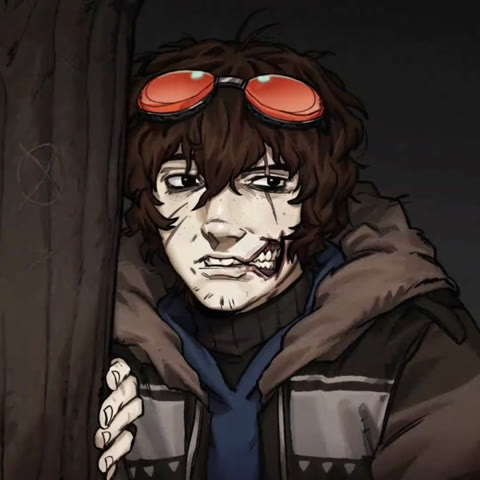
Turn one clear portrait into the Misanthropy Meme side-look loop. Your character holds a centered pose, looks left and right with the reference timing, then lands the expression beat that gives the animation its rhythm. SameVid keeps the square framing and graphic backdrop, then returns an 8-second 720p MP4 with the original sound.
Misanthropy Meme · 8s · 1:1
8s · 1:1 · 720p · original sound · ready in a few minutes
One focused loop
The Misanthropy Meme side-look beat
The reference is one continuous square shot. The character stays in the middle of the frame while the eyes, head and expression carry the full idea.
Hold the centered pose
The loop opens with one character placed squarely in the middle. The camera stays fixed, so a clear face and stable portrait make the uploaded identity easy to recognize before the movement starts.
Look to one side
The character makes the first quick sideways glance. It reads as an intentional reaction because the pose, framing and background remain consistent while only the gaze and head direction shift.
Sweep back across the frame
The glance travels to the opposite side on the reference rhythm. This small change is the core of the Misanthropy Meme format: it turns a still character design into a short, expressive animation beat.
Land the expression
The character returns to the central presentation with a compact facial reaction. The colored graphic backdrop supports the final beat while the single-shot loop keeps all attention on your character.
Three quick steps
Make a Misanthropy Meme video from one portrait
Add one clear portrait, check the 220-credit button and generate the complete side-look loop in the same square composition as the reference.
Choose your centered character photo
Upload one clear portrait with a visible face. This image defines the face, hair, skin tone, clothing details and overall identity of the character who appears throughout the loop. A simple pose and balanced light make the sideways glances easy to follow.
Preview the reference rhythm
Watch the example above to see the fixed camera, centered framing and fast left-to-right eye movement. The character stays alone in frame from the opening pose through the final expression, so one upload is all the template needs.
Generate and share your loop
Press Generate to create one 8-second square MP4 for 220 credits. SameVid follows the source timing, combines the original sound with the result and saves the finished clip in My Work for replay, download and posting.
Misanthropy Meme video specs
What your Misanthropy Meme portrait becomes
One clear portrait becomes one complete Misanthropy Meme side-look loop for 220 credits. The output keeps the source clip's square composition, single-character timing and original sound.
You upload
- 1 clear portrait of one person or character
- A visible face, eyes and defining hair or clothing details
- JPG, PNG or WebP, at least 300 pixels on every side and up to 10 MB
You get
- One 8-second MP4 at 720p in a 1:1 square frame
- Your identity as the only centered animated character
- The full left-and-right side-look sequence and final expression beat
- The fixed camera and colour-changing graphic backdrop from the reference
- The original reference sound combined with the completed video
- A saved result in My Work for replay and download
| Photos | 1 clear portrait |
|---|---|
| Model | Kling 4.0 video edit |
| Duration | 8 seconds |
| Picture | 720p, 1:1 square |
| Audio | Original reference sound |
| File | MP4 |
| Credits | 220 per video, refunded if it fails |
Photo tips
Pick a portrait that carries the reaction
The template gives one character a quick series of glances. A clear, consistent portrait gives the animated version strong facial details to carry through each beat.
- Use one person or character with a clear face, visible eyes and a relaxed expression. The template can then preserve the key features as the head and gaze move through the loop.
- Choose balanced light and an uncluttered portrait. Distinct hair, glasses, clothing or a recognizable silhouette help your character remain easy to identify in the fixed square frame.
- Keep the subject large enough for the face to read clearly. A centered head-and-shoulders or half-body portrait gives the side-look motion a clean starting point.
- Keep one consistent identity in the uploaded image. A single subject gives the template a precise character to place in the source loop from start to finish.
A character animation format
Where the Misanthropy Meme side-look comes from
This format travels through original-character art, fandom drawings, Cosplay and live-action takes. The shared hook is the same compact left-and-right reaction in one fixed shot.
An animation meme built around one glance
The Misanthropy Meme format has spread through character-focused posts rather than one fixed cast or scene. An early match in the research set already uses the familiar “misanthropy is when …” wording with an anime character, while later posts swap in OCs, game characters, Cosplay and illustrated personas. That flexibility is why one uploaded portrait can fit the format naturally.
The action is compact: one character stays centered, looks from one side to the other and finishes with a small expression change. It has the clarity of a reaction image while still feeling like a complete animation, making it easy to recognize in a single viewing.
The reference behind this template
This page follows the @vennro2 TikTok reference, a 1080 by 1080 single-character animation loop. It was selected after a visual review of nine downloadable trend clips because the character remains complete in frame, the camera stays still and the sideways look reads clearly from opening pose to final beat.
The source provides the composition, timing and original sound. Your portrait supplies the character identity, so the finished loop keeps the recognizable format while making the central reaction yours.
Give your character the signature side look
Add one clear portrait and turn it into the complete 8-second Misanthropy Meme loop for 220 credits.
FAQ
Misanthropy Meme FAQ
What is the Misanthropy Meme video generator?
It turns one portrait into a short character animation built around the Misanthropy Meme side-look rhythm. Your character stays centered in a fixed square shot, glances from side to side and ends on the same compact expression beat as the reference loop.
How do I make a Misanthropy Meme video?
Upload one clear portrait, check the 220-credit button and press Generate. SameVid uses your portrait for the central character, follows the source loop and saves the finished 8-second MP4 in My Work when it is ready.
How many photos do I need?
One photo is enough. The Misanthropy Meme reference has one core character in the center of the frame, so your portrait maps directly to that character for the full loop.
What kind of photo works best?
A clear portrait of one person or character works best. Choose visible eyes, a recognizable face and balanced light. A centered head-and-shoulders or half-body pose gives the template strong visual details to keep through the left-and-right reaction.
What stays the same from the reference video?
The finished clip keeps the fixed square framing, centered character placement, side-look sequence, expression timing and graphic backdrop structure of the source. Your uploaded portrait defines the person or character who performs those beats.
Does the finished video include sound?
Yes. The reference track is combined with the completed video after generation, so the finished Misanthropy Meme MP4 carries the same original sound as the example clip.
What format will I receive?
You receive an 8-second MP4 at 720p in a 1:1 square frame. That size fits a feed post, profile share or a cropped vertical short-form post, and the completed file is ready to play and download from My Work.
How many credits does a Misanthropy Meme video cost?
One Misanthropy Meme video costs 220 credits. Available credit packs show how many complete videos each pack covers.