
Creative · New
Unforgettable Car AI Video Generator
Upload your photo to make a 10-second Unforgettable Car video: walk toward the camera through the garage, flick the 2 and 4 cards, and reveal a sports car behind you. Add a car photo to use your own vehicle.
Unforgettable Car · 10s · 9:16
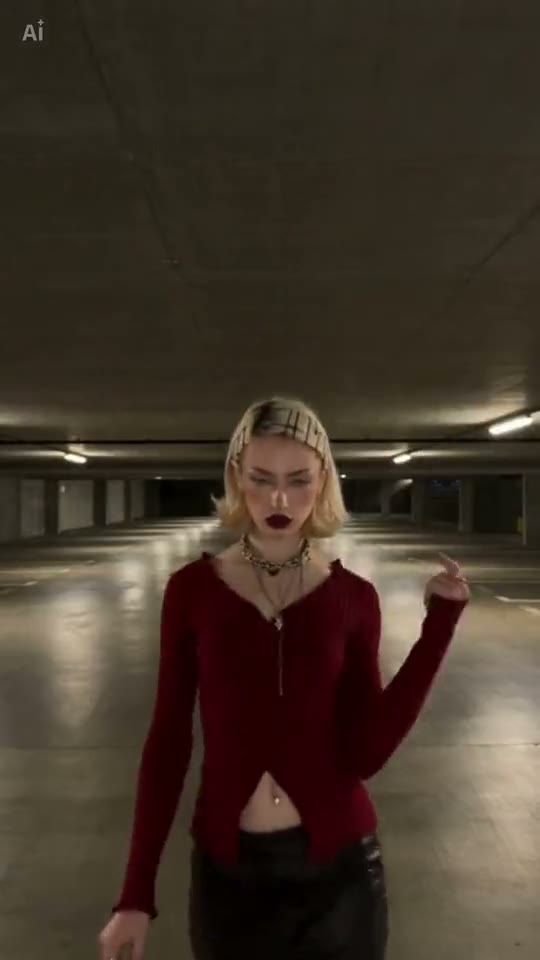
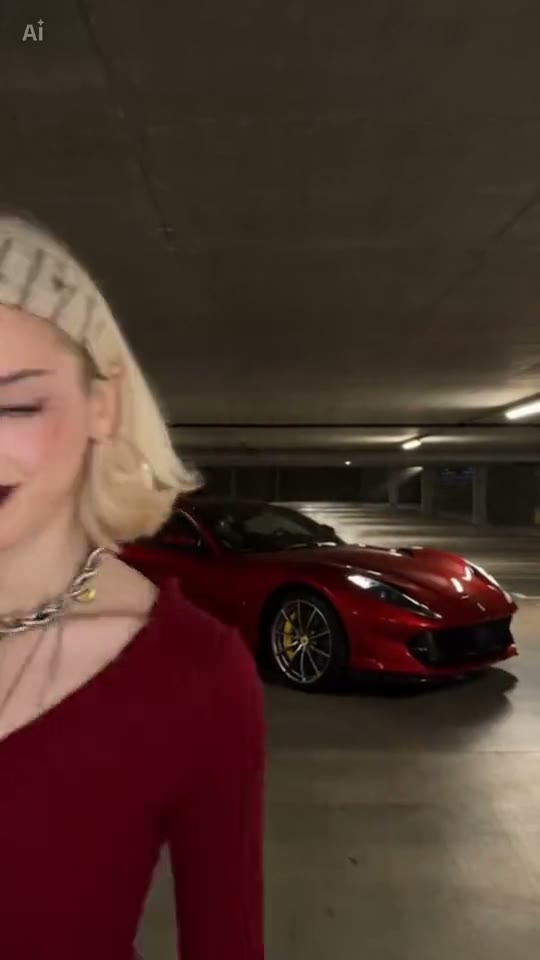
One person photo starts the reveal. Add a car photo to replace the red sports car.
10s · 9:16 · 720p · Seedance · original track
Watch the 24 card reveal
The existing TikTok reference: approach, card flick, red car reveal and exit.
Playing-card reveal by @phm_hang
@phm_hangMake video reveals from your photos
Prepare the person and car on this page, then generate when the setup is ready.
Choose the person
Add your portrait to the "Your photo" slot. You can prepare the photos before signing in. The Generate button shows the required 80 credits; signing in connects the result to your account.
Keep the red car or add your own
Upload a car photo to reveal your own vehicle, or leave the optional car slot empty to keep the red sports car from the example.
Start the reveal
Press Generate after adding your portrait. If you are signed out, signing in keeps your uploaded photos in place. The system checks your credit balance before starting the render.
Play and download
When the job finishes, open My Work to play the completed video and download the MP4. The file contains the entrance, card flick, car reveal and ending, ready to use as a short vertical clip.
What is the Unforgettable Car trend?
The Unforgettable Car trend is a short card-swipe reveal: a person raises two cards in an empty parking garage, flicks them toward the camera, and a car appears behind them. This AI video generator uses your photo for the person and an optional second photo for the car. Also known as the 24 car trend or UNO car trend, this video template recreates the classic playing-card reveal with the 2 and 4 of hearts.
Follow the reference clip, moment by moment
In the selected clip by @phm_hang, the person walks toward the camera through an underground garage during the first two seconds. Two playing cards, the 2 and 4 of hearts, rise into the foreground between roughly two and three and a half seconds. The cards move close to the lens before the person flicks them away. That short interruption gives the reveal its recognizable shape.
Around four seconds, a red sports car appears behind the person. The next two seconds hold on the person and car together. Near the end, the person turns, gestures toward the vehicle and leaves the frame, so the final shot belongs to the car. Those beats give the ten-second clip a beginning, transition and finish instead of a sequence of unrelated car images.
The reference video above shows the exact pacing and camera movement. Watch it with sound to preview how the reveal transitions into the track.
Listen to the transition
The format is associated with the Unforgettable sound. The selected TikTok post labels its audio as original sound by supercarvicky. Play the example with sound to hear how the approach, card movement and car reveal sit against the track.
The generated MP4 includes the synchronized reference track, so your video is ready to share without adding audio in a separate app.
Put yourself in the garage
Use a clear portrait showing your face and shoulders. The template applies your appearance throughout the approach, card flick, and exit.
The opening puts the person near the camera before the car arrives. That makes the clip work as a personal introduction as well as a vehicle reveal: viewers see the person first, then the object behind them. You can keep the reference car when the person is the main focus.
Feature a project car or dream car
A second image lets you make the car part of the story. Add a photo of your project vehicle, classic car or favorite model, and the prompt assigns its body shape and color to the reveal. The car photo is separate from the person photo, so it is not used as the performer's face reference.
A clear, full-body photo of your car gives the model the best detail for its shape, wheels, and paint finish. Leaving this slot empty is also a complete setup and keeps the red reference car.
Save the finished clip
Transform your still photos into a cinematic card-swipe video without needing video editing tools or manual prompt crafting.
Once complete, the MP4 is available in My Work. Download the finished MP4 to your phone or computer, ready to post directly to TikTok, Instagram Reels, or YouTube Shorts.
What you upload and what you get
You upload
- One required portrait photo of a person (JPEG, PNG, or WebP, minimum 300px, maximum 10MB)
- One optional car photo to define custom vehicle model and paint finish
You get
- A 10-second vertical MP4 following the card-swipe reveal
- 720p output with the reference audio
- A result saved in My Work to play and download
| Model | Seedance |
|---|---|
| Duration | 10 seconds |
| Resolution | 720p |
| Aspect ratio | 9:16 vertical |
| Format | MP4 |
| Audio | Original reference track |
| Photos | One person, optional second car photo |
| Credits | 80 per video, refunded if it fails |
Make your Unforgettable Car reveal
Add your portrait, choose whether to include your own car, and create the 24 card-swipe video.
FAQ
Unforgettable Car FAQ
What is the unforgettable car trend?
It is a card-swipe car reveal associated with the Unforgettable sound: a person holds up a 2 and a 4, flicks them toward the camera, and a car appears behind them. This template follows the underground-garage version shown above.
Do I need to upload both a person and a car photo?
Only the person photo is required. If you do not provide a car photo, the generator automatically uses the reference scene's default red sports car. If you do upload a car photo, the system replaces the default car with your vehicle's identity and color.
What technical specifications are used for the final video?
Videos are generated using Seedance in a 9:16 vertical aspect ratio at 720p resolution. Each generated clip runs for 10 seconds in MP4 format and retains the original reference audio track.
What image formats and dimensions are supported?
You can upload images in JPEG, PNG, or WebP formats. Files must be at least 300 pixels in width and height, with a maximum file size limit of 10MB per upload.
Can I change the garage setting or card action?
The underground garage, playing cards, and camera choreography are fixed to match the viral trend. You customize the video entirely through your uploaded photos.
How many credits does an Unforgettable Car video cost?
Each video costs 80 credits whether you add one photo or two, shown on the Generate button before you start. If generation fails, the deducted credits are returned to your balance automatically.
How long does rendering take and where do I find my video?
Rendering typically takes several minutes and runs in the background. Once finished, your video will be stored in your My Work tab, where you can preview and download the finished MP4.
What happens if my video generation fails?
If generation fails, the credits deducted for that job are returned to your balance automatically. A failed job does not provide a finished download.
Keep scrolling
More viral AI video trends
 NEW50 CR
 NEW110 CR
 NEW330 CR
 HOT60 CR
 HOT110 CR
 HOT60 CR
 HOT330 CR
 NEW110 CR