
Dance · New
Last Dance AI Video Generator
Make a Last Dance AI video from two photos. Each person takes one dancer in the autumn backyard duet, keeping the handhold, the stretch and the turning routine from the first pose to the final frame. Your finished 11-second vertical MP4 keeps the original sound, fixed camera and outdoor setting of the reference clip.
Last Dance AI · 11s · 9:16
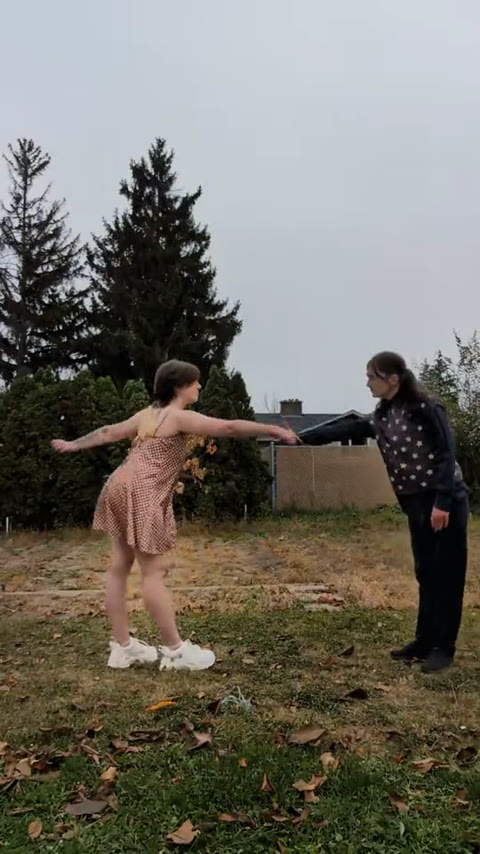
11s · 9:16 · 720p · original sound · ready in a few minutes
Preview clip: @mochadied on TikTok
A shared routine
The two-person Last Dance behind this template
Last Dance gives two people one simple scene: meet in the same frame, hold on and turn together.
A dance made for a pair
The Last Dance format appears in animation, fan art, Cosplay and live-action posts, but its clearest idea stays the same. Two characters face each other, reach out, share a handhold and move through one short turning sequence. It works especially well for a couple, friends or siblings because neither dancer is only watching from the edge of the shot.
The routine is compact enough to read in one viewing. The dancers remain full-body in a fixed outdoor frame, so their shared movement carries the scene without a second camera angle, a cutaway or a separate setup. That makes the original gesture easy to recognise even after the two identities change.
The reference used here
This template follows the 11-second backyard duet posted by @mochadied on TikTok. The first dancer begins on the left in a patterned dress, while the second begins on the right in black. The example above plays the same section with its original sound before you add photos.
Your photos replace the two dancers rather than inventing a different routine. The outdoor grass, trees, fence, daylight and portrait framing remain part of the clip, so the attention stays on the two people and the way they move together.
One continuous duet
The Last Dance moves your photos follow
Both identities move through the same short sequence, keeping their own place as the dancers reach, hold and turn.
Start in the open backyard frame
The first dancer begins on the left and the second begins on the right, facing one another with enough space for the full-body movement to read clearly.
Reach out and take hands
The pair extends toward the centre of the frame. The handhold connects the two photo identities and gives the rest of the routine one shared rhythm.
Stretch apart, then rotate
They lean away from one another with their arms extended, then use the held hands to guide the turning movement. Each person stays attached to their own photo while their screen position changes.
Finish the duet in the same shot
The fixed camera continues to hold both dancers and the autumn yard. The ending feels like one complete moment because the pair remains together in the original scene.
From TikTok
Three ways creators make the Last Dance their own
The same two-person timing travels across animation, a pose base and a live-action Cosplay version.
@arts_w_cortex
A red-curtain animation version that makes the pull, handhold and turn read like a tiny stage performance.
@1sampokoskifan
A clean pose-base version that makes the two-person hand positions and rotation path especially easy to study.
@homuralvrrr
A live-action Cosplay duet that keeps the same handhold and spin in a different outdoor mood.
Two photos, one complete dance
What you add and what the duet gives back
Choose one clear photo for each dancer and receive one Last Dance AI video for 300 credits.
You upload
- Two portraits, with one clear person in each photo
- JPG, PNG or WebP, at least 300 pixels on every side and up to 10 MB each
- No video, audio track or written prompt needed
You get
- One 11-second vertical MP4 in 9:16 at 720p
- Two photo identities mapped to the dancers from their opening positions through the final turn
- The outdoor backyard, fixed camera and complete handhold-and-rotation routine from the reference clip
- The original reference sound merged onto the finished video
- A completed video in My Work, ready to play and download
| Photos | 2, one for each dancer |
|---|---|
| Model | Kling |
| Duration | 11 seconds |
| Resolution | 720p |
| Frame | 9:16 vertical |
| Audio | Original Last Dance sound |
| File | MP4 |
| Credits | 300 per video, refunded if it fails |
Simple pricing
One complete Last Dance duet for 300 credits
An 11-second Last Dance AI video costs 300 credits. Choose a credit pack below, add two photos and make the full two-person routine in one go.
- Basic$9.9400 credits1 video
- Growth$19.9850 credits2 videos
- Most PopularPro$39.91,800 credits6 videos
- Studio$99.94,800 credits16 videos
- Max$299.915,000 credits50 videos
Three clear steps
How to make a Last Dance video from two photos
Assign one photo to each dancer, check the opening positions and create one complete 11-second Last Dance AI video for 300 credits.
Add one photo for each dancer
Put a clear portrait in both upload boxes. The first photo becomes the dancer in the patterned dress on the left at the opening, and the second photo becomes the dancer in black on the right. JPG, PNG and WebP all work from 300 pixels on each side up to 10 MB.
Check the opening frame
Use the example video above to see the backyard, the two starting places and the handhold that connects the pair. Distinct hair, clothes and a clear face help both identities stay easy to follow as the dancers stretch and turn through the same shot.
Generate and play the duet
Sign in, check the 300-credit button and press Generate. The template keeps the fixed camera, outdoor setting and complete Last Dance routine, then adds the original sound to the finished 9:16 MP4. Your video appears in My Work when it is ready to play and download.
FAQ
Last Dance AI FAQ
What is the Last Dance AI video generator?
It turns two photos into the Last Dance backyard duet. One photo becomes the dancer on the left at the opening and the other becomes the dancer on the right, while the handhold, stretching movement, turn, outdoor setting, fixed camera and original sound stay with the clip.
How do I make a Last Dance video from photos?
Add one clear portrait for each dancer, check the 300-credit button and press Generate. The finished 11-second 9:16 MP4 appears in My Work when it is ready, where you can play it and download it.
How many photos do I need?
You need two photos: one person in each. The first photo maps to the dancer in the patterned dress on the left at the opening, and the second maps to the dancer in black on the right. Each person keeps their identity as the duet moves through the turn.
What kind of photos work best?
Use one clear person per image, with a visible face, natural light and a half-body or full-body view. JPG, PNG and WebP files work from 300 pixels on each side up to 10 MB, and visible hair and clothing give each dancer plenty of recognisable detail.
Does the finished Last Dance video include sound?
Yes. The template uses the original sound of the reference clip and merges it onto the finished 11-second MP4, so the duet arrives ready to play and post.
What stays the same in the video?
The portrait camera, autumn backyard, two-person timing, handhold, stretch, rotation and full movement sequence stay with the source clip. Your two uploaded people take the dancers’ places.
How much does a Last Dance AI video cost?
One 11-second video costs 300 credits. The available credit packs show how many complete Last Dance duets each pack covers.
How long does it take to make the video?
Rendering usually takes a few minutes and continues after you leave the page. Your completed video appears under My Work as soon as it is ready to play and download.
Same category
More Dance templates
 NEW400 CR
 NEW140 CR
 NEW270 CR
 NEW220 CR
 NEW400 CR
 NEW400 CR
 NEW400 CR
 NEW140 CR
 NEW400 CR
 NEW270 CR
 NEW240 CR
 NEW300 CR
Keep scrolling
More viral AI video trends
 NEW220 CR
 NEW400 CR
 NEW220–430 CR
 NEW380 CR
 NEW400 CR
 NEW220 CR
 NEW380 CR
 NEW380 CR
 NEW300 CR
 NEW270 CR
 NEW220 CR
 NEW380 CR