
Funny · New
Cat Riding Surron AI Video Generator
Cat Riding Surron AI puts your cat into a fast, playful wheelie on an electric dirt bike. Upload one clear cat photo and SameVid keeps the selected road, the teal bike, the camera movement and the long front-wheel lift in place while your cat becomes the rider. The result is an 8-second vertical 720p MP4 with the original clip audio joined to the finished ride. It is a compact way to turn a favorite cat photo into a motorbike moment for a group chat, a Reel or a TikTok post, and each video uses 220 credits.
Cat Riding Surron AI · 8s · 9:16
8s · 9:16 · 720p · original sound · ready in a few minutes
From TikTok
The Cat on Ultra Bee wheelie that started this ride
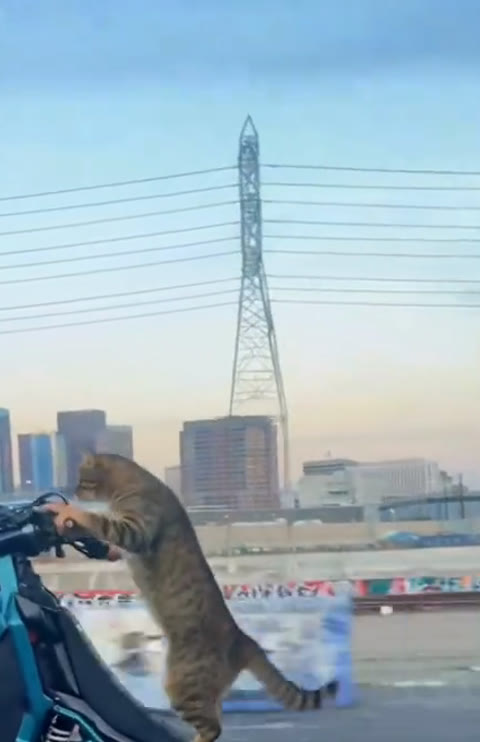
The selected @mxrender clip is captioned Cat on Ultra Bee: a cat holds the bike through a dramatic wheelie while the city slides by. Watch the reference with its original sound, then use your own cat photo for the same single-rider scene.
@mxrender
A tabby cat rides a teal electric dirt bike through one sustained wheelie. The composition stays focused on one rider, one bike and one moving road, which makes the action easy to recognize from the first frame and gives your own cat a defined role throughout the clip.
How it works
Make a cat riding Surron AI video in three steps
Your cat photo supplies the rider. SameVid keeps the selected electric dirt bike wheelie, road and moving camera ready for an 8-second vertical video that uses 220 credits.
Choose one clear cat photo
Pick a bright photo where one cat is easy to recognize. A visible face, ears, whiskers, fur pattern and body outline give the new rider a familiar look, while the template supplies the teal electric dirt bike, city road and sustained wheelie.
Add your cat to the rider slot
Upload that photo in the Your cat slot. SameVid uses it to define the rider while keeping the single-bike scene, forward road movement and camera timing aligned to the selected reference. The template has one cat rider, so every frame can stay focused on the same pet.
Generate and share the ride
Review the 220-credit total, then start the render. Your finished vertical MP4 appears in My Work with the original selected audio joined after the visual render, ready to replay, download or share as a quick cat-on-an-electric-bike reveal.
The scene
One cat, one bike, one long wheelie
The action stays in a single flowing ride, so your cat has a clear place in every moment. The bike, road and city backdrop hold the scene together while the rider identity comes from your photo.
The cat takes the handlebars
The clip opens with one cat already positioned as the rider on the electric dirt bike. A clear cat photo gives the model the face, fur pattern, ears and body shape to carry through the entire ride, while the bike’s color and the surrounding road remain part of the established scene.
The front wheel lifts
The rider holds the bike through the signature wheelie. The raised front wheel, steady cat posture and moving pavement make the joke land quickly: your familiar cat looks completely committed to an energetic city ride, with the road and skyline giving the action real momentum.
The ride stays in motion
The camera follows the same rider and bike as the scene travels forward. Keeping one cat in one continuous sequence makes the result feel like a complete mini-story instead of a collection of separate shots, ready to replay with the original clip audio attached.
Photo tips
Choose a cat photo that feels ready to ride
Your photo supplies the rider identity, so a clear view of your cat gives the finished wheelie its personality. A relaxed everyday image works beautifully when the fur, face and body outline are easy to see.
- Use one sharp, well-lit photo that shows your cat’s face, ears, fur pattern and body shape. A photo taken near a window or outdoors in soft daylight gives the rider a recognizable look that carries naturally across the full ride.
- Pick a photo where your cat is the clear subject. A seated, standing or relaxed pose gives the model useful details for the rider while the template provides the bike, the wheelie and the road movement.
- Choose an image with one cat framed clearly from the surroundings. A simple background keeps attention on the whiskers, coat markings and ear shape that make your cat feel unmistakably like the star of the ride.
- Choose a photo with bright, even detail across the face and body. This gives the finished clip a strong rider identity from the opening moment through the last part of the wheelie.
Ready to post
Captions for a cat with a full throttle attitude
The ride tells the visual joke in a single glance. Pair it with a short line that lets your cat’s new electric-bike confidence do the talking.
- “My cat found the fast lane. 🐾”
- “Tiny paws. Serious wheelie energy.”
- “The group chat asked for a rider.”
- “One photo, one very confident cat.”
- “Electric bike. Feline focus.”
- “My cat’s weekend plans just got louder.”
- “A tabby with main-rider energy.”
- “The front wheel lifts. The cat delivers.”
- Open with the wheelie so the rider reveal lands in the first second of the post.
- Use your cat’s nickname in the caption for an easy personal twist friends will recognize.
- Send the finished clip to the friend whose pet should take the next ride.
Put your cat in the wheelie
Choose one clear cat photo and let it take the electric dirt bike through the full 8-second ride. The road, bike, camera path and original audio are ready; your 220 credits create the rider reveal everyone will recognize.
FAQ
Cat Riding Surron AI FAQ
What is Cat Riding Surron AI?
Cat Riding Surron AI turns one clear cat photo into a short vertical electric dirt bike video. Your photo supplies the rider’s fur pattern, face and cat personality, while the template supplies the teal bike, city road, moving camera and continuous wheelie. The finished clip is an 8-second 720p MP4 with the original selected audio joined after the visual render.
How many photos does Cat Riding Surron AI need?
This template uses one photo for one cat rider. Choose a clear photo where your cat is easy to recognize, with its face, ears and fur visible. That single image gives the model the rider identity while the template keeps the electric bike scene, the road and the wheelie action aligned across the full video.
What kind of cat photo works best?
A bright, sharp photo of one cat works especially well. A relaxed standing, sitting or portrait-style pose gives the model a useful view of the whiskers, eyes, ears, coat markings and body outline. The bike and road come from the selected ride, so your cat photo can focus on showing the details that make your pet instantly familiar.
How long is the Cat Riding Surron AI video?
Each Cat Riding Surron AI video runs for 8 seconds. The visible example, the silent visual reference and the delivered video all use the same compact ride segment, so the cat enters the bike scene, holds the wheelie and completes the moving road sequence in one consistent vertical clip.
Does the finished Cat Riding Surron video include audio?
Yes. SameVid uses a silent visual reference while creating the new cat rider, then joins the original selected clip audio to the finished video. This keeps the generation focused on the wheelie and rider identity while giving the downloaded MP4 the ready-to-play sound of the reference ride.
What format will I receive?
You receive a vertical 9:16 MP4 at 720p. The finished video is sized for a quick post, replay or direct share, with one cat rider, the electric dirt bike and the city-road wheelie sequence all presented in the same compact mobile-first frame.
How much does Cat Riding Surron AI cost?
One 8-second Cat Riding Surron AI video costs 220 credits. The credit total appears before you generate, alongside the video length, vertical format and single cat-rider photo slot, so you can start the ride with a clear view of what your video includes.
What happens after I generate my cat ride?
Your finished Cat Riding Surron AI video appears in My Work, where you can play it again and download the MP4. The completed ride keeps the selected wheelie structure and original audio while bringing your cat’s face, fur and character into the role of the single electric-bike rider.