
Creative · New
Ceiling Fan AI Outfit Transition Generator
Make a ceiling fan AI video: you roll off a pink sofa onto a blue rug under a ceiling fan, and each time a blade sweeps across the overhead shot you appear in the next of four gowns. Upload a photo of one person and get a 12-second vertical MP4 with the clip’s original sound.
Ceiling Fan · 12s · 9:16
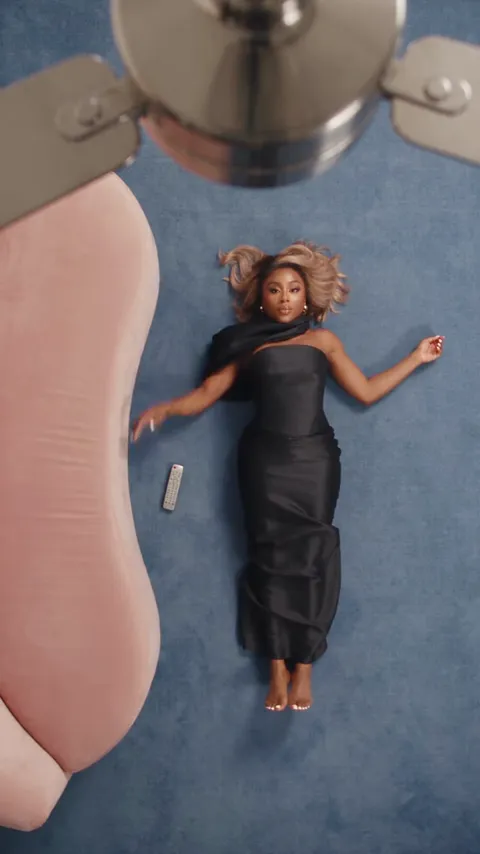
12s · 9:16 · up to 1080p · Seedance · audio included
Full-body photo works best. Preview clip: @sklouchere.pierre on TikTok
Examples
AI and real ceiling fan transitions
The AI clip this template follows, a menswear AI version and a real one shot without AI. Each links to its creator.
Four gowns under the fan
A black strapless gown, a black-and-gold kaftan, a corset with a denim mermaid skirt and a gold ruffled gown, one per blade pass.
@sklouchere.pierreA menswear version
Sunglasses and four black streetwear fits in the same pink-sofa room.
@bhodiiwTrying it without AI
A real overhead shot on a grey carpet, with a new outfit after each pass of a white fan.
@lottsjsworldQuick walkthrough
How to make a ceiling fan AI video
One photo, one button, and the finished clip waits in My Work.
Add one photo
Upload a photo of one person into You. A clear, front-facing full-body photo works best, because the video shows you lying head to toe on the rug. Your face, hair, skin tone and build come from the photo; the four gowns come from the template.
Generate
Sign in and check the credits shown on Generate. Seedance, up to 1080p, 12 seconds, the 9:16 frame, the four looks and the original sound are already set, so there is no prompt to write, no outfit to upload and no phone to tape to the ceiling. Press Generate to start the task.
Watch and download
Generation and upscaling usually take about ten minutes and keep running if you leave the page. Open My Work on this template to play the result and download the MP4. If a task fails, the charged credits return automatically.
The trend
Where the ceiling fan transition comes from
An overhead outfit edit that went AI, then went back to real.
What the ceiling fan transition is
The camera looks straight down from the ceiling at someone lying on the floor. A fan blade sweeps across the lens, and when it passes, the person is wearing a different outfit. TikTok tags it #ceilingfantransition and #ceilingfantrend; people also call it the fan transition, the fan outfit trend or "under the fan."
The AI version went viral
In late September 2026, AI versions spread on TikTok: one photo placed into a room seen from the ceiling, often with a pink sofa and a blue rug, changing into a new look on every blade pass. On September 28, The Tab reported that the AI ceiling fan trend had gone viral right after the Hotel Lobby trend, and that it looked so real some people did not realize it was AI.
The Hotel Lobby edit has its own template: the Hotel Lobby AI video puts one or two photos into the orange-booth performance.
The no-AI comeback
Doing it by hand means taping a phone to the ceiling, lying underneath it in each outfit and editing the clips together on the blade passes. In October, creators answered with real attempts. @amyrebeccaowen’s version, captioned "and this is why I don’t participate in trends," passed 22 million plays, and @lottsjsworld’s "trying AI trends without AI" passed 2.5 million.
Ideas
Who to put under the fan
Four red-carpet looks in 12 seconds suit anyone who deserves a glow-up.
Yourself
Post your own ceiling fan transition without filming four times or changing on the floor. Add a "which look is your fav?" caption and let the comments vote.
A best friend on their birthday
Send the birthday girl four gowns she never had to buy. A full-body photo from a night out works well.
Your mom or grandma
Give the family’s favorite woman a runway moment on the rug, from the black gown to the gold ruffles.
The friend who never dresses up
The gowns stay the same whoever you upload, so a photo of your most casual friend, brother or dad becomes a four-gown surprise for the group chat.
Input and output
What you upload and receive
One photo in, a 12-second, four-look transition out.
You upload
- One JPG, PNG or WebP photo of one person
- At least 300 pixels on each side, up to 10 MB
- No video, audio, outfit photos or prompt
You get
- A 12-second MP4 in vertical 9:16, up to 1080p
- Four looks, changing each time the blade sweeps past
- The original sound of the source clip
- A task in My Work on this page with playback and download
| Photos | 1 |
|---|---|
| Model | Seedance |
| Duration | 12 seconds |
| Resolution | Up to 1080p |
| Frame | 9:16 vertical |
| Looks | 4 gowns, set by the template |
| Audio | Original sound of the source clip |
| File | MP4 |
| Credits | 330 per video, refunded if it fails |
Start creating
Make your ceiling fan transition
Pick the photo, lie down on the blue rug and let the fan change your look.
FAQ
Ceiling Fan FAQ
What is the ceiling fan AI trend?
The ceiling fan AI trend is an outfit transition filmed from above: a person lies on the floor under a ceiling fan, and each time a blade sweeps across the camera, they appear in a new outfit. AI versions build it from a single photo; this template puts your photo into a 12-second, four-look version.
When did the ceiling fan transition go viral?
AI versions spread on TikTok in late September 2026, and The Tab covered the trend on September 28. In October, real "without AI" versions took off too; the most-watched, by @amyrebeccaowen, passed 22 million plays.
Can I choose the outfits?
No. The four looks are set by the template: a black strapless gown, a black-and-gold kaftan, a brown corset with a denim mermaid skirt and a gold ruffled gown. Your photo supplies your face, hair, skin tone and build, not your clothes.
Can I use a photo of a man?
Yes. The person in the photo takes the spot on the rug and wears the same four gowns, which many people use as a joke for friends, brothers or dads.
What photo works best?
A clear, front-facing, full-body photo of one person, in JPG, PNG or WebP, at least 300 pixels on each side and up to 10 MB. The video shows the person head to toe, so a full-body photo keeps proportions closest to you. Avoid sunglasses, hats and group photos.
Do I need a ceiling fan or a phone mount?
No. The room, the fan, the overhead camera and the blade timing are already in the template. You upload one photo and the AI video is generated from it.
Does the video have sound?
Yes. The MP4 carries the original sound of the source clip, matched to the 12-second edit. You can also add a trending sound when you post it.
How much does it cost and how long does it take?
Each ceiling fan AI video costs 330 credits for a 12-second clip up to 1080p, and the Generate button shows the amount before you start. Generation and upscaling usually take about ten minutes and continue in the background. If the task fails, the charged credits return automatically.
Keep scrolling
More viral AI video trends
 HOT60 CR
 NEW110 CR
 NEW110 CR
 HOT110 CR
 HOT330 CR
 NEW110 CR
 NEW110 CR
 NEW50 CR