
Transformation · New
AI Army Soldier Video Generator
Make an AI army soldier video from one portrait: a sweeping wipe replaces your photo with you as a soldier in camouflage and body armor, standing in front of an armored vehicle on a dusty field. Upload one photo, press Generate and get a 6-second vertical MP4 with the clip’s original sound.
AI Army Soldier · 6s · 9:16
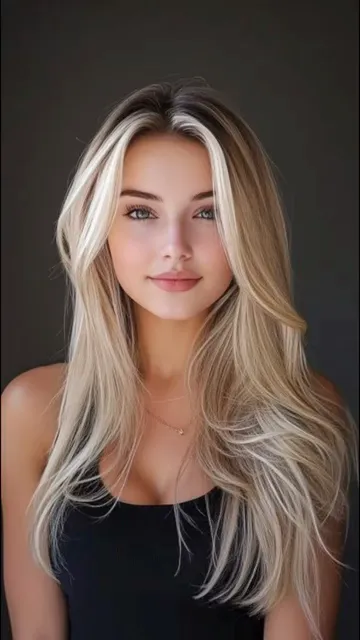
6s · 9:16 · 720p · original sound · ready in a few minutes
Preview clip: @khem_is_here on TikTok
Examples
AI army soldier videos from TikTok
The portrait-to-soldier clip this template follows, and the walking version of the same effect. Each links to its creator.
Portrait to soldier by an armored vehicle
A head-and-shoulders portrait is wiped away and replaced by a full-length soldier in camouflage with a rifle and body armor.
@khem_is_hereWalking down a path in uniform
A woman in a leather jacket and jeans walks toward the camera; her outfit is swapped piece by piece for a combat uniform while the path turns to mud.
@gekstu7Ready to post
Captions for your AI soldier video
The first two come from real posts of this trend. The rest suit a portrait-to-soldier clip.
- “A soldier is never out of his duty. Try this ai military effect and go viral on TikTok. This ai army effect is trending on TikTok #armyai #militaryai #militar #ia”
- “US Army Filter AI #CapCut #usa #templatecapcut #news #trending #viral #ai”
- “POV: you asked the AI what you would look like in uniform”
- “Same face, different mission”
- “Ready for duty in 6 seconds”
- Tag #armyai and #aiarmy so the video sits with the other AI soldier posts.
- The MP4 comes with the clip’s original sound; lay another track over it when you post if you prefer.
The trend
Where the AI army soldier trend comes from
A photo-to-uniform effect that shows an ordinary portrait turning into a soldier.
What the AI army soldier effect is
The AI army soldier effect shows an ordinary photo and then swaps the person into a full combat uniform: camouflage, a plate-carrier vest, gloves, boots and a rifle, set against a vehicle or a field. On TikTok it appears as "ai army soldier," "AI army effect," "US Army Filter AI" and "ai military effect," often tagged #armyai, #militaryai and #capcut.
How the clip is built
The clip this template follows has three beats. For about two seconds it holds a head-and-shoulders portrait on a dark studio background. A wipe then sweeps across the frame in horizontal bands and replaces the portrait with a full-length soldier. For the last few seconds the soldier stands still in front of a desert-colored armored vehicle, with smoke and dust behind and a rifle held across the body. Nothing else moves, which is why one photo is enough to rebuild it.
How it spread
Of the posts we checked, the oldest big one is @gekstu7’s "US Army Filter AI" from June 23, 2025, with about 207,000 plays. @khem_is_here’s portrait-to-soldier clip followed on October 6, 2025 with about 315,000 plays, and a repost with CapCut tags from October 23, 2025 passed 697,000. Many of these posts add a phone screen recording that shows how to apply a CapCut template to your own photos.
Quick walkthrough
How to make an AI army soldier video
One portrait, one button, and the finished video waits in My Work.
Add one portrait
Drop a head-and-shoulders photo of one person into You. The face, hairstyle and skin tone are taken from it; the uniform, the vehicle and the field are set by the template.
Generate
Sign in, check the credits on the Generate button and press it. The wipe, the length and the sound are already set, so there is no prompt to write and nothing to edit.
Play and save
Wait about five minutes; the task keeps running if you close the tab. Then open My Work on this page, play the video and save the MP4. A failed task gives the credits back.
Input and output
What you upload and receive
One portrait in, a 6-second soldier clip out.
You upload
- One photo of one person, as JPG, PNG or WebP
- At least 300 pixels on the short side, up to 10 MB
- No video, no sound and no prompt to supply
You get
- A vertical 9:16 MP4 at 720p that runs 6 seconds
- A portrait, a sweeping wipe and a full-length soldier by an armored vehicle
- The soundtrack of the source clip
- The finished video in My Work, ready to play and download
| Photos | 1 |
|---|---|
| Model | Seedream |
| Duration | 6 seconds |
| Resolution | 720p |
| Frame | 9:16 vertical |
| Scene | Portrait, wipe, then a soldier in a dusty field |
| Audio | Original sound of the source clip |
| File | MP4 |
| Credits | 160 per video, refunded if it fails |
Credits
What an AI army soldier video costs
One 6-second video costs 160 credits. Credit packs below show how many videos each one covers.
- Basic$9.9400 credits2 videos
- Growth$19.9850 credits5 videos
- Most PopularPro$39.91,800 credits11 videos
- Studio$99.94,800 credits30 videos
- Max$299.915,000 credits93 videos
FAQ
AI Army Soldier FAQ
What is an AI army soldier video?
It is a short AI video that shows a portrait and then swaps the person into a full combat uniform with camouflage, body armor and a rifle. This template recreates the portrait-to-soldier clip from the "ai army soldier" TikTok trend as a 6-second vertical MP4 with the original sound.
How do I make an AI army soldier video?
Add one portrait to the You slot, press Generate and wait about five minutes. You do not write a prompt or edit anything: the wipe, the vehicle, the uniform and the length are set. Open My Work on this page to play the clip and save the MP4.
When did the AI army effect go viral?
Of the posts we checked, the oldest big one is @gekstu7’s "US Army Filter AI" from June 23, 2025 with about 207,000 plays, followed by @khem_is_here on October 6, 2025 with about 315,000 and a CapCut-tagged repost on October 23, 2025 with about 697,000.
Is this the same as the CapCut army effect?
It is the same idea, a portrait that turns into a soldier, made differently. The CapCut posts in this trend apply a template inside the CapCut app. This page makes the 6-second video from your photo in the browser: you add one portrait and get an MP4 in My Work, with no app to open and nothing to edit.
What photo works best?
Use a head-and-shoulders portrait of one person, as in the example clip: face toward the camera, even light and a plain background. JPG, PNG or WebP, at least 300 pixels on the short side and up to 10 MB. Sunglasses, helmets and masks make it harder to keep the face recognizable. Only have a group photo? Upload it and crop to one person right here, no other app needed.
Can I choose the uniform or the background?
No. The camouflage uniform, the armored vehicle and the dusty field are set by the template, and so is the order of the wipe. Your photo opens the clip as you uploaded it; in the soldier shot only your face, hair and skin tone are kept, not its clothes or background. Military uniforms of a particular country or unit are not offered.
Can I post the video, and do credits expire?
You can post it on TikTok, Reels or Shorts. The Terms grant a license to use generated videos for personal and commercial purposes, subject to third-party rights such as the rights of the people shown and of the original clip’s music. One-time packs and the 10 sign-up credits never expire; plan credits last for the billing period.
How much does it cost and how long does it take?
One AI army soldier video costs 160 credits, shown on the Generate button before you start, and takes about five minutes. If it fails, the credits come back.
Same category
More Transformation templates
 NEW220 CR
 NEW350 CR
 NEW160 CR
 NEW270 CR
 NEW140 CR
 NEW320 CR
 NEW400 CR
Keep scrolling
More viral AI video trends
 NEW320 CR
 NEW220 CR
 NEW300 CR
 NEW270 CR
 NEW400 CR
 NEW220 CR
 NEW380 CR
 NEW400 CR
 NEW140 CR
 NEW270 CR
 NEW220 CR
 NEW380 CR