
Dance · New
Sway Dance AI Video Generator
Sway Dance AI turns one full-body photo into a 14-second video of you doing the viral sway dance. You sway side to side with loose arms, turn around and come back, throw both hands above your head, squat and clap, then kick one knee up high, all in one continuous shot with the original song. Sway Dance AI is the same routine people call the AI sway dance effect or AI sway dance filter on TikTok and CapCut.
Sway Dance AI · 14s · 9:16
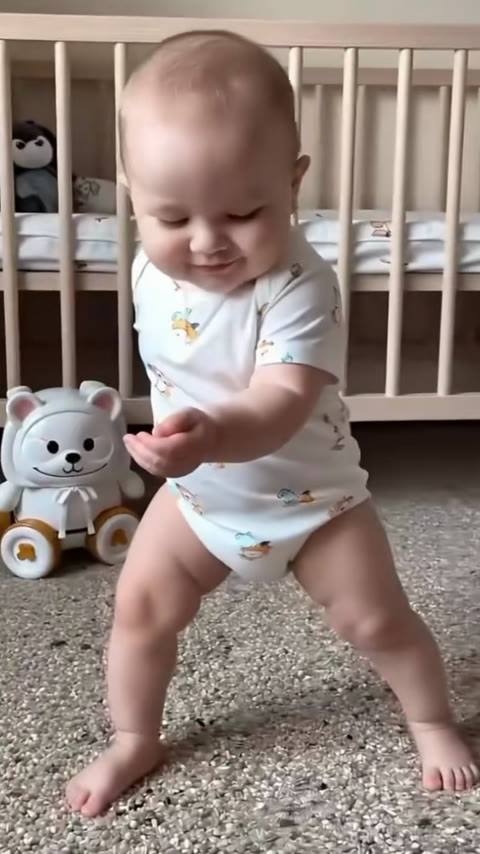
14s · 9:16 · 720p · original sound · ready in a few minutes
The Sway Dance AI routine
What happens in the 14 seconds
The camera stays still and shows the dancer head to toe the whole time. Every move lands on the beat of the song, so the routine reads as one smooth, playful dance.
0–4 s: the sway
Knees bent, feet wide, the dancer rocks from one side to the other with loose, bouncy arms. This side-to-side groove is the move the trend is named after.
4–7 s: the turn
The dancer turns around to show their back, wiggles to the beat, and spins back to face the camera.
7–10 s: arms up
Both arms open wide, then go straight up over the head while one knee lifts, the most energetic moment of the routine.
10–12 s: squat and clap
A low squat with both hands clapping in front of the chest, then a bounce back up with a big smile.
12–14 s: the knee kick
Arms spread out like wings, the dancer kicks one knee up high and lands the last beat facing the camera.
Who to put in
Who to put in your sway dance
Any one person with a clear full-body photo can do the sway. The funniest videos put someone unexpected on the dance floor.
Yourself
Post your own sway dance without learning a single step. Wear something bright and the moves pop on screen.
Your kids
The trend started with dancing babies, and a toddler or a young child doing the knee kick is still the crowd favorite.
Parents and grandparents
A grandma or a dad doing a perfectly timed sway is the kind of video family group chats share all week.
A friend for a birthday
Turn a friend’s photo into a surprise dance and send it with a birthday message or post it as a tag.
Characters and mascots
An anime character, a cartoon figure or a team mascot works too, as long as the whole body is in the picture.
Photo tips
Best photos for a Sway Dance AI video
The camera shows the dancer from head to feet for all 14 seconds, so the photo should too. A clear full-body shot gives the model everything it needs to keep the face, outfit and body shape through every move.
- Show the whole body, from the top of the head to the feet.
- Stand facing the camera, arms relaxed at the sides.
- Use even daylight or bright indoor light on the face and clothes.
- Pick one person, with the body filling most of the frame height.
- Close-up selfies, sitting poses or photos cut off at the waist or knees.
- Heavy filters or busy backgrounds that hide the outline of the body.
Background
Where the sway dance comes from
The sway dance grew out of the AI baby dance clips of late 2025 and came back in October 2026 as a one-photo effect anyone can try.
From AI babies to everyone
Know Your Meme traces the AI Baby Dance Trend, also called the Sway Dance, to December 2025, when TikTok clips of AI-made babies in sunglasses and gold chains swayed to the song "Last Call for Love". By January 2026 the format had spread to Instagram Reels and Facebook, and families were filming real toddlers copying the AI moves next to the originals.
The same side-to-side groove then moved from babies to adults, celebrities, pets and cartoon characters, because one still photo is all it takes. For the merengue version where a toddler waves, pats the chest and stamps, see Baby Dance AI.
The October 2026 sway wave
At the end of October 2026 the dance returned on TikTok as the AI Sway Dance effect, with captions like "wassup sway" and "Wassup, been a minute". Many posts pair it with the Jersey Club beat "Been a Minute" by Prodzbee, with moves credited to @khialboy. The most watched post of the wave, an anime character dancing the sway by @user6652005612173, passed 100,000 plays within days.
The CapCut template behind the wave, Ai Sway Dance effect, has been used more than 546,000 times. Its sample clip, a barefoot baby in a white bodysuit dancing in front of a wooden crib, is the routine this template follows.
How the Sway Dance AI video is made
SameVid uses Kling video editing on the original 14-second clip. Your photo replaces the dancer, while the nursery, the camera, the timing of every move and the song stay exactly as they are in the trend video.
- Upload one full-body photo of one person.
- Press Generate and wait about five minutes.
- Watch and download the finished video in My Work.
One price per sway dance
Each 14-second Sway Dance AI video costs 380 credits, with the original song merged in. Credits come back automatically if a video fails.
- Basic$9.9400 credits1 video
- Growth$19.9850 credits2 videos
- Most PopularPro$39.91,800 credits4 videos
- Studio$99.94,800 credits12 videos
- Max$299.915,000 credits39 videos
FAQ
Sway Dance AI FAQ
What is the Sway Dance AI trend?
It is a TikTok trend where one photo becomes a video of the person swaying side to side to the beat, then turning, raising both arms and kicking a knee up. It began with AI baby dance clips in December 2025 and came back as the AI Sway Dance effect in October 2026.
How do I make a Sway Dance AI video?
Upload one clear full-body photo of one person, press Generate and wait about five minutes. The finished video is saved to My Work, where you can watch and download it.
How long is the video and how much does it cost?
The video is 14 seconds long, 720p and 9:16 vertical. It costs 380 credits.
Does the video have music?
Yes. The finished video carries the original song from the trend clip, matched to every move.
Does it work for adults, or only babies?
It works for anyone. The model keeps the face, hair, outfit and body shape from your photo, so adults, kids, grandparents and cartoon characters can all do the same routine.
What photo works best?
A full-body photo of one person standing and facing the camera, in good light, with the head and feet both in the frame.
Will my video look exactly like the trend clip?
The moves, the timing, the camera and the nursery setting follow the trend clip. Your face, hair and clothes come from your photo, so the dancer is clearly you.
Can I use a photo of someone else?
Yes, as long as you have their permission to use their photo.
Same category
More Dance templates
 NEW400 CR
 NEW140 CR
 NEW270 CR
 NEW220 CR
 NEW400 CR
 NEW400 CR
 NEW300 CR
 NEW400 CR
 NEW140 CR
 NEW400 CR
 NEW270 CR
 NEW240 CR
Keep scrolling
More viral AI video trends
 NEW400 CR
 NEW400 CR
 NEW220 CR
 NEW320 CR
 NEW400 CR
 NEW270 CR
 NEW220 CR
 NEW380 CR
 NEW380 CR
 NEW300 CR
 NEW270 CR
 NEW220 CR