
Movie & TV · New
Mother Monster AI Video Generator
Make a Mother Monster AI video from one photo. Step into a snowy fantasy scene, lift a tiny pink baby dragon in both hands, and hold it close while the scene’s instrumental track plays. Your photo supplies the adult keeper; the snowfield, rocks, gentle camera movement and baby dragon stay set for the story.
Mother Monster AI · 13s · 16:9
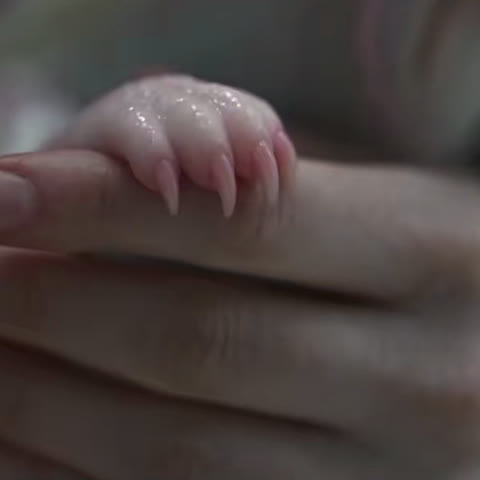
13s · 16:9 · 720p · original sound · ready in a few minutes
The scene
Names you may see around the Mother Monster story
These names all point to the same tender snowfield story: one adult protecting a pink baby dragon.
The Mother Monster
The name used for the fantasy film about a woman who protects a dragon the village fears. This template focuses on its quiet baby-dragon moment.
The Mother’s Monster
A closely related title used on film uploads and scene collections. The snowy setting, pink dragon and protective embrace make the connection easy to recognize.
She Gave Birth to a Dragon
The title of MYTHRA’s 28-minute original Mother Monster AI fantasy film, published on September 14, 2026. It describes the wider story while this generator recreates one short, gentle holding scene.
Dragon Mother
A shorthand for the emotional center of the scene: an adult treats the small dragon as family and keeps it warm in the snow.
One clear keeper
Photo tips for your baby-dragon scene
The scene moves from a wider snowfield view into a close, quiet embrace, so a clear adult portrait helps the likeness stay steady.
- Choose a sharp, well-lit photo of one adult with the full face visible. A front-facing or slight three-quarter angle gives the model a clear identity for the close shots.
- Use a half-body or full-body photo when you can. Visible shoulders, arms and hands help the holding pose look natural as the dragon rests against your chest.
- Wear clothes you would enjoy seeing in a winter fantasy scene. Your hairstyle, color palette and clothing guide the dragon keeper’s look.
- Pick a JPG, PNG or WebP photo with at least 300 pixels on the short side and up to 10 MB, so the face and hands stay detailed through the scene.
- Keep eyes, hairline and cheeks easy to see. A clean portrait gives the keeper a warm, recognizable expression while the camera moves closer.
- Choose a single-person crop. The template assigns your photo to the adult keeper, while the baby dragon and snowy landscape are already part of the scene.
Source scene
The snowfield scene you step into
This 13-second scene establishes the soft winter light, the small pink dragon and the protective moment your photo joins.
Lift and hold the baby dragon
In a pale snowfield beside dark rocks, one adult kneels, gathers a pink baby dragon in both hands and presses it gently against their chest. The scene’s instrumental track stays with the finished video.
MYTHRAReady to share
Captions for your Mother Monster AI video
Keep the post focused on the tiny dragon, the snow and the protective moment.
- “A tiny dragon, a very big promise. 🐉❄️”
- “Found something small enough to fit in both hands and big enough to change everything.”
- “Snow outside, warm heart inside.”
- “The baby dragon picked its keeper.”
- “Holding the whole little world close.”
- “One quiet moment before the adventure begins.”
- Lead with the lift or cheek-to-cheek close-up so the pink dragon appears in the opening beat of your post.
- Pair the clip with a short story caption, then let the scene’s instrumental track carry the winter mood.
Three simple steps
How to make a Mother Monster AI video
Add one photo, generate the scene and receive a 13-second MP4 with sound for 350 credits.
Add your dragon keeper photo
Upload one clear photo of the adult who will lift the baby dragon. Your face, hairstyle, skin tone and clothing guide the keeper, while the dragon, snow and rocks come from the template.
Generate the snowfield scene
Sign in, check the 350 credits shown on the button and start the video. The camera, 16:9 frame, 720p detail, 13-second runtime and story beats are prepared for you.
Play and share your MP4
The task continues in My Work while you do something else. When it is ready, play the video with the scene’s instrumental track and download the MP4 for your edit or post.
A small story starter
Ways to make the dragon scene yours
The template supplies the snowfield moment; your photo gives the keeper a personal place in it.
A winter profile reveal
Use a favorite portrait and post the first lift as a fantasy-style profile reveal. The close-up makes the keeper’s face and the dragon’s color easy to recognize on a small screen.
A birthday guardian story
Make a gentle birthday message for a friend who loves fantasy worlds, then write a line about a new year of adventures beginning in the snow.
An original character moment
Give an original character a first encounter with a baby dragon. A costume, hairstyle or expression in your photo helps the keeper feel like part of your own story world.
A family keepsake for an adult
Turn an adult family portrait into a warm fantasy scene that feels like a storybook memory. The single keeper stays central while the small dragon adds the surprise.
FAQ
Mother Monster AI FAQ
What is Mother Monster AI?
Mother Monster AI is a photo-to-video scene inspired by the AI fantasy film The Mothers Monster. You add one adult portrait and appear as the keeper in a snowy field, gently lifting and protecting a small pink baby dragon in a 13-second video.
How do I make a Mother Monster AI video?
Add one clear photo of an adult, sign in, review the 350 credits on the Generate button and start the task. My Work keeps the task available while it renders, then gives you a 13-second 720p MP4 with the scene’s instrumental track.
What photo works best for the dragon keeper?
A clear, well-lit photo of one adult with the face visible works best. A half-body or full-body portrait gives the scene useful detail for clothing, shoulders, arms and hands as you lift the baby dragon. JPG, PNG and WebP files work from 300 pixels on the short side up to 10 MB.
Who appears in the Mother Monster AI video?
Your photo becomes the adult keeper. The template provides one small pink baby dragon, the snowy field, dark rocks, winter daylight and the close protective embrace. This keeps the story focused on one keeper and one dragon.
Can I choose the snowfield or the dragon?
The snowfield, rocks and pink baby dragon are set by this scene so the protective story stays clear from the opening lift to the final embrace. Your photo supplies the keeper’s face, hair, skin tone, body shape and clothing.
How long is the Mother Monster AI video?
The finished video runs for 13 seconds. It opens in the snow, moves through the gentle lift and a close moment with the dragon, then ends with the keeper holding it close to the chest.
Does the video include sound?
Yes. The finished MP4 carries the instrumental track from the source scene, aligned to the same 13-second moment. You can keep that sound when you post or add another track in your editor.
How many credits does Mother Monster AI cost?
One 13-second Mother Monster AI video costs 350 credits, shown on the Generate button before you start. A completed task appears in My Work with playback and download.
Same category
More Movie & TV templates
 NEW380 CR
 NEW380 CR
 NEW400 CR
 NEW400 CR
 NEW140 CR
 NEW270 CR
 NEW400 CR
Keep scrolling
More viral AI video trends
 NEW220 CR
 NEW220 CR
 NEW380 CR
 NEW400 CR
 NEW140 CR
 NEW270 CR
 NEW220 CR
 NEW300 CR
 NEW400 CR
 NEW270 CR
 NEW220 CR
 NEW300 CR