
Dance · New
Big Michael Baby Dance AI Video Generator
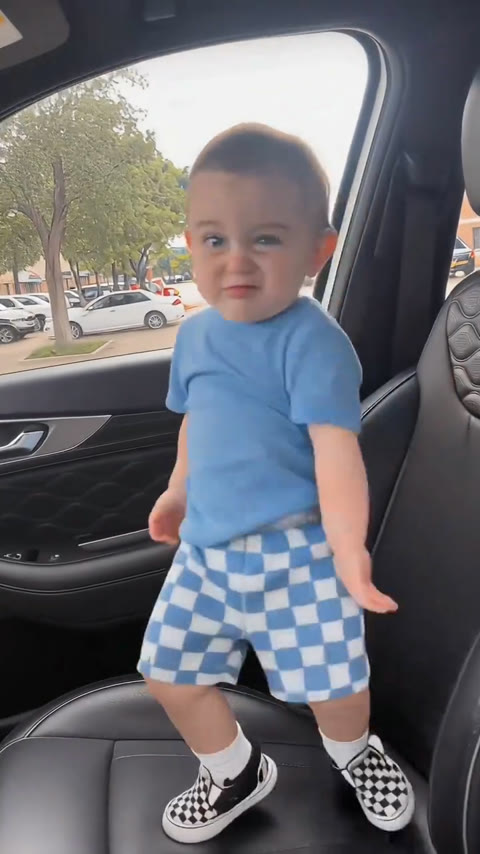
Put one clear photo of your little dancer into the Big Michael baby dance. SameVid keeps the car-back-seat scene, the camera and every move from the original 8-second clip, then returns a vertical video with the original sound ready to share.
Big Michael Baby Dance AI · 8s · 9:16
8s · 9:16 · 720p · original sound · ready in a few minutes
Ready to post
Captions for your Big Michael baby dance
Pair the little dance with a short line that lets family and friends in on the moment.
- “Big big big Michael Michael 😎”
- “Tiny dancer, huge entrance 🕺”
- “The back-seat concert starts now ✨”
- “One photo, eight seconds, all the moves”
- “Our smallest performer has the biggest rhythm”
- “Big Michael energy in a tiny seat”
- “When the family car becomes the dance floor”
- “#BigMichaelMichael #babydance #aidance”
- Open with your child’s name or age to make the clip feel like a family moment.
- Use the first dance frame as the cover so the pose is visible before the video starts.
- Share the original vertical framing directly in Reels, Shorts or a family group chat.
One clear photo becomes one Big Michael dance
Your 8-second Big Michael Baby Dance AI video costs 220 credits. The price is shown before you generate.
- Basic$9.9400 credits1 video
- Growth$19.9850 credits3 videos
- Most PopularPro$39.91,800 credits8 videos
- Studio$99.94,800 credits21 videos
- Max$299.915,000 credits68 videos
Background
From Big Michael to a tiny dance star
The audio and character behind this short dance arrived through live performance, then found a playful new life in AI baby clips.
Big Michael Michael started with a live character
Detroit performer Looze Cannon built a following by switching between his own voice and a Michael Jackson-inspired character during TikTok performances. Complex reported that fans called the character “Big Michael Michael,” a name that became part of the song and the clips made around it.
The track became a ready-made sound for creators who wanted an instant burst of character, rhythm and expression. The baby-dance version keeps that playful energy in a single, easy-to-recognize shot.
The baby version keeps the scene simple
The reference clip shows one toddler in the rear seat of a car, fully visible in a steady vertical frame. That simple setup gives the dance a clear focus: one little dancer and one continuous routine.
TikTok creator @nooonn206 shared the high-play version used here as the visual reference. SameVid follows that motion, framing and pace while your photo supplies the dancer’s own face, hair and outfit.
How the one-photo video comes together
Kling edits the reference clip as the base for your video. The back seat, camera placement and complete sequence remain steady while your child becomes the performer. The original sound is added to the finished video after generation, so the reference sent to the model stays silent and the downloaded clip still carries the beat.
Choose one clear photo, generate the dance for 220 credits, then find the 8-second vertical MP4 in My Work. It is compact enough for a quick family share and keeps the full routine intact.
- Add one clear photo of your child with the face easy to see.
- Press Generate to create your Big Michael Baby Dance AI video with the complete 8-second routine for 220 credits.
- Open My Work to download the vertical MP4 with the original sound already paired with the dance.
Ideas
Little ways to share a big moment
An eight-second dance fits naturally into the places where family photos already get shared.
The group-chat surprise
Send the finished clip before the usual photo update and let everyone discover the dance as it starts playing.
A monthly milestone
Post the dance with an age marker such as “18 months and finding the beat” for a milestone that feels lively and personal.
The car-ride recap
Add the clip after a family-day photo carousel to turn an ordinary drive into the final punchline.
Birthday-story opener
Start a birthday Reel or invitation story with the dance, then follow it with party details and favorite photos.
A sibling series
Make one clip for each child and post them side by side, with every dancer carrying their own look into the same routine.
A before-and-after reveal
Show the still photo first, then cut straight to the first dance move for a fast, cheerful reveal.
Photo tips
Pick a photo that puts your little dancer in focus
A clean, bright photo gives the dancer’s face, hair and clothing clear details to carry through the complete routine.
- Use one child standing or sitting with the face clearly visible in soft, even light.
- Choose a photo that includes the full body or at least the body down to the knees for a natural dance silhouette.
- Keep the child centered and leave a little space around the head, hands and feet.
- Choose a sharp frame with one clearly visible child so the face and outfit remain easy to recognize throughout the dance.
FAQ
Big Michael Baby Dance AI FAQ
What is Big Michael Baby Dance AI?
Big Michael Baby Dance AI is a one-photo video template. It places your child into an 8-second baby dance inspired by the Big Michael Michael sound, in a fixed car-back-seat shot with the original dance sequence and sound.
How do I make a Big Michael baby dance video?
Add one clear photo of your child, press Generate and find the finished 8-second vertical MP4 in My Work. Each video uses 220 credits, shown on the button before you start.
Which photo works best?
Choose a sharp, evenly lit photo of one child with a clear face. A full-body photo, or one that reaches at least the knees, gives the dancer a natural shape through the whole routine.
What changes in the reference video?
Your child becomes the dancer. Their face, hair, skin tone, proportions and clothing come from your photo, while the car rear seat, camera, daylight, dance timing and continuous motion stay aligned with the original clip.
How long is the video?
The finished video is 8 seconds long, vertical at 9:16 and delivered at 720p.
Does the finished video include sound?
Yes. SameVid adds the original sound from the reference clip to the completed Big Michael baby dance video.
How many credits does Big Michael Baby Dance AI cost?
One 8-second video costs 220 credits. The full price appears before generation, and you can get more in credit packs.
How does this relate to older AI baby Michael Jackson dances?
This template follows the current Big Big Big Michael Michael baby-dance pattern: one child, a car-back-seat scene and its own sound. Earlier AI baby Michael Jackson clips use their own music, styling and dance routines.