
Dance · New
Can I Ride AI Dance Video Generator
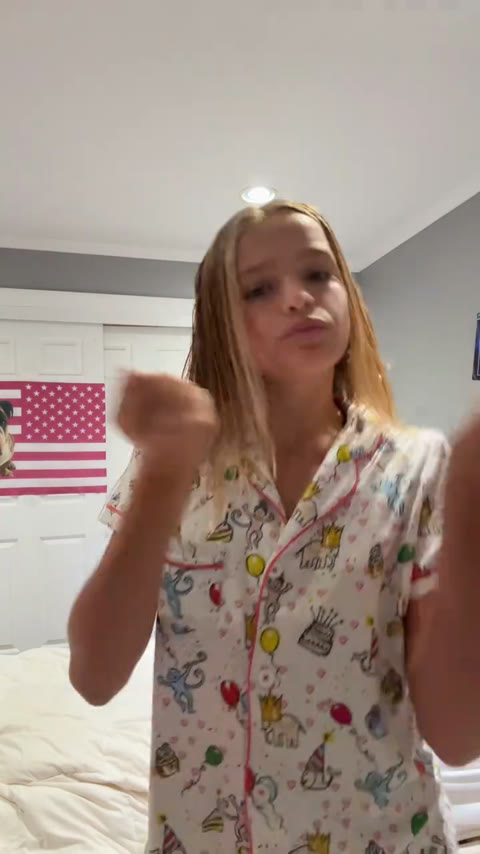
Can I Ride AI turns one clear photo into the full Can I Ride dance. SameVid keeps the hand routine, the fixed bedroom camera and the timing of the beat, then places your face, hair and outfit on the dancer. Your finished vertical video runs for 10 seconds at 720p and carries the original track, ready for a TikTok, Reel or group chat. It takes 270 credits to make one video.
Can I Ride Dance AI · 10s · 9:16
10s · 9:16 · 720p · original sound · ready in a few minutes
From TikTok
Three ways creators play the Can I Ride routine
The routine reads instantly because the camera stays still and the hands do the storytelling. These clips show the bedroom original, a polished character version and an early real-person take. Each one plays here with its own audio so you can feel the rhythm before you upload.
@its.not.meeee1
The real-person bedroom version behind this template. Small shoulder sways, hand flicks and alternating palms keep the moves friendly, clear and easy to recognize from the first beat.
@boogiebug0
A stylized single-character version in a clean outdoor scene. It shows why the format works well for a photo-to-dance video: one centered performer, a full routine and a clear beat from start to finish.
@evieballerinabarbie15
An early public take with the same front-facing energy. The performer keeps her hands high and expressive, giving the short dance a playful before-the-camera feeling that fits friends, siblings and personal posts.
How it works
Make your Can I Ride AI dance video in three steps
Everything is set for this exact 10-second routine. Add your photo, start the render and collect a vertical video with the choreography and music already in place for 270 credits.
Choose a clear photo
Pick one photo of the person you want to dance. A portrait with a visible face, natural light and a relaxed expression gives the dancer a strong likeness. A half-body or full-body shot lets the system carry the person’s hair, face and outfit naturally into the full routine.
Upload your dancer
Place that photo in the Your dancer box. SameVid reads the person from your image and maps them into the solo performance. The bedroom framing, the camera position, the choreography and the rhythm stay aligned to the original clip, so the result feels like one complete take.
Generate and share
Check the 270-credit total, then choose Generate. Your finished MP4 appears in My Work with the original Can I Ride audio joined to the completed dance. Save it, send it to a friend or post it as a short vertical video while the routine is still fresh in everyone’s feed.
Input and output
Can I Ride AI video specifications
Can I Ride AI is set up for one person, one locked choreography and one shareable vertical video. The visible example, silent motion reference and finished result follow the same 10-second dance segment.
You upload
- One clear portrait of one person, facing the camera
- JPG, PNG or WebP up to 10 MB
- A half-body or full-body photo with visible hair and clothing
You get
- One 10-second vertical MP4 at 720p
- The complete Can I Ride hand routine in a fixed bedroom shot
- The original audio aligned to the finished choreography
- A compact file ready to play, download and share from My Work
| Input | 1 clear photo |
|---|---|
| Dance format | Solo Can I Ride hand routine |
| Length | 10 seconds |
| Frame | 9:16 vertical |
| Resolution | 720p |
| Audio | Original clip audio |
| Output | MP4 video |
| Price | 270 credits |
| Credits | 270 per video, refunded if it fails |
One photo, one dancer
Who should take the Can I Ride dance?
This is a solo, personality-first hand routine. It works especially well when the person in the photo has a recognizable style, a favorite outfit or a reaction your friends instantly know.
Yourself
Turn a favorite selfie into your own short dance post. It is a quick way to join the format with a familiar face while keeping the routine, framing and soundtrack in sync.
Your best friend
Use the photo everyone has saved for the friend who brings the energy. The expressive hand movements make a birthday message, a weekend recap or an inside joke feel personal in just 10 seconds.
A sibling
A bright portrait of a sibling becomes a playful dance cameo. The steady camera makes the finished clip easy to recognize, replay and share in the family chat.
Your partner
Give a favorite couple photo its own solo moment. Their hairstyle and outfit come from the image while the dance supplies the timing, movement and ready-to-post vertical format.
The guest of honor
Celebrate a graduation, reunion, team win or birthday with a compact dance reveal. A clear portrait is all you need to turn the guest of honor into the performer for the group’s message.
Ready to post
Captions for your Can I Ride post
- “Can I ride? My photo already answered. ✨”
- “One picture, one routine, all the energy. 💃”
- “Put me in the Can I Ride dance.”
- “The group chat requested a performance.”
- “Hand moves on beat, confidence all the way up.”
- “My camera roll finally joined the dance.”
- “Same routine, my own main-character moment.”
- “Ten seconds of Can I Ride energy.”
- Lead with the first second of the dance so the hand routine lands immediately in the feed.
- Tag the friend whose photo should take the next turn, then send them the finished clip directly.
- Pair a simple caption with one personal detail such as a birthday, school memory or weekend plan for an easy reply hook.
Your photo already knows the routine
Choose one clear portrait and let it step into the full Can I Ride dance. The camera, hand moves and original track are ready; your 270 credits create the version your friends will recognize right away.
FAQ
Can I Ride Dance AI FAQ
What is Can I Ride AI dance?
Can I Ride AI turns one clear photo into a short vertical dance video. Your photo supplies the dancer’s identity, while the template supplies the locked solo routine: chest-level hand bounces, alternating palms, arm swings, a raised-hand wave and a final downward hand sweep. The result is a 10-second 720p MP4 with the original track ready for TikTok, Reels, Shorts or a group chat.
How many photos does the Can I Ride dance need?
This template uses one photo for one dancer. Choose a clear portrait with the face visible and a relaxed pose. A half-body or full-body photo gives the system a useful view of the person’s hairstyle and outfit, which helps the dancer feel connected to the person your friends know.
What kind of photo works best?
Use a bright, clear photo of one person facing the camera. Natural daylight or an evenly lit room keeps facial details easy to recognize. A portrait where the person’s hair, shoulders and clothing are visible gives the finished dance more of their individual style while the template keeps the same choreography and framing.
Is this Can I Ride AI template solo or duo?
This Can I Ride AI template is a solo dance. It uses one photo for one person and follows the complete 10-second routine in the reference clip. The focused one-dancer format gives the face, outfit and hand movements a clear place in every frame, making it easy to create a personal version from a single portrait.
How long is the finished Can I Ride video?
Each Can I Ride Dance AI video runs for 10 seconds. That length follows the complete selected reference segment, so the visible example, the choreography the model receives and the video you receive all follow the same compact routine from its opening hand move to its final beat.
Does the finished video include music?
Yes. The completed MP4 carries the original audio from the selected Can I Ride clip. The track joins the finished dance after the visual render, which keeps the music aligned with the hand movements and gives the downloaded video a ready-to-share rhythm.
How much does Can I Ride Dance AI cost?
One 10-second Can I Ride Dance AI video costs 270 credits. The exact total appears on the Generate button before you start, so you can choose the right credit pack and begin with a clear view of the video length, format and dancer slot.
What do I receive after generation?
You receive a 9:16 vertical MP4 at 720p featuring your chosen person in the Can I Ride routine. The finished video appears in My Work, where you can play it, revisit it and download it for posting. Its compact file size makes it easy to share across the places where short dance clips travel fastest.