
Transformation · New
Vampire AI Video Generator
Vampire AI turns one photo into a 10-second vertical video of you changing into a vampire. Add a portrait, and you get the lights going out, a bat sweeping past, glowing red eyes and a slow smile with fangs, with sound.
Vampire AI · 10s · 9:16
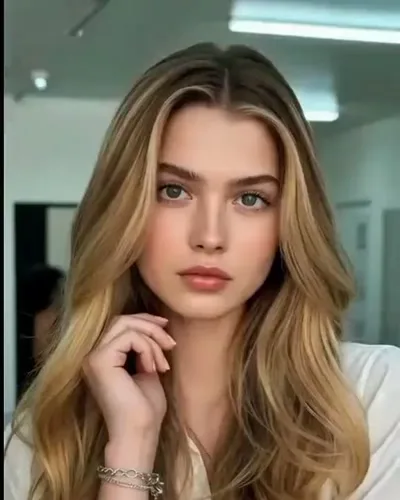
10s · 9:16 · 720p · original sound · ready in a few minutes
Ideas
Where to post your vampire transformation
A Halloween reveal
Post it as your costume for the night, without buying a costume.
A friend prank
Use a friend’s portrait and send them the moment they turn.
A Story with a pause
Open on your normal portrait so viewers stay for the red eyes.
A fan edit
Pair it with a line from your favorite vampire series or book.
From TikTok
Vampire AI videos worth watching
Three single-person transformations that show how the format plays.
@waren_a11
One unbroken shot from a daylight portrait to red eyes and fangs. This is the clip behind this template.
@99briona
The change continues into a black cloak, ending on a hooded close-up with red eyes.
@mrdanesia
A vampire effect that carries on into a garage fight scene.
The Vampire AI output
What goes in and what comes out
One portrait goes in, and one 10-second vertical transformation comes out for 270 credits. The format fits TikTok, Instagram Reels and YouTube Shorts.
You upload
- 1 photo of one person
- A clear face looking toward the camera
- JPG, PNG or WebP, 300 pixels or more per side, up to 10 MB
You get
- A 10-second, 9:16 vertical MP4 at 720p
- Your face and hair carried through the whole change
- Red eyes, pale skin and fangs in crimson light
- The original sound from the trend clip
- A saved copy in My Work, ready to replay or download
| Photos | 1 |
|---|---|
| Model | Kling |
| Duration | 10 seconds |
| Picture | 720p, 9:16 vertical |
| Scene | One shot, from room light to red glow |
| Audio | Original sound from the trend clip |
| File | MP4 |
| Credits | 270 per video, refunded if it fails |
Background
Where the Vampire AI trend comes from
A CapCut template that grew at Halloween
The look spread through CapCut AI filter templates with names like Vampire Awakening and Vampire Transformation. This April 2026 post from @waren_a11 shows the format, and more versions appeared in the run-up to Halloween 2026.
How to make a Vampire AI video
Each video takes one photo and about five minutes.
- Add a clear portrait of one person.
- Press Generate for 270 credits.
- Open My Work to play or download the 10-second MP4.
From still vampire filters to a moving transformation
Vampire photo filters have been around for years: apply one to a selfie and you get pale skin, red eyes and a pair of fangs in a single still image. The Vampire AI video goes one step further and shows the change itself. Viewers see the normal you first, then watch the room go dark and the vampire take over, which is why the clips hold attention to the last second.
That before-and-after structure is the heart of the trend. The opening frame looks like an everyday photo, so the reveal at the end lands as a surprise. A still filter shows only the result; the video shows the moment you turn.
What makes the vampire look
The look repeats a handful of details across the trend, and this template builds each of them into the scene.
- Bright, ordinary indoor light at the start, so the first frame feels like a real photo.
- A sudden drop into darkness that makes the face the only thing in view.
- A black bat sweeping across the frame just before the change begins.
- Pale skin with a crimson glow rising across the hair and cheeks.
- Glowing red eyes and two long fangs in a slow, knowing smile.
Why the vampire transformation works so well
Vampires are one of the most familiar figures in film, books and TV, so the change needs no explanation. A short vertical clip can tell the whole story in ten seconds: a calm portrait, a scare, a transformation and a final look straight into the camera. It suits Halloween, fan edits of vampire series and pranks on friends, and it works for anyone with a clear portrait.
The format also travels well across platforms. The 9:16 frame fits TikTok, Instagram Reels and YouTube Shorts as it is, the original sound comes built in, and the reveal at the end gives viewers a reason to replay it. Post the finished clip next to the photo you started from, and friends can see both sides of the change.
Ready to post
Captions for your vampire video
- “Went to bed human. Woke up thirsty.”
- “Sunlight and I are no longer speaking”
- “This is your sign to stop inviting me in”
- “Immortal, and still late to everything”
The Vampire AI scene
What happens in the 10 seconds
One continuous shot takes you from an everyday portrait to a full vampire.
The portrait
You pose calmly in soft indoor light, just like your photo, with one hand raised near your chin.
The lights go out
The room falls dark and your expression turns to alarm as a bat sweeps past.
The change
A hand rises to your throat, your skin pales and a red glow creeps in.
The reveal
Your eyes burn red and you finish on a slow smile with sharp fangs, looking straight into the camera.
FAQ
Vampire AI FAQ
What is Vampire AI?
It is an AI video effect that turns a portrait of a person into a vampire on camera. This template makes a 10-second vertical MP4 at 720p with sound.
How do I make a Vampire AI video?
Add one portrait, press Generate (270 credits) and wait about five minutes. The MP4 appears in My Work, ready to play and download.
Which photo works best?
A sharp, evenly lit photo of one person, showing the head and shoulders with the face toward the camera. A relaxed closed-mouth expression gives the fangs the biggest reveal.
Does it work for men and women?
Yes. The transformation follows the person in your photo, and your clothing and hair carry into the video.
Is this a video or a still vampire portrait?
It is a moving 10-second video that shows the whole change, with sound from the trend clip.
Does the video have sound?
Yes. The finished MP4 carries the original sound from the trend clip.
Can I make one for a friend?
Yes. Add a clear portrait of your friend instead of your own, and the video follows that person through the change. It makes a fun Halloween surprise to send them.
How do credits work?
Each video costs 270 credits, and they return to your balance automatically if it fails. Credits come from credit packs.
Same category
More Transformation templates
 NEW220 CR
 NEW350 CR
 NEW160 CR
 NEW140 CR
 NEW160 CR
 NEW320 CR
 NEW400 CR
Keep scrolling
More viral AI video trends
 NEW320 CR
 NEW220 CR
 NEW300 CR
 NEW220 CR
 NEW380 CR
 NEW400 CR
 NEW140 CR
 NEW270 CR
 NEW220 CR
 NEW380 CR
 NEW300 CR
 NEW400 CR