
Funny · New
Stop Sign AI Video Generator
Put one person or pet in the driver seat for a Stop Sign AI video. Your photo becomes the puzzled driver at a night traffic stop: light falls through the open window, the driver looks up as if they have just heard something impossible, then answers with a small, confident shrug. SameVid keeps the close camera, the night-road energy and the original dialogue in an 11-second vertical MP4 that is ready to share.
Stop Sign AI · 11s · 9:16
11s · 9:16 · 720p · original sound · ready in a few minutes
Your input and your clip
One driver photo becomes a full Stop Sign moment
Give the template one clear driver photo and receive an 11-second night-time reaction video with the reference dialogue, for 300 credits.
You upload
- One clear photo of one person, dog, cat, or other pet that will take the driver seat
- A JPG, PNG, or WebP image with the face, eyes, and main features easy to see
- The look you want to carry into the car scene: hairstyle, fur markings, clothing, or accessories
You get
- An 11-second vertical MP4 at 720p, framed for TikTok, Reels, and Shorts
- A night road, an outside-the-window camera move, flashlight glow, and red-blue traffic-stop light
- One driver who looks up, takes in the moment, and lands the scene with a puzzled shrug
- The original dialogue and ambience aligned to the finished clip
- A completed video in My Work, with playback and download ready when rendering finishes
| Photos | 1 driver |
|---|---|
| Model | Kling 4.0 |
| Duration | 11 seconds |
| Resolution | 720p |
| Frame | 9:16 vertical |
| Scene | Night car window traffic stop |
| Audio | Original dialogue and ambience |
| File | MP4 |
| Credits | 300 per video, refunded if it fails |
Reference clip
See the Stop Sign beat before you make yours
This is the complete 11-second scene the template follows: a driver meets the light at the window, looks up in disbelief, and responds with an innocent shrug.
The night-window reaction
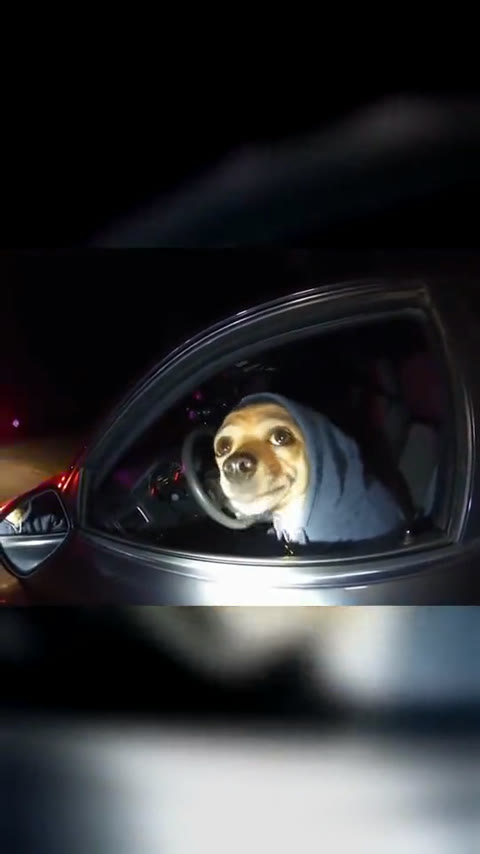
A grey-hoodie dog takes the driver seat in one continuous night traffic-stop shot. The outside camera closes in at the window, the driver listens, looks down for a beat, and lifts a paw in a final “what stop sign?” reaction.
The scene
The three beats that make the joke land
The camera and setting do the setup. Your driver carries the reaction that turns the stop into a shareable moment.
The light reaches the window
The clip begins outside a parked car on a dark road. Distant blue and red light sits behind the car while a bright flashlight sweep brings attention to the driver side window. Your subject is already seated at the wheel, so the scene feels immediate from the first frame.
The driver listens and looks up
The outside camera moves closer to the open window. Your driver looks toward the source of the light with a calm, slightly confused face, then turns back toward the steering wheel. That short pause gives the dialogue room to set up the misunderstanding.
The puzzled shrug is the punchline
At the close of the shot, the driver looks back toward the camera and makes a small open-handed or paw-up shrug. The expression stays sweet and certain, which is why the same beat works for a pet, a friend, or your own portrait.
The original line
Where the What Stop Sign meme comes from
The format grew from a short traffic-stop conversation that became a widely quoted reaction line, then a scene people re-created with their own drivers.
A misunderstanding at a traffic stop
The original clip shows a driver asking why they were stopped while an officer begins to explain. The driver hears “stop sign” instead, then answers, “What stop sign, man?” with complete certainty. That quick switch from a serious setting to an innocent reaction is the core of the meme.
The Know Your Meme entry traces the viral clip to Daytona Beach in 2025 and records how the catchphrase spread through reposts, reaction videos, and accuracy reenactments.
From quoted line to a reaction format
Creators picked up the rhythm of the exchange because it works even when the driver is someone completely new. A friend, a fictional character, a dog, or a cat can take the seat as long as the camera stays outside the window and the reaction arrives after a short listening pause.
That is why the setting stays simple: one driver in one car, one outside point of view, night lighting, and a single memorable response. The format gives the uploaded photo a clear role without asking you to act out the scene yourself.
The version this template makes
Stop Sign AI keeps the night road, the close window framing, the puzzled look, and the shrug. Your upload becomes the driver, so their face, fur, hairstyle, and personality carry the joke. The original dialogue returns on the final video to keep the timing of the reaction intact.
Make your driver clip
How to make a Stop Sign AI video in three steps
Choose one driver photo, start the 300-credit generation, and open the finished 11-second video in My Work.
Add one clear driver photo
Choose one person, dog, cat, or other pet to take the driver seat. A photo with the face, eyes, hairstyle, or fur markings clearly visible gives the window close-up a recognizable expression. A portrait or half-body image both fit the scene because the template supplies the car, road, light, and camera position.
Generate the night-window reaction
Sign in, review the 300-credit total shown on the Generate button, and begin. Kling places your uploaded subject at the wheel, keeps the outside-window camera path, and builds the listening pause and puzzled shrug around the same 11-second story beat.
Play, download, and share
The finished MP4 appears in My Work when the task is complete. Play the video with its dialogue and night ambience, download it when it suits your post, then share the driver reaction on TikTok, Reels, Shorts, or directly with the friend who will recognize the joke immediately.
Credits
Make a Stop Sign AI video for one clear price
One 11-second Stop Sign AI video costs 300 credits. Your total appears on the Generate button before the task begins.
- Basic$9.9400 credits1 video
- Growth$19.9850 credits2 videos
- Most PopularPro$39.91,800 credits6 videos
- Studio$99.94,800 credits16 videos
- Max$299.915,000 credits50 videos
FAQ
Stop Sign AI FAQ
What is a Stop Sign AI video?
A Stop Sign AI video puts one person or pet from your photo in the driver seat of a night traffic-stop reaction scene. The camera approaches from outside the window, the driver listens with a puzzled face, then answers the moment with a small shrug. SameVid delivers the scene as an 11-second vertical MP4 with the original dialogue and ambience.
How do I make a Stop Sign AI video?
Add one clear photo, sign in, and select Generate. The page shows the 300-credit cost before the task begins. Kling renders your driver into the night window scene, then the finished video appears in My Work for playback and download. The whole flow happens on this page, so you can move from a favorite photo to a shareable clip in a few simple steps.
Can I use a dog or cat photo?
Yes. Stop Sign AI is designed for people and pets. A dog or cat photo with clear eyes, face shape, ears, and fur markings gives the driver a recognizable look at the window. The template keeps the subject as an animal in the driver seat, so the final reaction has the personality of your own pet.
What photo works best for the driver?
Choose one well-lit photo of one subject, looking near the camera with the face easy to see. A close portrait or half-body photo both work well. Clear eyes and natural facial detail help the driver read clearly when the window light lands on them. For pets, choose an image with the whole face, ears, and fur markings visible.
How long is the Stop Sign AI video?
Every generation is 11 seconds long. That length covers the outside-window approach, the listening pause, and the final puzzled reaction in one continuous vertical shot. It fits naturally into TikTok, Instagram Reels, YouTube Shorts, a group chat, or a quick response post.
Does the finished video include sound?
Yes. The final MP4 includes the original dialogue and night ambience aligned to the same scene timing as the reference clip. That sound carries the setup while your driver’s expression and shrug land the visual response.
What do 11-second Stop Sign AI videos cost?
One video costs 300 credits. The Generate button always displays the full credit amount before you start, and credit packs below show how many videos each option covers. Completed clips stay available in My Work so you can replay or download them whenever you are ready to share.
Who appears in the Stop Sign AI scene?
Your uploaded subject is the only custom role: the driver. The traffic-stop view, night road, light at the window, and camera movement come from the template, while the person or pet from your photo brings the expression that makes the reaction personal.