
Effects · New
AI Clone Effect Video Generator
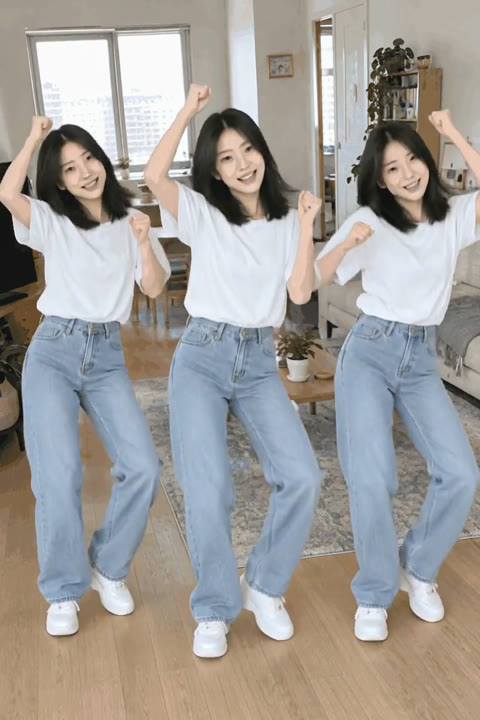
Make an AI Clone Effect video from one photo. Three copies of you dance together in a bright room, each with your face, hair and outfit. Get a 5-second vertical MP4 with the original sound.
AI Clone Effect · 5s · 9:16
5s · 9:16 · 720p · original sound · ready in a few minutes
Preview clip: @saqiulhassan1 on TikTok
Input and output
What your photo becomes in the AI Clone Effect
One photo becomes a three-person dance scene: three versions of you, one shared room and one finished vertical MP4 for 140 credits.
You upload
- One clear photo of one person: you, a friend or a family member
- A JPG, PNG or WebP image from 300 pixels on each side up to 10 MB
- A full-body or three-quarter photo with the person easy to see
You get
- Three matching versions of the person from your photo, dancing together
- A bright home interior and full-body framing built into the template
- A 5-second vertical video with the reference clip’s original sound
- An MP4 in My Work, where you can play it, save it and share it
- One clear visual identity across the trio, so each dancer shares the face, hairstyle and outfit from your upload while taking a distinct place in the frame
- A deliberate left, center and right composition that turns one portrait into a group-style moment for a quick social reveal
| Photos | 1 (the person appearing three times) |
|---|---|
| Model | Kling |
| Duration | 5 seconds |
| Resolution | 720p |
| Frame | 9:16 vertical |
| Scene | Bright room with three matching dancers |
| Audio | Original sound from the reference clip |
| File | MP4 |
| Credits | 140 per video, refunded if it fails |
Make every version look like you
Photo tips for a natural AI Clone Effect
The template creates three dancers from the same person, so a single clear subject gives the model a strong likeness to carry across the whole frame.
- Use a well-lit photo with one person fully visible from head to toe or from the knees up. A relaxed standing pose gives all three dancers a natural body shape.
- Keep the face, hairline and clothing easy to see. The three dancers take their face, hairstyle, skin tone and outfit from this one image.
- Leave a little space around the person in the photo. It helps the pose read clearly when the scene opens into a full-body room.
- Choose JPG, PNG or WebP from 300 pixels per side up to 10 MB. A sharp original gives the most consistent trio of dancers.
- Use balanced daylight or even room light rather than dramatic backlighting. Clear facial detail and a readable outfit help the AI Clone Effect keep the three copies consistent from the opening pose through the final beat.
- Choose a photo with one main person, so the template can create a clean matched trio in the room.
- Keep eyes, hair and the outline of the outfit visible for a lively, recognizable dance result.
One photo, three dancers
How to make an AI Clone Effect video
Start with a photo, confirm the 140-credit generation and pick up the finished clip in My Work. The three-person dance scene is ready for you.
Add one clear photo
Choose a photo of one person and add it to the uploader. The template carries that person’s face, hair, body shape and outfit into all three dancers, while the bright room and group choreography come from the reference scene. A centered subject with a visible outline gives the left, center and right dancer an equally clear starting point.
Generate your three-person scene
Sign in, review the 140 credits shown on the Generate button and begin. Kling turns the photo into a 5-second vertical clip at 720p, with the three-person movement and camera composition already prepared.
Play, save and post
Your completed MP4 appears in My Work when rendering finishes. Play it on the page, download it for your camera roll and share the three-of-you moment on TikTok, Reels or Shorts.
See the effect
The three-person clone dance reference
This short reference clip sets the feeling of the template: one dancer becomes a matching trio, and all three own the same bright room together. It shows the AI Clone Effect as a single continuous group moment, with each version visible at the same time instead of a series of separate cuts.
Three versions, one dance floor
A dancer in a white shirt and light jeans appears three times in a sunlit room. The matching figures keep a comfortable side-by-side distance as they move through the same cheerful beat.
More to try
Give your photo another creative scene
The same clear, characterful photo can lead to plenty of short-form transformations. Try a new setting, a new look or a new moment whenever you want another post.
 NEW140 CR
 NEW320 CR
 NEW160 CR
FAQ
AI Clone Effect FAQ
What is an AI Clone Effect video?
An AI Clone Effect video turns one photo of a person into a short scene with three matching versions of that person. This template places the trio across a bright room and gives them a shared upbeat dance, creating a polished group moment from a single image.
How do I make an AI Clone Effect from a photo?
Add one clear photo, sign in and start the 140-credit generation shown on the button. The template takes care of the room, the three-person dance and the framing. When the 5-second MP4 is ready in My Work, you can play it, save it and post it.
What photo works best for the clone dance?
Choose a sharp, well-lit photo of one person with the face, hair and outfit visible. A full-body or three-quarter standing photo gives the three dancers the clearest pose. JPG, PNG and WebP images from 300 pixels on each side up to 10 MB work well.
Will all three dancers look like the person in my photo?
Yes. The template uses one uploaded person as the appearance reference for all three dancers. Their face, hair, skin tone, body shape and clothing follow your image while the room and movement create the shared scene.
What happens in the AI Clone Effect scene?
The scene opens in a bright home interior with three matching, full-body dancers. They share the frame, move in a lively rhythm and hold a relaxed side-by-side composition from the opening pose through the final beat.
Does the AI Clone Effect video include sound?
Yes. The finished MP4 carries the original sound from the short reference clip. Your photo defines the three dancers, and the reference sound completes the same upbeat posting experience.
How long is the video and what does it cost?
Each AI Clone Effect video is 5 seconds long, vertical at 9:16 and rendered at 720p. One generation costs 140 credits, shown on the Generate button before you start.
Can I use an AI Clone Effect video for social posts?
Yes. The finished vertical MP4 is sized for TikTok, Instagram Reels and YouTube Shorts. It works especially well for a playful “me and my twin” post, a friend reveal or a quick before-and-after in your feed.
Same category
More Effects templates
 NEW220 CR
 NEW220 CR
 NEW270 CR
 NEW400 CRNEW320 CR
 NEW320 CR
 NEW300 CR
 NEW220 CR
 NEW400 CR
 NEW270 CR
Keep scrolling
More viral AI video trends
NEW140 CRNEW160 CR NEW220 CR
 NEW380 CR
 NEW400 CR
 NEW140 CR
 NEW270 CR
 NEW220 CR
 NEW380 CR
 NEW300 CR
 NEW400 CR
 NEW270 CR