
Transformation · New
AI Aging Video Filter
AI Aging Video Filter turns one photo of you into a 13-second video that runs through your whole life. You start as you are today, then the numbers 4, 12, 21, 40 and 80 fly onto your face one at a time, and each one cuts you to that age: a small child, a pre-teen, a young adult, you at 40 and finally you at 80 with silver hair, smiling into the camera, with the trend sound.
AI Aging Video Filter · 13s · 9:16
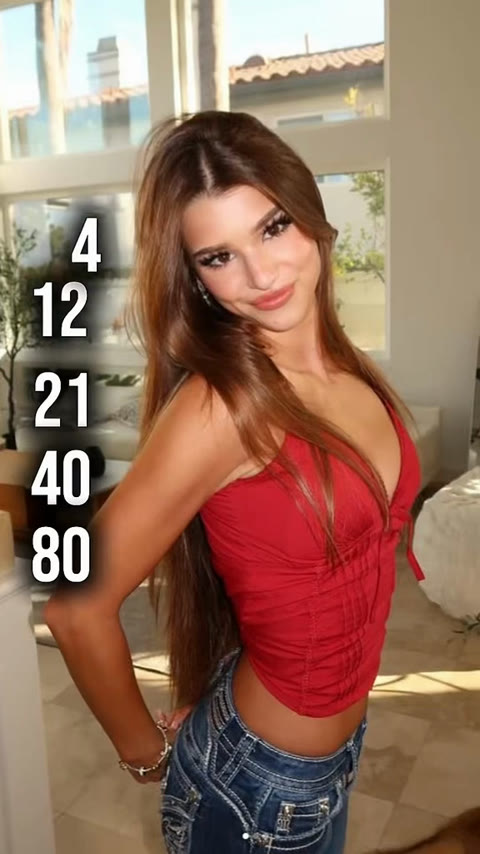
13s · 9:16 · 720p · original sound · ready in a few minutes
The AI Aging Video Filter output
What goes in and what comes out
One photo goes in, and one 13-second AI Aging Video Filter clip comes out for 350 credits. The vertical frame is ready for TikTok, Instagram Reels and YouTube Shorts.
You upload
- 1 photo of one person
- A clear face toward the camera; a full-body or half-body photo fits the framing best
- JPG, PNG or WebP, 300 pixels or more per side, up to 10 MB
You get
- A 13-second, 9:16 vertical MP4 at 720p
- Six stages of the same face: today, 4, 12, 21, 40 and 80
- The five age numbers flying onto your face before each cut
- Your face shape, eyes, skin tone and hair color carried into every age
- The trend sound from the original clip
- A saved copy in My Work, ready to replay or download
| Photos | 1 |
|---|---|
| Model | Kling |
| Duration | 13 seconds |
| Picture | 720p, 9:16 vertical |
| Ages shown | Today, 4, 12, 21, 40 and 80 |
| Cuts | 5 hard cuts, about every 2 seconds |
| Audio | Trend sound from the original clip |
| File | MP4 |
| Credits | 350 per video, refunded if it fails |
The AI Aging Video Filter scene
From young to old in 13 seconds
The camera stays still in a bright, sunny room. Only your age changes, five times, and each change starts with a number flying onto your face. Here is the order the AI Aging Video Filter plays in.
You, today
The clip opens on you as in your photo, standing in a sunlit living room, with 4, 12, 21, 40 and 80 stacked on the left edge of the frame.
4 years old
At one second the 4 flies onto your face and the picture cuts to you as a small child, with the same eyes and hair color in a child-sized outfit.
12 years old
The 12 lands next, and you jump to a slim pre-teen in a casual t-shirt, standing in the same spot.
21 years old
The 21 brings you to young adulthood: a smooth face, a fuller frame and the same relaxed smile.
40 years old
The 40 adds a slightly fuller face, fine lines at the eyes and the first grey strands.
80 years old
The last number, 80, cuts to you with long silver hair, deep laugh lines and a soft knit cardigan, smiling warmly into the lens until the end.
Examples
AI Aging Video Filter examples
The aging trend on TikTok comes in two popular formats. One runs a single person through a row of ages with flying numbers and hard cuts. The other counts up through future years while the face slowly gets older. This template makes the first, an aging filter video built from a single photo.
Five ages in one shot: 4, 12, 21, 40, 80
One fixed shot in a sunny living room. Each number lands on the face and cuts to a new age, from a small child to a silver-haired 80. This is the clip the template follows, 13 seconds with sound.
The year counter: seeing yourself in 50 years
A year counter climbs from 2049 to 2073 at the top of the frame while grey streaks spread through her curls, under the caption "Seeing what I'll look like in 50 years".
hqrtpoqvf9420Who to put in
Who to put in the AI Aging Video Filter
Any clear photo of one person works. The reveal is most fun when viewers know the face, so the people closest to you make the best subjects for the AI Aging Video Filter.
Yourself
The classic version of the trend: see yourself as a toddler and then at 80 in one clip, and ask your followers which age suits you best.
Your partner
Make one for your partner and post it with a line about growing old together. Couples often make two clips and post them side by side.
A parent or grandparent
Use a recent photo of a parent and watch them go back to childhood before arriving at 80. Families like to set it next to real old photos.
A best friend
Surprise a friend on their birthday with a clip of their whole life in 13 seconds, ending on the silver-haired version of them.
Ideas
Ways to post your AI Aging Video Filter clip
The clip already has the trend sound and the vertical frame, so you can post it as it is. These ideas give it an extra hook.
Ask which age is best
Write "which age is my best era?" on the cover and let the comments vote for 4, 12, 21, 40 or 80.
Compare with real photos
Follow the clip with a real childhood photo of you at 4 or 12 so viewers can see how close the AI came.
Make it a family chain
Make one clip for each family member and post them in a row, ending with the oldest person in the family.
Pair it with a birthday
Post it on a birthday with the caption "every age so far, and one still to come" to mark the day.
FAQ
AI Aging Video Filter FAQ
What is the AI Aging Video Filter?
The AI Aging Video Filter is a video template made from one photo. The numbers 4, 12, 21, 40 and 80 fly onto your face one at a time and cut you to each age, in a 13-second vertical MP4 at 720p with the trend sound. It follows the young to old, different ages filter trend from TikTok and CapCut, the moving version of the familiar AI aging filter and old age filter.
How do I make an AI Aging Video Filter video?
Add one clear photo of one person, press Generate (350 credits) and wait about five minutes. The video appears in My Work, where you can play it, download the MP4 and post it.
Which photo works best?
A sharp, evenly lit photo of one person facing the camera works best. A full-body or half-body photo matches the standing framing of the clip, and a plain or bright background keeps attention on the face as it changes.
Will every age still look like me?
Yes. Your photo defines the face shape, eyes, nose, mouth, skin tone and hair color at every stage. Age, body size and outfit change from stage to stage, so you are recognizable as a child and at 80.
How is this different from Age Filter AI?
Age Filter AI is a 6-second selfie clip with two jumps, to 40 and then to 80. The AI Aging Video Filter is longer and covers a whole life: five jumps in 13 seconds, from age 4 to age 80, in a full-body shot.
Does the video have sound, and what size is it?
Yes, the finished MP4 carries the trend sound from the original clip. It is 13 seconds long, 9:16 vertical, at 720p, so it fits TikTok, Instagram Reels and YouTube Shorts as it is.
How do credits work?
Each video costs 350 credits, and they return to your balance automatically if it fails. Credits come from credit packs.
Same category
More Transformation templates
 NEW220 CR
 NEW160 CR
 NEW270 CR
 NEW140 CR
 NEW160 CR
 NEW320 CR
 NEW400 CR
Keep scrolling
More viral AI video trends
 NEW220 CR
 NEW380 CR
 NEW400 CR
 NEW140 CR
 NEW270 CR
 NEW220 CR
 NEW380 CR
 NEW300 CR
 NEW400 CR
 NEW270 CR
 NEW380 CR
 NEW400 CR