
Couple · New
AI Zombie Video Generator
Turn two photos into the viral AI zombie love story: a 15-second video where a survivor faces an infected partner, pet, or friend, lowers the weapon, and cuts to a warm memory from before the outbreak. Pick a couple, pet, or friend story, add one photo for the human survivor and one for the loved one who turns, and download a 720p MP4 with the soundtrack already in place—no prompt writing required.
AI Zombie Video Generator · 15s · 9:16
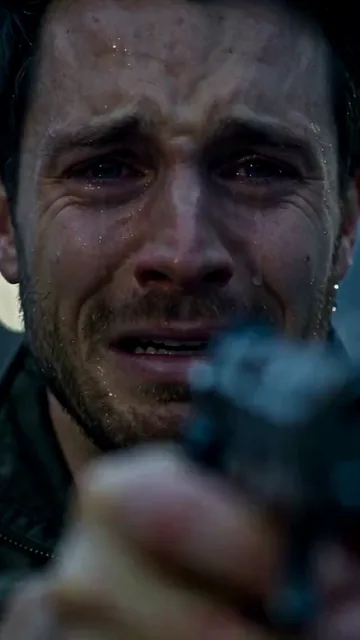
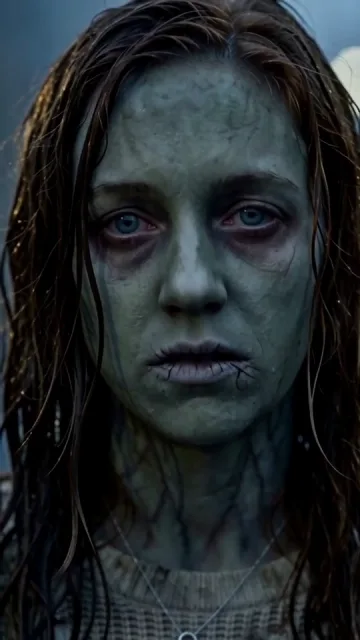
15s · 9:16 · 720p · reference soundtrack
Story Scenes
Reference videos for the three zombie stories
Each scene follows a 15-second progression from a ruined standoff to a golden memory.
Couple: Rain standoff to beach kiss
A survivor lowers his weapon before his infected partner on a rainy street, transitioning to a sunset beach kiss.
Pet: Supermarket reunion to sunny meadow
A woman drops her guard for a cloudy-eyed calico cat in ruined aisles, transitioning to warm cuddles in a sunny meadow.
Friend: Rainy alley to seaside hug
Two friends face each other across a rainy street before cutting to a warm hug by the sea.
The Narrative Arc
What is the AI zombie love story trend?
The AI zombie love story, also called the zombie hug trend, spread across TikTok and Instagram Reels in autumn 2026. Each clip turns the zombie apocalypse into a reunion: a survivor takes aim at someone they love, recognizes the familiar face behind the infection, and chooses an embrace over a shot. The scene then cuts from a cold, ruined street to a sunlit memory of the two of them before the outbreak.
Four beats in 15 seconds
Every story keeps the timing of its reference clip. In roughly the first three seconds, the survivor stands in a ruined setting—a rain-soaked street or an abandoned supermarket—with a weapon raised and tears in their eyes, looking across at the infected figure.
Over the next several seconds, close-ups of the zombie’s clouded eyes and, for people, pale skin cut against the survivor’s reaction, and the standoff breaks: the survivor lowers the weapon and reaches out—in the Pet story, the owner is already holding the cat before the memory begins. Roughly the last three seconds jump to the warm memory—a sunset beach for couples and friends, a sunny meadow for pets—where both characters look healthy again.
Why the story uses two separate photos
The payoff depends on recognizing both characters, so each role takes its own photo. The survivor stays human in every shot and takes the face, hair, and clothing from the first photo. The second photo defines the loved one, who appears with cloudy eyes, and pale skin for people, while a pet keeps its own fur and markings, in the cold scenes but stays recognizable, then returns to a healthy look in the memory.
The two identities are kept apart: the survivor’s photo is never used for the zombie, and faces, hair, and clothing are not blended between them.
Couple, pet, and friend versions
Couple is the classic zombie love story: the standoff on a rainy street ends in a sunset kiss on the beach. Friend uses the same rainy street and seaside memory but ends with a hug, with no kiss or romantic gesture added. Pet moves the standoff to an abandoned supermarket and ends with the owner holding the animal in a golden meadow.
For pets, the embrace adapts to the species and size in your photo, and the scene direction keeps your pet’s fur color, markings, ear shape, and legs instead of turning the animal into a person. All three stories leave out gunfire, bites, and gore—the tension comes from the lowered weapon, not violence.
How to make your own zombie love story video
Choose story and aspect ratio
Select a storyline—Couple, Pet, or Friend—and choose either 9:16 portrait for mobile feeds or 16:9 landscape for widescreen viewing.
Assign the two photos
Upload two individual photos. The first slot is for the human survivor, and the second slot is for the partner, pet, or friend who appears infected before the reunion. If you place a photo in the wrong slot, delete it and upload again.
Generate and download
Generating costs 110 credits and renders in the background. If you need to sign in, your selected story, aspect ratio, and photos are restored upon return. View and download your finished MP4 in My Work and History; credits are refunded automatically if generation fails.
What you upload and what you get
Each export includes the fixed reference soundtrack merged into the video. In-app audio replacement and shot adjustments are not supported, but you can download your MP4 and add subtitles or edits in an external editor.
You upload
- One photo of the survivor
- One photo of your partner, pet, or friend
You get
- 15-second cinematic reunion sequence
- Apocalypse standoff transitioning into a golden memory
- The reference clip’s soundtrack
- Downloadable 720p MP4 in 9:16 portrait or 16:9 landscape
| Photos | 2 |
|---|---|
| Duration | 15 seconds |
| Resolution | 720p |
| Aspect ratio | 9:16 portrait (default) or 16:9 landscape |
| Sound | Reference soundtrack |
| Format | MP4 |
| Credits | 110 per video, refunded if it fails |
Create your AI zombie video
Choose Couple, Pet, or Friend, upload two photos, and generate your 15-second 720p video for 110 credits.
FAQ
AI Zombie Video Generator FAQ
What photos work best for an AI zombie video?
Use a clear, well-lit photo with one subject and the face fully visible in each slot. For the Pet story, show your pet’s face, ears, and body. JPG, PNG, and WebP files up to 10 MB are accepted; a photo whose pixel size or shape is outside the supported range is resized or cropped automatically before upload.
Can I upload one couple photo for both roles?
No. The survivor and the loved one each need their own photo, so a single picture cannot fill both roles. Pick a solo shot of each person or pet so every role has one clear subject.
Does the zombie video show shooting, bites, or gore?
No. The survivor holds a weapon during the standoff but lowers it instead of firing. The scene direction leaves out gunshots, bites, and bloody action, and the infection shows only as cloudy eyes, plus pale skin for people.
Can I change the music or use a TikTok sound?
Not inside the generator. Each story’s soundtrack is merged into the MP4 and cannot be swapped before generating. After downloading, you can replace or mute the audio in any video editor, or add a sound from TikTok’s library when you post.
How many credits does it cost to generate a video?
Each video costs 110 credits. The 150-credit Basic pack ($9.99) covers one video on its own, and new accounts start with 10 free credits. Credits are returned automatically if generation fails.
Do I need to write prompts to create an AI zombie video?
No prompt writing is needed. Simply pick your storyline and upload two photos. The generator applies the scene, pacing, and soundtrack automatically.
Do I need an account to use the generator?
Anyone can explore the reference examples on the page, but signing in to an account with sufficient credits is required to generate and save videos.
Keep scrolling
More viral AI video trends
 HOT60 CR
 HOT60 CR
 HOT110 CR
 HOT330 CR
 NEW80 CR
 NEW110 CR
 NEW50 CR
 NEW110 CR