
Dance · New
Digi Digi AI Robot Dance Video Generator
Digi Digi AI turns one clear photo into a full 15-second robot-dance performance. Your person takes the place of the solo dancer in the reference clip, carrying the same grounded footwork, crisp arm patterns and direct front-facing energy from the opening beat through the final pose. The fixed vertical camera, indoor setting and original sound make the finished MP4 feel ready for a dance post, a group-chat reveal or a playful personal remix.
Digi Digi AI · 15s · 9:16
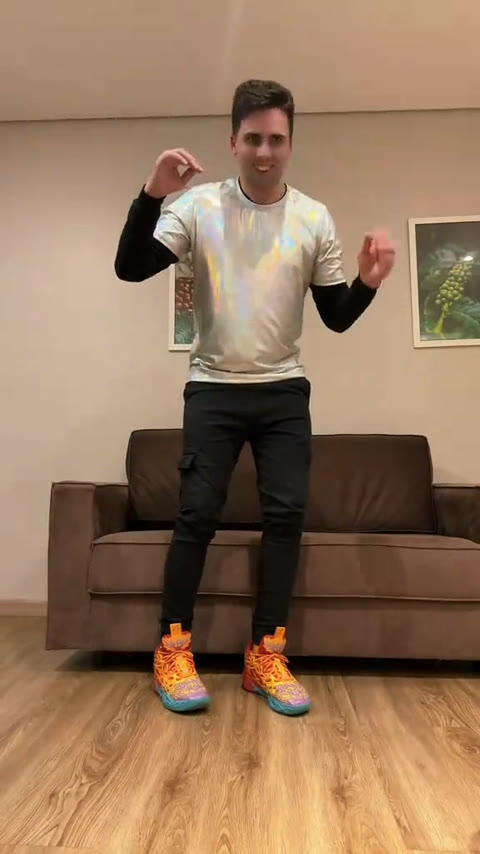
15s · 9:16 · 720p · original sound · ready in a few minutes
The reference
A robot-dance moment made for your own face
Digi Digi AI is built around a clear, single-dancer reference: one person framed full length by a fixed camera, moving through a recognizable sequence of stepping patterns and arm gestures. That simple setup gives your photo space to become the performer while the dance remains the star.
One person, one camera, one complete routine
The 15-second reference was posted by @maykonreplay on TikTok on July 17, 2026. It opens with the dancer already centered in the frame, so the performance reads immediately. The camera stays front-facing while the dancer travels through compact steps, hand shapes and body accents that build with the beat. The result is a short routine with a clear beginning, a strong middle and a satisfying final hold.
Digi Digi AI keeps that focused performance structure. Your upload supplies the person people recognize, and the video edit carries that person through the choreography, room and camera framing already established by the source clip. It is an easy way to turn one favorite photo into a dance moment that still feels coherent from the first second to the fifteenth.
The sound belongs with the movement
The visible example uses the synchronized source audio from the same 15-second segment. During generation, the visual reference stays silent so Kling can focus on the dancer replacement. SameVid then aligns the original audio beneath your finished result, keeping the rhythm connected to the footwork and arm accents people see on screen.
How it works
Make your Digi Digi AI dance in three steps
Start with one photo, let the template place you in the lead role, then collect a finished 15-second dance video for 400 credits. The choreography, framing and sound workflow are already prepared for this page.
Choose one full-body photo
Pick a photo with one person clearly visible from head to toe or from the waist down enough for the pose and outfit to read. A bright, front-facing image with a visible face gives the dancer strong details as the routine moves through the frame.
Generate the robot dance
Digi Digi AI uses Kling 4.0 video edit to place your uploaded person into the solo performer role. The person follows the reference footwork, arm movements, fixed-camera framing and indoor atmosphere for the full 15-second sequence.
Play, save and share the result
Your vertical MP4 appears in My Work and History with the original source sound aligned beneath the completed dance. Play it there, download the version you want and share it as a short dance reveal wherever your friends watch videos.
Your full Digi Digi dance, ready in one generation
One photo becomes a complete 15-second robot-dance performance for 400 credits. The result includes the vertical 720p video and its synchronized original sound.
- Basic$9.9400 credits1 video
- Growth$19.9850 credits2 videos
- Most PopularPro$39.91,800 credits4 videos
- Studio$99.94,800 credits12 videos
- Max$299.915,000 credits37 videos
Input → output
One photo in, a complete dance performance out
The template is designed around a single recognizable performer. You bring the face, hairstyle and outfit; the prepared source clip supplies the full routine, room, fixed-camera look and timed movement. Every part arrives together as one shareable vertical video.
You upload
- One JPG, PNG or WebP photo of one person
- A face, hairstyle and outfit that are easy to see in even light
- A full-body or tall portrait photo where the person is clearly separated from the background
- A relaxed, confident or expressive pose that feels natural for a dance performance
You get
- A 15-second vertical MP4 with your person as the solo dancer
- The source footwork, arm choreography and front-facing fixed-camera rhythm
- An indoor dance scene with the original framing, lighting and pacing
- Original source sound aligned with the final completed video
- A finished file available in My Work and History for playback and download
| Photos | 1 person |
|---|---|
| Model | Kling 4.0 video edit |
| Duration | 15 seconds |
| Resolution | 720p |
| Aspect ratio | 9:16 vertical |
| Sound | Original source sound |
| Format | MP4 |
| Where to find it | My Work and History |
| Credits | 400 per video, refunded if it fails |
Ready to post
Captions for your dance reveal
The clip already has a clear performance beat, so a short caption lets the dance stay in focus. Pick a line that fits your person, your outfit or the moment you want to share.
- “Stepped into my Digi Digi era. 🪩🤖”
- “One photo, fifteen seconds, full robot-dance energy.”
- “The footwork had my name on it.”
- “My camera roll just learned a new routine.”
- “Front row, center frame, ready for the beat.”
- “I brought the face. Digi Digi brought the moves.”
- “The group chat asked for a dance reveal.”
- “A little rhythm, a lot of attitude.”
- Pair a confident portrait with the caption that sounds most like you.
- Tag the friend whose photo deserves the next dance turn.
- Keep the caption compact so the 15-second performance stays the main event.
The scene
The Digi Digi performance, beat by beat
This is a performance-first video: the source dancer stays framed in one clear space, and the choreography unfolds in compact beats that give your photo a complete beginning-to-end role. Kling carries the movement through each part of the sequence while the camera keeps the person easy to recognize.
Find the center of the frame
The dancer begins full length in the center of the vertical scene. Your uploaded person becomes the clear focal point right away, with the face, hair and outfit visible before the rhythm starts building.
Set the stepping rhythm
Compact footwork establishes the character of the routine. The steps stay grounded and readable in the fixed camera, giving the new dancer a confident base for every move that follows.
Build the arm pattern
Arms and hands add the recognizable robot-dance accents. The performance alternates precise shapes with looser transitions, so the dancer feels active through the upper body as well as the feet.
Carry the energy through the middle
The routine keeps its forward-facing connection to the camera while the dancer layers body angles, steps and gestures. A clear single-person photo helps the new face stay expressive through these faster beats.
Land the final pose
The final seconds bring the movement into a clear held finish. That closing shape gives the video a strong stopping point for a loop, a reaction or a quick share with friends.
Cast ideas
Who should take the Digi Digi dance floor
One person owns this routine from start to finish. Think of a photo that already has presence: a favorite outfit, a playful expression, a polished portrait or the friend everyone expects to turn a moment into a performance.
You in your sharpest look
Use a photo that captures the hairstyle and outfit you want to see moving through the routine. The full-length framing gives your personal style room to read from the first beat to the final pose.
The friend with instant dance energy
Turn the friend who makes every gathering feel lively into the solo performer. A bright portrait with a clear face transforms into a short dance surprise made for the group chat.
A birthday star or celebration guest
Choose one great event photo and give the guest of honor a second entrance. The fifteen-second routine works as a compact greeting, a party invite opener or a lively addition to a birthday post.
Your stylish alter ego
Pick the photo where you look ready for the lens and let the fixed camera turn it into a new performance. The template keeps the person front and center while the choreography supplies the energy.
A family member with a signature pose
A clear family photo can become a playful new dance moment for celebrations and chat threads. Keep the subject clearly separated in the frame so their features carry naturally into the performance.
FAQ
Digi Digi AI FAQ
What is Digi Digi AI?
Digi Digi AI is a one-photo video template that puts your person into a 15-second robot-dance performance. The template uses the fixed-camera source routine for the footwork, arm movements, room and pacing while your uploaded face, hairstyle and outfit define the solo dancer. The finished result is a vertical 720p MP4 with the original source sound aligned beneath it.
Which photo gives the best Digi Digi AI result?
Choose a clear photo of one person with a visible face, hair and outfit. Full-body photos and tall portraits work especially well because the reference dancer stays framed full length for much of the routine. Even lighting and a clean separation between the person and background help the dancer read consistently through the footwork and arm motions.
Will the choreography follow the reference dance?
Yes. Digi Digi AI uses Kling 4.0 video edit, which places your uploaded person in the lead role while following the source routine. The fixed-camera framing, front-facing performance, footwork, arm movements, body trajectory and timing all follow the prepared 15-second reference clip.
How long is a Digi Digi AI video?
Each completed Digi Digi AI video is 15 seconds long. The source example and the silent visual reference use the same 15-second segment, so the visible dance and the model input stay aligned from beginning to end.
Does the finished video include sound?
Yes. The model receives a silent visual reference so it can focus on the dancer replacement. SameVid then merges the synchronized source audio beneath the completed video, keeping the rhythm and visible choreography together in the final MP4.
How many credits does Digi Digi AI cost?
One 15-second Digi Digi AI video costs 400 credits. The amount is based on the generated video length and appears on the Generate button before you start your dance.
Where is my completed Digi Digi AI video?
Your completed Digi Digi AI video appears in My Work and History on SameVid. From there you can play the result, download the MP4 and choose the version you want to share with friends.
Same category
More Dance templates
 NEW400 CR
 NEW140 CR
 NEW270 CR
 NEW220 CR
 NEW400 CR
 NEW400 CR
 NEW300 CR
 NEW400 CR
 NEW140 CR
 NEW270 CR
 NEW240 CR
 NEW300 CR
Keep scrolling
More viral AI video trends
 NEW220 CR
 NEW380 CR
 NEW270 CR
 NEW400 CR
 NEW220 CR
 NEW380 CR
 NEW380 CR
 NEW300 CR
 NEW270 CR
 NEW220 CR
 NEW380 CR
 NEW320 CR