
Comedy · New
Arrested AI Video Generator
Make an Arrested AI video from one photo: an AI police arrest video in which, at night, two officers walk you out of a brick house under blue and red police lights and you turn to smile at the camera. Upload a photo of one person and get an 8-second vertical MP4 with the original sound of the "Not bro, getting arrested again" clip, with no arrest filter to find and no CapCut template to open.
Arrested AI · 8s · 9:16
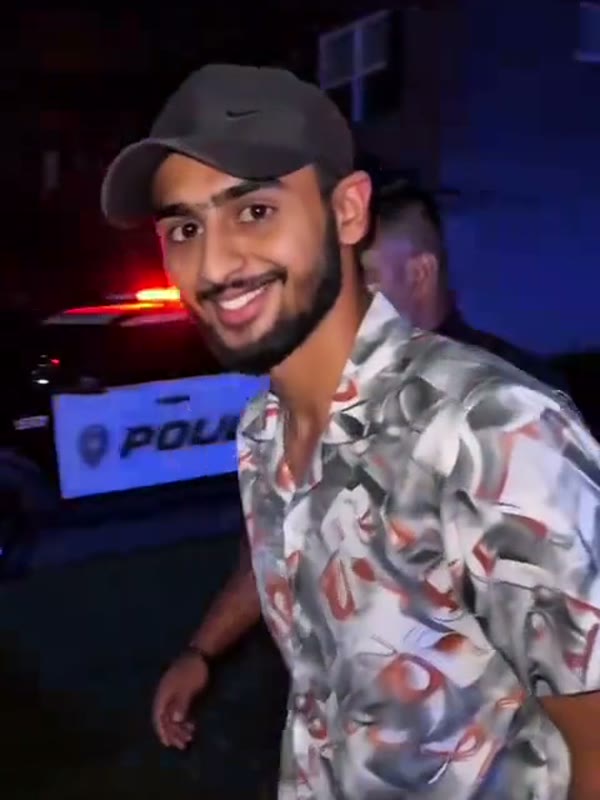
8s · 9:16 · 720p · original sound · ready in a few minutes
Preview clip: @saqiulhassan1 on TikTok
Quick walkthrough
How to make an Arrested AI video from a photo
Add one photo, press Generate and download the MP4. It takes three steps and 220 credits.
Add one photo
Put a photo of one person in the box. Your face, hairstyle, skin tone and clothing come from the photo; the house, the police lights and the two officers come from the template. Use a JPG, PNG or WebP file of at least 300 pixels on each side and up to 10 MB.
Press Generate
Sign in and check the 220 credits on the Generate button. The template renders the scene at 9:16 vertical for 8 seconds with Kling at 720p and adds the original sound. The task runs in the background, so you can leave the page, and there is no prompt to write.
Play and download the MP4
Generation usually takes about five minutes. Open My Work on this page to play the result and download the MP4. If the task fails, the charged credits return automatically.
Original and result
The Arrested AI clip and a video from this generator
The first video is the clip this template follows. The second was made by this generator from one standing photo.
The original clip
The first 8 seconds of the reference clip with its sound: two officers walk a man out of a brick house under blue and red lights, and he turns to smile at the camera.
@saqiulhassan1Generated by SameVid AI
Made by this generator from one standing photo of a man in a light pinstripe suit, with the original sound added. His face, hair and suit carry over, while the house, the police lights, the two officers and the turn to the camera stay as in the clip.
Input and output
What you upload and what you get
One portrait goes in; one 8-second vertical MP4 with the original sound comes out, for 220 credits.
You upload
- One photo of one person: yourself, a friend, a partner or family
- JPG, PNG or WebP, at least 300 pixels on each side, up to 10 MB
- No video, audio or prompt
You get
- An 8-second vertical 9:16 MP4 at 720p
- A night scene at a brick house with blue and red police lights, two officers and you walking out with your hands behind your back
- A last turn to the camera with a smile
- The original sound of the reference clip
- A task in My Work on this page with playback and download
| Photos | 1 (the person being walked out) |
|---|---|
| Model | Kling |
| Duration | 8 seconds |
| Resolution | 720p |
| Frame | 9:16 vertical |
| Scene | Night, a brick house and a police SUV, set by the template |
| Audio | Original sound of the clip |
| File | MP4 |
| Credits | 220 per video, refunded if it fails |
Upload guidelines
Photo tips for an Arrested AI video
The photo gives the video your face, hairstyle, skin tone and clothing, so one clear person matters most.
- Use a well-lit, front-facing photo where the whole face is visible; the video ends on a close-up of your smile.
- A half-body photo works: the clothes you wear in it are the ones you are walked out in.
- Choose a JPG, PNG or WebP file of at least 300 pixels on each side and up to 10 MB.
- Wear in the photo what you want to be walked out in: the hairstyle, hair color and clothing in the photo are what the video shows.
- Avoid group photos; the template has one person to replace, and a second face confuses the likeness.
- Avoid sunglasses, masks and hands over the face; they weaken the likeness in the final smile.
- Avoid heavy filters and tightly cropped faces; a natural, uncropped photo gives the clearest likeness.
The trend
Where the Arrested AI videos come from
A CapCut AI template that puts a photo into a night-time police scene.
What the clip shows
The reference runs 8 seconds in one continuous shot. Red and blue police lights wash the front of a brick house at night. The first officer walks out down the path toward the camera, the camera backs away as the person with their hands behind their back and a second officer follow, and on the dark street in front of a police SUV the person turns, looks into the lens with a wide smile and looks away.
How it spread
On TikTok the videos are made from a CapCut AI template and carry the caption "Not bro, getting arrested again". @winstonloo1174's tutorial, posted on September 27, 2026, has passed 880,000 plays.
@saqiulhassan1's clip, captioned "#CapCut AI ARREST TREND" and posted on September 30, passed 1.5 million plays. It is the reference this template follows.
How people use it
Most posts show a friend or the creator in the arrest scene with a joke caption, and many open with a short screen recording of the CapCut template steps. This page needs no template steps: one photo and one button.
Credits
What an Arrested AI video costs
One 8-second video costs 220 credits. Credit packs below show how many videos each one covers.
- Basic$9.9400 credits1 video
- Growth$19.9850 credits3 videos
- Most PopularPro$39.91,800 credits8 videos
- Studio$99.94,800 credits21 videos
- Max$299.915,000 credits68 videos
FAQ
Arrested AI FAQ
What is an Arrested AI video?
It is a short AI video that puts a person from your photo into a night-time police scene: two officers walk you out of a house under blue and red lights and you turn to smile at the camera. This template recreates the clip behind the "Not bro, getting arrested again" trend as an 8-second vertical MP4 with the original sound.
How do I make an Arrested AI video?
Three steps: add one photo; press Generate, which costs 220 credits shown on the button for one 8-second video; then wait a few minutes and play or download the MP4 from My Work on this page. There is no CapCut template to find, no editor to open and no prompt to write.
What photo works best?
A clear, well-lit photo of one person facing the camera, in JPG, PNG or WebP, at least 300 pixels on each side and up to 10 MB. A half-body photo is fine. Group photos and photos with sunglasses or a face covered by a hat or mask give a weaker likeness.
Can I choose the officers, the house or the lights?
No. The house, the police lights, the officers and the camera come from the reference clip, so the only thing you choose is the person. For a different scene, try Hop Hop Hop Dance or Ballon d'Or.
Is Arrested AI free, and how much does a video cost?
One 8-second video costs 220 credits, shown on the Generate button before you start. New accounts get 10 free credits, which is not enough for a video, so you need a credit pack: the 400-credit pack covers one video, the 850-credit pack three and the 1,800-credit pack eight. If a task fails, the charged 220 credits return automatically.
Do my credits expire?
Credits from one-time packs and the 10 sign-up credits never expire. Credits that come with a monthly or yearly plan are valid for the current billing period only and do not roll over.
Can I use the video commercially?
Yes. The Terms grant a license to use your generated videos for personal and commercial purposes, subject to third-party rights, including the rights of the people shown and of the original clip's music.
Does the video include the sound?
Yes. The MP4 carries the original sound of the @saqiulhassan1 clip, cut to the same 8 seconds. You can also add a trending sound when you post it.
Keep scrolling
More viral AI video trends
 NEW220 CR
 NEW270 CR
 NEW300 CR
 NEW320 CR
 HOT400 CR
 NEW400 CR