
Dance · New
Dame Hombro AI Video Generator for the Shoulder Dance Trio
Make a Dame Hombro AI video from one or three photos: the viral shoulder dance in front of a gray street shutter, as a 15-second vertical MP4 with the trend audio. One photo puts you in the lead; three photos cast the whole trio.
Dame Hombro · 15s · 9:16
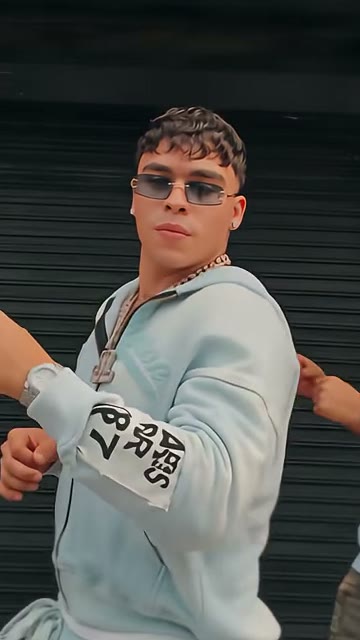 Lead dancerMiddle, nearest the camera
15s · 9:16 · 720p · original track · ready in a few minutes
Preview clip: @andreaclips_01 on TikTok
Quick Walkthrough
How to make a Dame Hombro AI video
Select your casting mode, add your portraits, and generate your 15-second trio dance video.
Pick your mode and add photos
Choose One photo or Three photos. In One photo mode, your subject takes the center lead while the two original dancers stay as filmed. In Three photos mode, upload separate photos for Lead dancer, Left dancer, and Right dancer, one person per box. Use JPG, PNG, or WebP files of at least 300 pixels per side and up to 10 MB. One photo cannot fill two roles.
Generate your dance video
Sign in and check the 110 credits fee on Generate. The template applies Seedance, 720p resolution, 9:16 vertical framing, and the 15-second duration with the trend audio. Clicking Generate starts a background task that keeps the sidewalk, the light and the camera moves of the reference; there is no prompt to write.
Play and download the MP4
Track progress in My Work on this page. Generation takes several minutes in the background. Play the video to check choreography and download the 15-second vertical MP4 to your device. If a task fails, charged credits return automatically.
Specs and Deliverables
What you upload and what you get
One or three portraits go in; one 15-second vertical MP4 with the trend audio comes out, for 110 credits.
You upload
- One photo for the lead dancer, or three for the trio
- JPG, PNG, or WebP files of at least 300 pixels, up to 10 MB
- Clear single-person portraits; half-body photos work too
You get
- A 15-second vertical 9:16 MP4 video at 720p resolution
- Synchronized dembow trend audio from the reference clip
- Finished video in My Work with playback and download
| Photos | 1 (you lead) or 3 (lead, left, right) |
|---|---|
| Model | Seedance |
| Duration | 15 seconds |
| Resolution | 720p |
| Frame | 9:16 vertical |
| Audio | Trend audio from reference clip |
| File | MP4 |
| Credits | 110 per video, refunded if it fails |
Casting Ideas
Who to put in the Dame Hombro trio
One photo casts the lead and keeps the two original dancers; three photos put people you know in every spot.
Solo lead dancer with street crew
Put yourself in the lead with One photo mode. Your photo replaces the center dancer, performing the shoulder bounce, forward turn, and hand gestures while the two original dancers back you up.
Three close friends on a sidewalk stage
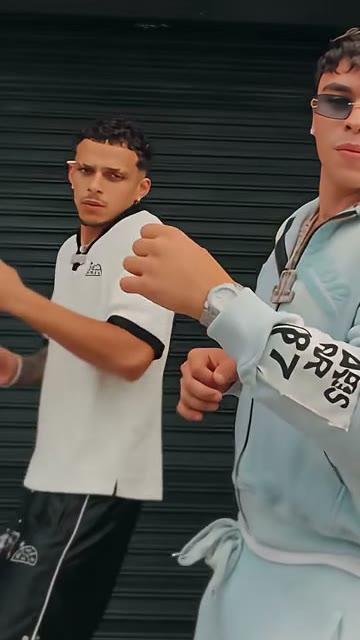
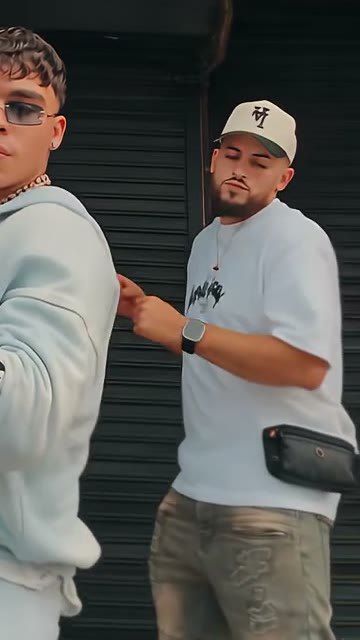
Recreate the trio with friends using Three photos mode. Assign three distinct photos to Lead, Left, and Right dancers. The lead steps forward while side dancers bounce behind for a shared AI dance video.
Family members or siblings
Feature relatives in a synchronized routine with Three photos mode. Put the most energetic person in the center lead spot, flanked by two family members against the shutter for an animated keepsake.
Coworker or classmate celebration
Celebrate finishing a project or exam week by casting a colleague or study partner in One photo mode, creating an energetic dembow routine without an in-person shoot.
Origin and Choreography
What is the Dame Hombro trend?
The Dame Hombro trend is a shoulder-bounce dance to "Dame Hombro," the dembow song by Bulin 47 and Kevin Wai.
Where it came from
In early October 2026, Kevin Wai played a dembow beat outside a venue in Spain and Bulin 47 answered with a freestyle and a shoulder bounce. The clip went viral, and the single followed on October 7. For the freestyle scene itself, use the Bulin 47 AI freestyle video template.
How the dance spread
Bulin 47 started #DameHombroChallenge with a €2,000 prize, and streamer Ibai Llanos and singer Jay Wheeler posted their own versions.
How to do the shoulder dance
There is no official choreography. Keep it small and on the beat:
- Tuck your fists against your chest and bend your knees a little.
- Bounce lightly on each beat, without jumping.
- Pop one shoulder, then the other.
- Keep a straight face, then smile at the camera.
The version this template follows
A 15-second, one-take clip shared on TikTok by @andreaclips_01: three dancers bounce side-on in front of a gray roll-up shutter, then the lead turns, steps toward the camera, frames his hands at his chest and steps back.
Upload Guidelines
Photo tips for the best dance results
Each photo gives one dancer its face, hair, skin tone and visible outfit, so one clear person per photo matters most.
- Use clear, well-lit front-facing portraits with sharp facial features.
- Upload single-person half-body photos; lower-body clothes are filled in to match.
- Choose JPG, PNG, or WebP files of at least 300 pixels and up to 10 MB.
- Avoid group photos; each dancer slot requires one individual person.
- Avoid blurry snapshots, dark shadows, or items covering the face.
- Do not reuse the same photo across multiple roles in Three photos mode.
Get Started
Make your Dame Hombro AI video
Step into the sidewalk shoulder dance. Upload your pictures, pick your casting mode, and generate your 15-second trio video.
FAQ
Dame Hombro FAQ
What does "dame hombro" mean?
"Dame hombro" is Spanish for "give me shoulder." In the dembow song, it serves as an upbeat call inviting listeners to bounce their shoulders to the rhythm.
Can I make it with one photo?
Yes, you can make a video with one photo. The One photo tab places your subject as the central lead while keeping the reference side dancers.
How many credits does one video cost?
Each video costs 110 credits, shown on the Generate button. You can buy more credits anytime through credit packs. Failed tasks refund automatically.
Does the video include the song?
Yes, the finished MP4 includes the synchronized trend audio from the reference clip, added directly to the 15-second video so it is ready to share.
Do I need CapCut or a Dame Hombro template app?
No. This page is the Dame Hombro template: pick One photo or Three photos, add your pictures and press Generate. There is no CapCut project to download, no footage to film and no prompt to write; the 15-second MP4 lands in My Work.
Can I use photos of friends?
Yes, you can use photos of friends, siblings or coworkers. In Three photos mode each person gets their own box, so the lead and both side dancers can all be people you know.
Can I use a half-body selfie?
Yes, a clear half-body selfie or waist-up portrait works well. The Seedance model captures your face and upper outfit, then fills in the lower body to match.
Is this the official Bulin 47 video?
No, this template is an independent AI video tool and is not official or affiliated with Bulin 47, Kevin Wai, or their labels. It recreates the trend with your photos.
Keep scrolling
More viral AI video trends
 HOT110 CR
 NEW110 CR
 HOT60 CR
 NEW110 CR
 NEW110 CR
 NEW80 CR