
Funny · New
Island Boy AI Video Generator
Put one or two portraits into a 14-second pool moment. Cast the person on the edge, the person in the water, or both, with original reference sound for 380 credits.
Island Boy AI · 14s · 9:16
Choose any core participants to replace. Every role is optional; add at least one photo.
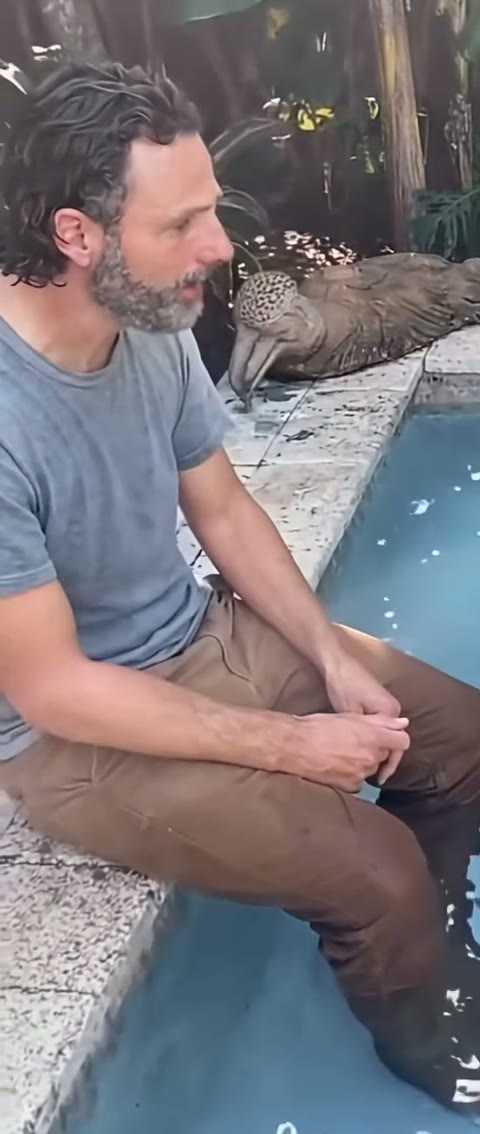 Person on the pool edgeClear portrait for the seated person on the left
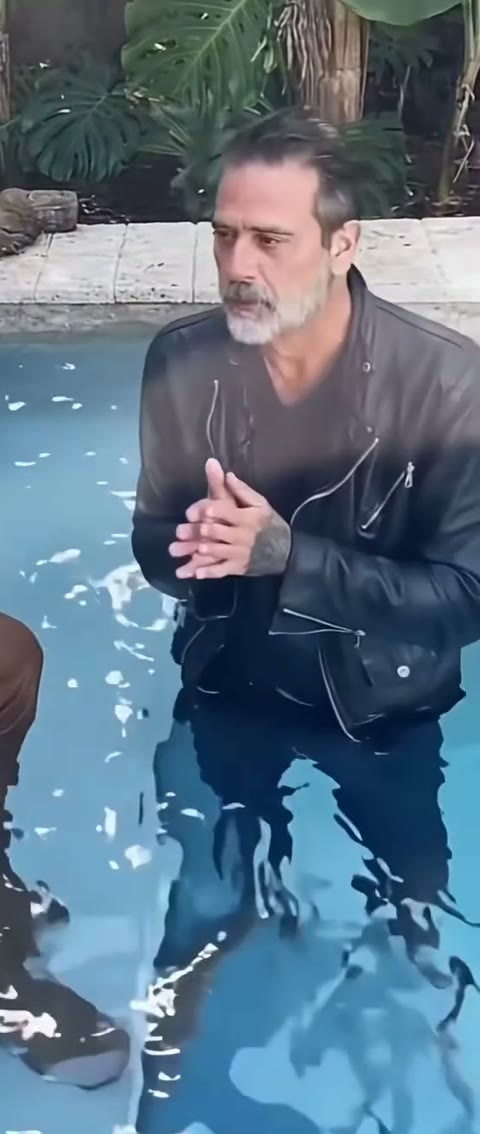 Person in the poolClear portrait for the person standing in the water on the right
14s · 9:16 · 720p · original track · ready in a few minutes
The poolside moment
How the Island Boy AI pool scene unfolds
A relaxed poolside conversation becomes a lively two-person scene through one seated role, one role in the water and a handheld camera that keeps both people close.
Settle at the water’s edge
The scene opens at a bright blue backyard pool bordered by pale stone and tall tropical leaves. One person sits on the left edge with their lower legs in the water, giving the frame an easy, grounded start. The other person stands waist-deep on the right, so the pair are instantly readable as two distinct roles with a shared place in the scene. Your portraits establish who takes each position before the camera begins its gentle drift.
Let the pool interaction build
The camera moves naturally around the water while the seated person glances between the lens and their friend. The person in the pool carries the larger hand gestures and expressive reactions, making the center of the frame feel animated without losing the relaxed poolside rhythm. Water ripples, wet fabric and sunlight keep the two positions connected, while each uploaded person keeps the visual identity chosen for their own role.
Finish on the shared reaction
The two people hold the last beat together as the handheld view eases back across the pool. The result lands as a short, playful friendship scene with enough motion for a social post and enough clear framing for both faces to stay easy to recognize. The finished video carries the reference sound after rendering, so the gesture timing and the poolside energy stay connected from the opening glance through the final response.
Three clear steps
How to make an Island Boy AI pool video
Choose one or two portraits, assign the pool roles, then generate a 14-second Island Boy AI scene with original sound for 380 credits.
Choose the poolside cast
Pick a clear portrait for the person seated on the pool edge, the person standing in the water, or both. A bright image with the face, hair, shoulders and outfit easy to see gives each role a distinct look in the close handheld frame. The template provides the water, stone edge and tropical setting, so your photos can focus on the people you want to feature.
Match each person to the scene
Add the left-side seated person to the Person on the pool edge card and the more expressive water role to the Person in the pool card. Each card maps to one stable story position. Choose one card for a single-person version, or fill both for a fully personalized Island Boy AI pool interaction where each person has their own place in the shot.
Generate the pool moment
Review the 380-credit total and select Generate. SameVid creates the 14-second 720p Island Boy AI video, then joins the original reference sound to the completed scene. Your MP4 appears in My Work, ready to play, download or share as a poolside friendship edit, a birthday reveal or a playful group-chat surprise.
Cast the two pool roles
Who fits the Island Boy AI pool scene?
The scene gives each person a clear position, so one or two portraits can become a poolside interaction that feels specific to the people you choose.
Two close friends
Use one portrait for the friend who always finds the best spot by the water and another for the person who brings the biggest reaction. The edge-and-water staging gives the pair an instant shared story, even when the original photos came from separate days. It makes a natural opening for a vacation recap, an inside joke or a group-chat video where everyone recognizes the two personalities immediately.
A couple with a summer memory
Put one partner on the pool edge and the other in the water to turn two clear portraits into a warm summer interaction. The steady vertical frame keeps the pair close together while the moving water gives the clip a lived-in feeling. Use the finished Island Boy AI video as a small anniversary moment, a trip reveal or a first slide before the rest of a sunny photo carousel.
Siblings or cousins
The two roles work well for relatives who bring different energy to every family pool day. Put the calmer person on the stone edge and the animated storyteller in the water, then let the camera movement make the exchange feel spontaneous. A clear portrait for each role turns a familiar family dynamic into a short scene people can replay and send back to the group chat.
One standout portrait
Add one photo when a single person deserves the focus. The selected portrait takes the exact role card you choose, while the other participant keeps the reference position, timing and poolside behavior. This option gives a birthday guest, original character or favorite summer outfit a clear entrance while the scene keeps its complete two-person story.
Make the scene yours
Ways to share an Island Boy AI pool moment
Open a summer recap
Start a vacation, pool-day or long-weekend carousel with the two people at the center of the scene, then follow it with the photos that inspired their roles. The short handheld movement gives static pictures a lively first beat without making the post feel overproduced.
Give the group chat two leads
Choose the friends who make every pool plan memorable and give each one a separate position in the shot. The edge role and water role make the casting obvious before anyone reads the caption, which makes the video especially easy to drop into an existing running joke.
Make a birthday poolside reveal
Use a favorite portrait for the guest of honor and let the pool scene create a playful entrance. A second portrait can turn the clip into a small duet between the birthday person and the friend who always brings the energy, ready to share before the celebration photos arrive.
Build a character mood board
Put an original character in the pool-edge or in-water card and use the tropical leaves, stone, water and natural sunlight as a ready-made summer setting. The finished video gives a visual mood board one continuous action beat and a more memorable way to introduce the character’s style.
A recognizable internet moment
The poolside scene behind Island Boy AI
The format centers on two people by a backyard pool, a simple setting that became memorable through the way the water, camera and shared performance hold attention together.
A viral poolside freestyle
The phrase behind Island Boy comes from a 2021 poolside freestyle by the Island Boys. Two performers in and around a small pool, direct camera attention and an instantly recognizable hook gave the original moment a compact visual identity that traveled far beyond the first post.
A brief Axios report traces how the poolside video brought the pair broad attention and invited a wave of cover versions and visual parodies. That recognizable setting gives an Island Boy AI pool scene a clear visual context for a new two-person cast.
The reference format keeps that simple scene language: bright water, a person on the edge, another person standing in the pool and a handheld point of view that stays close enough to show each person’s reaction. Those ingredients make the pool interaction readable even when the two people in the final video come from entirely different portraits.
Why the two roles matter
The Island Boy AI scene works because the two positions serve different purposes. The pool-edge person gives the frame a calm anchor, visible from the opening moment through the closing glance. The person in the water brings the larger gestures, wet-clothing interaction and animated energy that give the handheld camera something to follow.
Keeping the roles separate lets friends, couples and relatives choose a casting that matches their own dynamic. The scene feels cohesive because each uploaded portrait has one defined place in the water-and-stone layout, rather than appearing as a floating face over a generic summer background.
A short scene with a complete arc
A single continuous pool shot can still tell a full story: the pair settle into place, the water role becomes more expressive, and both people finish on the same shared beat. That clarity is useful for a short social clip because viewers understand the relationship between the two people before the video reaches its final second.
The reference gives the camera path and scene progression, while your portraits give the roles their own face, hair, clothing and personality. Together, those pieces turn a compact poolside interaction into a video that feels ready for a summer recap, a friendship edit or a playful message to someone who belongs in the cast.
Make each role easy to recognize
Photo tips for the Island Boy AI cast
The camera stays close to both pool positions, so a clear photo helps each person remain distinctive while the scene adds water, sunlight and motion around them.
- Choose one person per role card so the pool-edge and in-water identities stay clearly separated from the opening frame through the final handheld movement.
- Use a bright portrait with the face, hair and shoulders visible. Even light helps the person remain easy to recognize when the camera drifts closer across the pool.
- Keep a visible outfit detail in each image, such as a shirt color, jacket, hairstyle or necklace, so the two roles read as distinct people beside the same bright blue water.
- Pick two portraits with clearly different hair, clothing or color choices when using both cards. The visual contrast keeps the interaction readable during the faster hand gestures in the water.
- Use a portrait with an open face and a clean shoulder line, giving the poolside role a natural place in the close vertical frame and a clear expression as the camera moves.
- Choose a photo where the person’s main features have enough room around them, so the scene can place them naturally by the edge or waist-deep in the water while preserving a recognizable outline.
FAQ
Island Boy AI FAQ
What is Island Boy AI?
Island Boy AI turns one or two portraits into a 14-second poolside scene with one person seated on the pool edge and another person standing waist-deep in the water. The template provides the bright pool, stone edge, tropical setting, handheld camera rhythm and reference sound while your selected photos define the people in each role.
How many photos can I upload?
You can add one or two photos. Each role card is optional, and the template starts with at least one selected portrait. Fill both cards for a fully personalized pool interaction, or choose either the pool-edge role or the in-water role when one person deserves the focus.
Which photo works best for the person on the pool edge?
Choose a clear portrait with the face, hair, shoulders and outfit visible in even light. This person sits on the left side of the pool edge with their lower legs in the water, so a relaxed portrait with a recognizable shirt, hairstyle or expression gives the scene a strong opening identity.
Which photo works best for the person in the pool?
Choose a clear portrait with an open face, visible hair and shoulders, plus a recognizable outfit detail. This role stands waist-deep on the right side of the frame and carries the larger gestures, so a bright image with a clean outline helps the person stay readable through the handheld motion and water reflections.
Can I use one photo for Island Boy AI?
Yes. Select either the Person on the pool edge or Person in the pool card, and that portrait takes its defined place in the scene. The other role keeps the reference story position, timing and interaction, so the finished video still reads as a complete two-person poolside moment.
How long is an Island Boy AI video?
Each Island Boy AI video runs for 14 seconds. The continuous shot gives the pool-edge person and the in-water person time to settle into their roles, share the camera’s attention and finish the interaction together.
Does the finished video include sound?
Yes. SameVid joins the original reference sound to the completed video after the visual render, keeping the poolside timing, water movement and hand gestures connected to the finished scene.
How many credits does Island Boy AI cost?
One 14-second Island Boy AI video costs 380 credits. The Generate button shows the total before your task begins, and the completed video appears in My Work when it is ready.