
Transformation · New
Messy Makeup AI Filter Video Generator
Make a Messy Makeup AI filter video from one photo: an AI makeup video in which a makeup artist's hands sweep your hair back and take your bare face to smoky eyes, winged liner and glossy lips. You get a 5-second 9:16 MP4 at 720p.
Messy Makeup AI Filter · 5s · 9:16
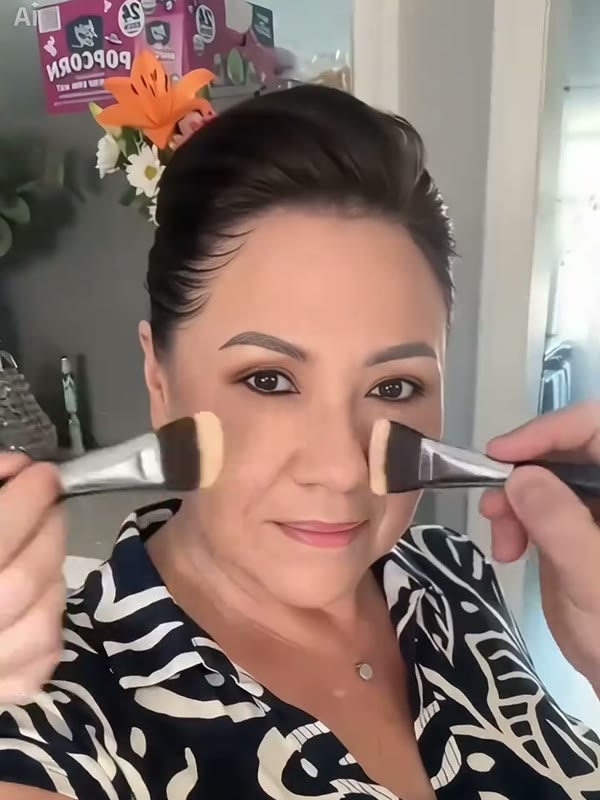
5s · 9:16 · 720p · ready in a few minutes
Preview clip: @migf149 on TikTok
Ready to paste
Messy Makeup filter captions to post with your video
These lines come from Messy Makeup filter posts on TikTok, so your video lands next to the same trend.
- “messy makeup filter”
- “messy makeup filter trend”
- “Messy Makeup AI Filter That Blurs & Glams Your Face”
- “clean girl vs messy girl”
- “filtro messy makeup”
- “Tren efek makeup berantakan”
- Tag the person in the video when you post a friend or relative.
- Pair the video with a bare-face photo of the same person for a sharper before and after.
Upload guidelines
Photo tips for a Messy Makeup AI filter video
Your photo sets the face in every frame, and the template adds the makeup, so a natural starting look shows the biggest change.
- Face the lens in soft daylight with your whole face in view; the video stays in close-up from start to finish.
- Choose a bare or lightly made-up face for the strongest before and after.
- Crop from the chest up with one person in the picture; the template has one person to transform.
- JPG, PNG and WebP files work, from 300 pixels per side up to 10 MB.
The trend
Messy Makeup filter videos from TikTok
The same makeover works across ages: glam on a grandmother is one of the most shared versions.
Grandmother glam-up
A playful older woman gets the full treatment, with the contrast carrying the joke.
@s6um1me5rEveryday curls to glam
A woman with natural curls gets a polished look in one shot.
@olcy2144816From selfie to glam
How to use the Messy Makeup AI filter on a photo
Your selfie becomes a finished makeover clip in three moves, for 140 credits and with zero editing.
Drop in your selfie
Pick a sharp selfie for the box on this page. Your features, skin tone and outfit stay yours, while the sleek hair sweep, the brushes and the glam finish are built into the template.
Start the makeover
Log in, confirm the 140-credit price on the button and start. Kling renders a vertical 5-second close-up in 720p. Prompts and timelines are handled for you.
Watch and save your glam-up
Your clip is typically ready within five minutes under My Work, right here on the page, where you can watch it and save the MP4. A failed task refunds its credits by itself.
Output
What you get from the Messy Makeup AI filter
One photo goes in; one vertical makeover video comes out, ready to post on TikTok, Reels or Shorts.
You upload
- One clear photo of one person
You get
- A single close-up shot that keeps your face throughout
- Hair swept back into a sleek updo
- Contour, smoky eyes, winged liner and glossy lips applied on camera
- A finished MP4 waiting in My Work, ready to save and post
| Photos | 1 (the person getting the makeover) |
|---|---|
| Model | Kling |
| Duration | 5 seconds |
| Resolution | 720p |
| Frame | 9:16 vertical |
| Look | Sleek updo with smoky full glam, set by the template |
| File | MP4 |
| Credits | 140 per video, refunded if it fails |
Behind the trend
Where the Messy Makeup filter trend comes from
A beauty mood from the runways met a TikTok AI filter, and the two now share one name.
What messy makeup means
Messy makeup started as a reaction to the polished clean girl look: smudged eyeliner, shadowy eyes and lived-in lipstick. Beauty press tracked its return through late 2025, and the Fall/Winter 2026 shows at Prada and Proenza Schouler carried the same undone mood onto the runway.
On TikTok the name took a playful turn. The Messy Makeup AI filter posts open on a plain, everyday face, and then hands appear with combs and brushes and work through a full makeover until the person looks camera-ready.
How the AI filter spread
The earliest post we found under this name is @annabalabala's clip from June 20, 2026, tagged #capcut and #capcutpioneer. @migf149's version followed on July 9 and passed 4 million plays. It is the clip this template follows.
By autumn the filter had crossed languages, with Spanish, Portuguese and Indonesian captions, and creators were pairing it with short screen recordings of the app steps in CapCut, Hypic and Dreamina. Most posts stack two makeovers back to back.
What makes the clip work
The payoff is the contrast. Every brush stroke happens on camera, so the viewer watches a familiar face change second by second instead of jumping to a finished photo. That is why this template animates the steps: combed-back hair, concealer, contour, smoky eyes, winged liner and glossy lips, all in one shot of about five seconds.
FAQ
Messy Makeup AI Filter FAQ
What is the Messy Makeup AI filter?
It is a TikTok trend in which a photo turns into a short video of a makeup artist's hands styling the hair and painting on a full glam look. This template makes that video from your photo: bare face at the start, smoky eyes, winged liner and glossy lips at the end.
How do I make a Messy Makeup filter video?
Three steps: add one photo; press Generate, which costs 140 credits shown on the button for one 5-second video; then play or download the MP4 from My Work on this page a few minutes later. One photo and one button replace the CapCut template steps and prompts.
What photo works best?
A sharp selfie of one person looking into the lens, ideally with a bare or lightly made-up face. JPG, PNG and WebP files from 300 pixels per side up to 10 MB are accepted.
Will the video still look like me?
The template tells the model to keep your face, skin tone and clothing from the photo in every frame, while the makeup and hair change on top of them. A sharp front-facing photo gives the closest likeness.
Can I use it on a friend, a parent or a grandparent?
Yes. Any clear photo of one adult works, and older relatives are a favorite in this trend because the contrast is so strong. Use photos of people who are happy to be in the video.
Is the Messy Makeup AI filter free, and how much does a video cost?
One 5-second video costs 140 credits, shown on the Generate button before you start. New accounts get 10 free credits to begin with, and credit packs cover the videos: the 400-credit pack makes two.
Can I use the video commercially?
Yes. Our Terms license your generated videos for personal and business use, as long as you respect the rights of the people shown.
Same category
More Transformation templates
 NEW220 CR
 NEW350 CR
 NEW160 CR
 NEW270 CR
 NEW160 CR
 NEW320 CR
 NEW400 CR
Keep scrolling
More viral AI video trends
 NEW220 CR
 NEW320 CR
 HOT400 CR
 NEW350 CR
 NEW300 CR
 NEW220 CR
 NEW380 CR
 NEW400 CR
 NEW140 CR
 NEW270 CR
 NEW220 CR
 NEW380 CR