
Creative · New
AI Rain Effect Video Generator
Make an AI rain effect video from one photo: you walk down a rain-soaked night street, stop under the street lamps, sit on a wooden bench and cry in the rain. Upload a photo of one person and get a 12-second vertical MP4 with the clip’s original sound.
AI Rain Effect · 12s · 9:16
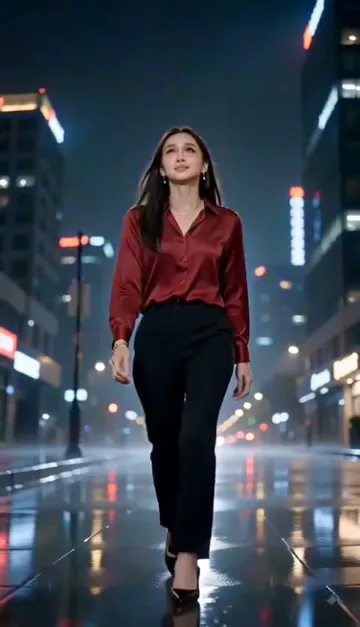
12s · 9:16 · 720p · original sound · ready in a few minutes
Preview clip: @fazila797 on TikTok
Ready to post
Captions for your rain AI effect video
The first three come from real posts of this trend. The rest fit a crying-in-the-rain video.
- “Hope Aftrler Rain #hopeafterrain #rain #aieffect”
- “TikTok trending Ai effect raining cry 😭 #rainingcry #Aivideo”
- “Effects tiktok keren😍 raining cry #aieffects #fotobergerak #viral”
- “POV: you cried so hard the rain felt warm”
- “Rain washes away what I could not say”
- Tag #rainingcry and #aieffect so the video sits with the other AI rain effect posts.
- The MP4 carries the clip’s original sound; swap in a sad or slow track at posting time if you like.
Examples
AI rain effect videos from TikTok
The crying-in-the-rain clip this template follows, the oldest big post of the trend, and a two-friend version. Each links to its creator.
Crying in the rain, night street
A woman in a red satin blouse walks a wet street, sits on a bench, covers her face and cries out.
@fazila797Hope after rain
A woman in a black hoodie sits on a rainy bench at night; posted on October 6, 2025 and watched about 338,000 times.
@brother_kholilRainy city besties
Two friends share an umbrella on a neon-lit street in the rain.
@aydarahman93Quick walkthrough
How to make an AI rain effect video
One photo, one button, and the finished clip waits in My Work.
Add one photo
Drop a photo of one person into You. A sharp, front-facing photo in even light works best, because the video opens with a full-length walk and then moves into close-ups of the face. The photo decides how the person looks, including the clothes; the rainy street, the bench and the order of events come from the template.
Generate
Sign in, read the price on the Generate button and press it. The length, frame, resolution and sound are already set, so you do not write a prompt, pick a rain overlay or edit anything.
Watch and download
Wait roughly five minutes; the task keeps running if you close the tab. Then open My Work on this page, play the clip and save the MP4. A failed task gives the credits back.
The trend
Where the AI rain effect trend comes from
A moving-photo effect that turns a portrait into a scene in the rain.
What the AI rain effect is
The AI rain effect turns a still photo into a short cinematic clip in the rain: wet hair, drops running down the face, blurred street lights and a sad or romantic mood. On TikTok it appears as "raining cry," "crying in rain," "Rainy City Besties" and the "Rain AI Effect Filter," often tagged #aieffect and #fotobergerak (Indonesian for moving photo).
How it spread
One of the oldest large posts is @brother_kholil’s "Hope After Rain" from October 6, 2025, which reached about 338,000 plays. In 2026 creators such as @fazila797 kept posting the crying-in-the-rain version, and CapCut now lists Rain AI effect templates that take a photo or a video.
The rain effect is not the Raindance trend. The Raindance AI video puts you into the sunny pier performance of the song, while this template is a night street in the rain.
Where these facts come from
The dates, plays and tags above come from the TikTok posts themselves: @brother_kholil’s Hope After Rain, @fazila797’s raining cry and @aydarahman93’s Rainy City Besties.
Ideas
Who to put in the rain
A sad, cinematic 12 seconds suits any face that can carry a story.
Yourself
Post your own crying-in-the-rain clip without waiting for a storm. Add "POV: you cried so hard the rain felt warm" and let the comments react.
A friend with a flair for drama
Send the group chat a film-style breakdown starring the friend who treats every small problem like a finale.
A character or an OC
Upload a clear portrait of your own character and give them a rainy night scene for a fan edit or a story post.
Your pet’s dramatic side
A front-facing portrait of a dog or cat that looks sorry for itself makes a funny version for the comments.
Input and output
What you upload and receive
One photo in, a 12-second rain scene out.
You upload
- One photo of one person, as JPG, PNG or WebP
- At least 300 pixels on the short side, up to 10 MB
- Nothing else: no video, no sound, no prompt
You get
- A vertical 9:16 MP4 at 720p that runs 12 seconds
- A rainy night street, a bench and four story beats: walk, tears, sit, cry out
- The soundtrack of the source clip
- A finished task in My Work with playback and download
| Photos | 1 |
|---|---|
| Model | Kling |
| Duration | 12 seconds |
| Resolution | 720p |
| Frame | 9:16 vertical |
| Scene | Rainy night street and bench, set by the template |
| Audio | Original sound of the source clip |
| File | MP4 |
| Credits | 320 per video, refunded if it fails |
FAQ
AI Rain Effect FAQ
What is the AI rain effect?
The AI rain effect is a TikTok trend that turns a still photo into a short cinematic clip in the rain, with soaked hair, tears on the face and blurred city lights. This template puts your photo into a 12-second crying-in-the-rain video made as an AI video.
When did the rain AI effect go viral?
One of the oldest large posts is @brother_kholil’s "Hope After Rain" from October 6, 2025 with about 338,000 plays, and crying-in-the-rain posts kept appearing through 2026.
Is this a rain overlay, a Gemini filter or a rain sound?
None of them. It does not paint rain onto your photo, does not need a Gemini prompt or a CapCut template, and is not a rain sound generator. You add one photo and it makes the whole 12-second AI video of you walking, sitting on a bench and crying in the rain, with the clip’s original sound already on it.
What photo works best?
A clear, front-facing photo of one person in JPG, PNG or WebP, at least 300 pixels on each side and up to 10 MB. Even light and a visible face give the cleanest result. Avoid sunglasses, hats pulled low and group photos.
Can I choose the clothes or the street?
No. The rainy night street, the bench and the sequence of the story are set by the template. Your photo supplies your face, hair, skin tone and clothes. The template takes one person; the "Rainy City Besties" video in the examples is a two-person version made elsewhere and is shown for reference only.
Do my credits expire, and can I use the video commercially?
Credits from one-time packs and the 10 sign-up credits never expire; credits that come with a monthly or yearly plan are valid for the current billing period only. The Terms grant a license to use your generated videos for personal and commercial purposes, subject to third-party rights, including the rights of the people shown and of the original clip’s music.
Does the video have sound?
Yes. The finished MP4 plays the soundtrack of the source clip, cut to the same 12 seconds. When you post it you can still lay a different sound over it.
How much does it cost and how long does it take?
One AI rain effect video costs 320 credits, shown on the Generate button before you start, and takes about five minutes. If it fails, the credits come back.
Keep scrolling
More viral AI video trends
 NEW220 CR
 HOT220 CR
 NEW320 CR
 NEW300 CR
 HOT400 CR
 NEW270 CR