
Transformation · New
Kids Drawing to Life AI Video Generator
Upload one child’s drawing and turn its main character into a living 3D scene. The drawing stays visible while the creature moves in an 8-second 720p video with original sound.
Kids Drawing to Life AI · 8s · 9:16
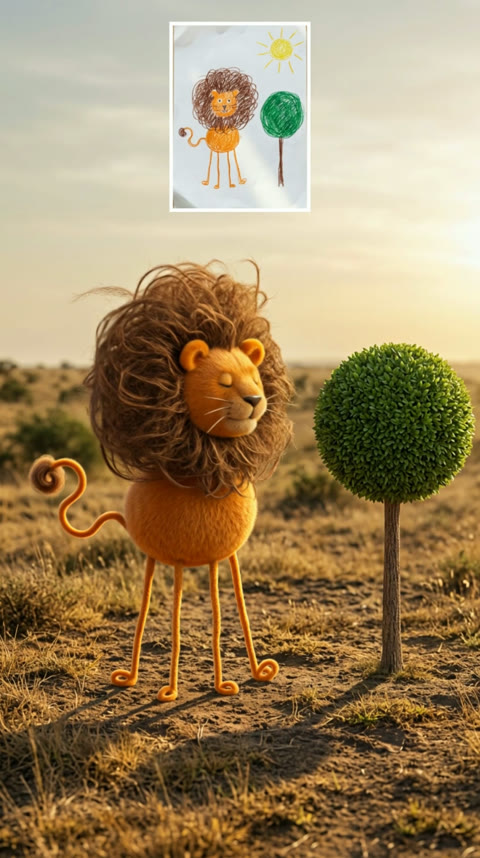
8s · 9:16 · 720p · original sound · ready in a few minutes
Ready to share
Captions for a Kids Drawing to Life AI video
Use a short caption that lets the drawing and its personality carry the reveal.
- “My daughter drew this and now it has a whole life of its own.”
- “When the family sketch decides it belongs in the real world.”
- “A very serious creature designed by a very imaginative artist.”
- “From crayons to a creature with places to be.”
- “This little masterpiece came alive exactly as it was drawn.”
- Name the creature in the caption so friends can recognize its most memorable detail.
- Keep the original drawing in the first frame when you post so the transformation reads immediately.
One drawing, many stories
What to bring to life
The strongest Kids Drawing to Life AI videos begin with one clear idea that already has a personality on paper.
A made-up animal
Give a unicorn-cat, rainbow fish, three-eyed puppy, or any original animal a small world where its odd proportions become its best feature.
A family monster
Turn a friendly blob, a toothy cave creature, or a tiny dragon into a character that feels ready for the next chapter of its story.
A favorite vehicle
A car with six wheels, a rocket with a smiling face, or a boat with giant windows can become a playful miniature scene while its drawing details stay visible.
A classroom creation
Use one child’s standalone project for a warm before-and-after reveal that lets the artist’s choices remain the center of the moment.
How it works
Make a Kids Drawing to Life AI video in three steps
Start with one drawing, let the original design lead the character, and receive a short video that keeps both versions together.
Add one clear drawing
Upload a photo or scan of one complete page. A single animal, monster, character, or simple vehicle gives Kids Drawing to Life AI a clear subject while the visible outline, colors, and unusual proportions remain part of the finished creature.
Generate the living character
Press Generate to turn the drawing into the full Kids Drawing to Life AI scene. SameVid follows the paper-card reveal, the sunny setting, and the gentle creature movement for 220 credits, with no prompt or timeline to prepare.
Watch and share the reveal
Open My Work to play the eight-second MP4 with the original sound. The drawing card stays in view while its matching creature moves in the main scene, making the transformation easy to show to family, classmates, or friends.
From paper to movement
Where Kids Drawing to Life AI comes from
The idea of treating children’s drawings as characters has a long creative history, and AI adds a quick moving reveal.
The charm is keeping the strange details
Kids Drawing to Life AI works because a child’s choices stay visible. A lion with wire legs, a dog with an oversized nose, or a monster made from three bright colors carries more personality than a polished redesign. The transformation treats those choices as the character’s identity and gives them a world where they can move.
The “children’s drawings come to life” idea appeared well before current video tools. A Bright Side video shared the visual premise in 2018, and a DW report covered Tom Curtis’s playful realistic interpretations in 2021.
From a still page to an active character
Meta AI published research in 2021 about animating children’s drawings with actions such as dancing, jumping, and running. Later work such as DrawingSpinUp explored turning a single character drawing into a three-dimensional animated subject. Kids Drawing to Life AI uses the same broad creative promise in a compact social-video format: keep the drawing recognizable, let one character move, and hold the original beside the result.
Current posts often use phrases such as “kids drawings come to life” and “children’s drawings became reality.” The simplest reveal remains the clearest one: a drawing card, the same creature in a living setting, and one small movement that makes its personality feel real.
Creator picks
Kids drawings that became living creatures
These short TikTok examples show several ways artists keep the drawing visible while its animal or creature steps into a new setting.
@happylily86
A daughter’s sketches switch between the page and lively creature results, making the original lines and colors easy to compare with each reveal.
@doodlewild
Farm-animal sketches become textured animals outdoors, a useful example of letting a bold shape and a playful drawing detail lead the final creature.
@happylily86
A simple animal sketch and its lively counterpart keep the visual joke readable through a direct page-to-creature comparison.
Prepare the page
Drawing tips for the clearest reveal
A clear view of the original art gives the living creature more of the child’s own design to carry into the scene.
- Photograph the whole sheet from above so the paper edges and the complete drawing are easy to see.
- Choose one main creature, character, or vehicle with a readable outline and a few colorful details that make it memorable.
- Use even daylight or a bright room so pencil lines, crayon colors, and small marks stay clear in the upload.
- Keep the artist’s unusual proportions and extra details in the picture; those are the features that make the living version feel personal.
- Choose a page where the drawing has enough open space around it for its outline and limbs to read clearly.
- Use a clean, flat photo of the artwork so the transformation begins with a clear, complete character design.
FAQ
Kids Drawing to Life AI FAQ
What is Kids Drawing to Life AI?
Kids Drawing to Life AI turns one child’s drawing into a short video where its animal, monster, character, or simple vehicle appears as a living three-dimensional subject. The original drawing stays visible in a small paper card while the same design moves in its scene.
How do I make a Kids Drawing to Life AI video?
Add one clear photo or scan of a drawing, then press Generate. SameVid uses the drawing as the character reference and creates an eight-second vertical Kids Drawing to Life AI video for 220 credits. The result appears in My Work for playback and download.
What kind of drawing works best?
A full-page drawing with one clear animal, monster, character, or simple vehicle works beautifully. A photo from directly above in even light keeps its outline, colors, and unusual details ready for the living version.
Can I use a drawing with a silly shape or unusual colors?
Yes. The playful proportion, color choice, and unexpected detail are the heart of Kids Drawing to Life AI. A giant mane, tiny legs, three eyes, bright stripes, or an imaginative wheel layout gives the finished creature its personality.
Does the video keep the original drawing visible?
Yes. The reference story keeps the artwork in a paper card at the upper-right while the matching creature appears in the main scene, so viewers can see the transformation at a glance.
How long is the Kids Drawing to Life AI video?
Each video runs for eight seconds. That length gives the original card, the living creature, and its final playful expression a focused sequence that is easy to share.
What quality does the video use?
Kids Drawing to Life AI creates a 720p vertical MP4. The finished file is prepared within a 3MB delivery limit for convenient viewing and sharing.
How many credits does Kids Drawing to Life AI cost?
One eight-second Kids Drawing to Life AI video costs 220 credits. The price is shown on the Generate button before the task starts.
Same category
More Transformation templates
 NEW350 CR
 NEW160 CR
 NEW270 CR
 NEW140 CR
 NEW160 CR
 NEW320 CR
 NEW400 CR
Keep scrolling
More viral AI video trends
 NEW140 CR
 NEW320 CR
 NEW220 CR
 NEW380 CR
 NEW400 CR
 NEW140 CR
 NEW270 CR
 NEW220 CR
 NEW380 CR
 NEW300 CR
 NEW400 CR
 NEW270 CR