
Funny · New
Ali G AI Video Generator
Ali G AI turns one photo of you into a 5-second Ali G driving scene: you sit behind a chunky blue steering wheel, stare into the camera with a straight face, then lose it to the beat and bang your head as the shot cuts from the front to the side and back again, with the music under it.
Ali G AI · 5s · 9:16
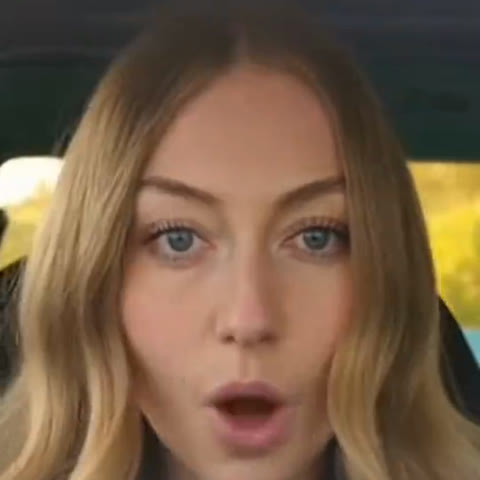
5s · 9:16 · 720p · original sound · ready in a few minutes
Moves
The Ali G driving scene, shot by shot
Five seconds, four camera angles and one big beat drop. These are the moments your video copies exactly.
The deadpan stare
A close shot through the windscreen: both hands on the thick blue steering wheel, eyes on the camera, a calm face that gives nothing away. It holds just long enough for the joke to build.
The side cut
The camera jumps to the passenger side as the beat kicks in. The driver turns and starts to move, hair swinging, still gripping the wheel.
The head-bang
Back to the front for the drop: the head nods hard with the bass, the mouth opens, both hands stay locked on the blue wheel. This is the part everyone shares.
The final wipe
One last side angle as the driver throws a hand across the frame, ending the clip on full energy so it loops straight back into the stare.
Steps
How to make an Ali G AI video
One photo in, one driving scene out. No prompt, no editing app.
Add one photo
Pick a clear photo of one person, face toward the camera, showing the head and shoulders.
Press Generate
The Ali G AI video costs 140 credits, and the price shows on the button before you start.
Wait about five minutes
Kling edits the driving scene so the car, the blue wheel, every camera angle and every head-bang stay as they are, and only the driver becomes you.
Download from My Work
Your 5-second vertical MP4 at 720p comes with the music laid back under it, ready for TikTok, Reels or Shorts.
Ideas
Who to put behind the wheel
The joke works best on someone everyone knows as calm, serious or the designated driver.
Yourself, fresh from the driving test
The trend started with captions like "me on my way to pick up my friend after getting my license". Your own face is the most direct version of that joke.
The friend who always drives
Put the person who does the school run or the late-night pickup behind the blue wheel and send it to the group chat.
A parent or grandparent
The quieter they are in real life, the bigger the laugh when they start head-banging at the wheel.
Your boss or teammate
A Friday message for the team channel: the colleague who runs every meeting, now banging their head on the commute.
Background
Where the Ali G driving scene comes from
A car scene from 2002
Ali G is the comedy character created by Sacha Baron Cohen. In the film Ali G Indahouse, released in the UK on 22 March 2002, he cruises through his home town in a small hatchback with a chunky pale blue steering wheel, nodding harder and harder to a pounding jungle track. That shot of a straight-faced driver who suddenly starts head-banging became one of the most quoted moments of the film.
Why it is back in 2026
In late August 2026 TikTok users began posting the original clip with captions about new drivers on their way to pick up friends, like this post by @sxm.edtz from 25 August. Interest grew ahead of the new film Ali G: Who Iz I?, released in cinemas on 23 October 2026, and from mid-October creators started using AI to swap their own faces into the driving scene. The AI version spread fast because it needs only one photo and the payoff, the beat drop and the head-bang, lands in a few seconds.
How the SameVid version is made
This template uses a 5-second driving clip with a blue steering wheel and four quick camera angles. Kling edits that clip so the car interior, the light, the camera cuts and the timing of every head movement stay as filmed, and only the driver changes to the person in your photo: their face, hair and skin tone come from your photo. The music is laid back under the finished video, so it is ready to post as soon as it lands in My Work.
Photo
Photo tips for a sharp Ali G AI video
The driving scene is a close shot, so the face carries the whole video.
- Use one person facing the camera, with the head and shoulders in frame.
- Choose soft, even light on the face, like a window or an overcast day.
- Pick a sharp photo at least 720 pixels wide so the close-ups stay crisp.
- A neutral or serious expression makes the head-bang moment even funnier.
- Sunglasses, masks or a hand over the face, which hide the features the video needs.
- Only have a group photo? Upload it and crop to the one person you want behind the wheel, right here.
Ideas
Ways to share your Ali G driving video
Five seconds with a beat drop fits almost anywhere a short loop does.
New driver announcement
Passed the test? Post the clip with "license unlocked" and let the head-bang say the rest.
Pickup message
Send it before you leave to collect someone: "on my way". It plays right inside WhatsApp, iMessage and Messenger.
TikTok and Reels trend post
Post it with the driving scene caption of the week and #alig so it sits next to the other Ali G AI videos.
Road trip countdown
Open a holiday or road trip story with the driver who will be at the wheel.
Birthday surprise
Put the birthday person behind the blue wheel and drop it in the family chat in the morning.
Loop it as a reaction
The clip ends where it begins, so it works as a looping reaction whenever a good song comes on.
Also called
Other names for the Ali G AI trend
The same driving scene goes by several names on TikTok and in search.
Ali G driving scene AI
The full name of the trend: an AI video that puts a new face into the Ali G car scene.
Ali G car dance
Used for the head-banging part of the scene, when the driver starts moving to the beat.
Ali G Indahouse scene
Named after the 2002 film whose opening drive the trend is based on.
Blue steering wheel trend
A nickname from the chunky pale blue steering wheel that makes the scene easy to recognize.
Ali G Who Iz I
The title of the 2026 film; TikTok posts use #whoizi next to #alig for the same driving videos.
Booyakasha
Ali G’s catchphrase, often added to captions of the AI driving clips.
FAQ
Ali G AI FAQ
What is Ali G AI?
Ali G AI is an AI video template that puts the face from one photo into the Ali G driving scene: a straight-faced driver behind a blue steering wheel who suddenly starts head-banging to the beat, across four quick camera angles, with music.
How do I make the Ali G driving scene with AI?
Add one clear photo of one person, press Generate (140 credits) and download the 5-second clip from My Work after about five minutes.
What changes and what stays the same?
The driver’s face, hair and skin tone change to match your photo. The car interior, the blue steering wheel, the four camera angles, every head movement and the music stay as in the original driving clip.
Is this the original film clip?
No. The video is a new AI clip in the style of the famous driving scene, with you as the driver; it does not contain footage from the film.
Which photo works best?
A sharp photo of one person facing the camera, head and shoulders in frame, in soft even light and without sunglasses.
Does the video have sound?
Yes. The finished MP4 comes with the music laid under the head-bang, so it is ready to post.
How long is the video and what format is it?
Each Ali G AI video is 5 seconds long, a 9:16 vertical MP4 at 720p that fits TikTok, Reels and Shorts.
How many credits does an Ali G AI video cost?
One Ali G AI video costs 140 credits. The price shows on the Generate button, a failed video returns the credits to your balance, and more credits are in credit packs.
Same category
More Funny templates
 NEW220 CR
 NEW380 CR
 NEW300 CR
 NEW270 CR
 NEW380 CR
 NEW320 CR
 NEW300 CR
 NEW320 CR
 NEW350 CR
 NEW400 CR
 NEW380 CR
 NEW400 CR
Keep scrolling
More viral AI video trends
 NEW220 CR
 NEW400 CR
 NEW400 CR
 NEW220 CR
 NEW400 CR
 NEW400 CR
 NEW140 CR
 NEW270 CR
 NEW220 CR
 NEW380 CR
 NEW400 CR
 NEW220 CR