
Effects · New
Giant AI Video Generator
Turn 1 photo into a 10-second Giant AI video towering above city skyscrapers: crush an empty taxi at street level, lock eyes with a news helicopter, and lean on a glass tower in 720p vertical MP4 with sound for 270 credits.
Giant AI · 10s · 9:16
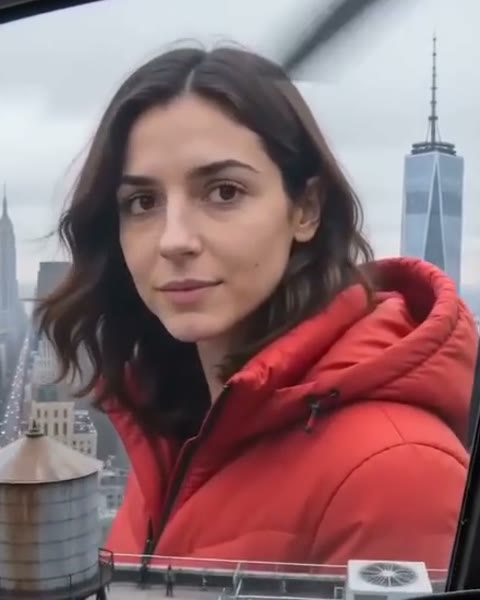
10s · 9:16 · 720p · original sound · ready in a few minutes
Deliverables & specs
What goes into Giant AI and what comes out
One clear full-body photo goes in; a finished 10-second vertical city-giant clip with synced breaking-news audio comes out.
You upload
- 1 clear full-body or knee-up photo of one person standing upright in bright, even lighting so your face, hairstyle, outfit, and shoes stay consistent across every camera angle.
- Front-facing posture with eyes unobstructed and clean contrast against the background so both street-level wide shots and the helicopter window close-up read sharply.
- Your favorite recognizable everyday outfit—bold jackets, hoodies, or sneakers scale up dramatically against overcast glass skyscrapers.
You get
- A complete 10-second vertical 9:16 MP4 at 720p powered by Kling 4.0 reference-to-video, built across three breaking-news camera angles without prompt writing or timeline editing.
- Full breaking-news sound design synced directly into the MP4: thunderous footsteps, crunching metal and glass, car alarms, fleeing street crowds, and overhead helicopter rotors.
- Automatic credit protection—if a render ever fails to finish, your credits return to your account automatically so you can retry right away.
| Photos | 1 full-body photo |
|---|---|
| Model | Kling 4.0 |
| Duration | 10 seconds |
| Picture | 720p, 9:16 vertical |
| Audio | Synced city & helicopter SFX |
| File | MP4, ready to post |
| Credits | 270 per video, refunded if it fails |
Same category
More Effects templates
 NEW220 CR
 NEW10 CR
 NEW320 CR
 NEW380 CR
 NEW140 CR
 NEW220 CR
 NEW140 CR
 NEW160 CR
 NEW160 CR
 NEW400 CR
 NEW10 CR
 NEW160 CR
Who to cast
Best people and characters to turn into a city giant
Giant AI turns a single uploaded photo into an AI giant video—ideal for starring yourself, ending group-chat height jokes, or animating a character.
Yourself towering over downtown
Drop in a crisp full-body outfit photo and watch yourself step across a crowded downtown avenue, dwarf yellow cabs, and look straight through a hovering news chopper windshield.
The shortest friend in the group chat
End years of height jokes in ten seconds flat. Upload a full-body shot of your shortest friend so they finally stand taller than every glass skyscraper on the block.
A friend who just moved to a big city
Celebrate a big move, new job, or city trip by turning a traveler or new city resident into a skyscraper-sized headline act straddling the morning commute.
Your partner or family member
Create an unforgettable birthday roast or weekend surprise by putting a partner, sibling, or parent into a dramatic breaking-news city walk with their real jacket and sneakers.
Cosplay looks or original characters
Upload a clean full-body cosplay portrait or original illustrated character to produce widescreen-quality vertical shorts for story channels, fan edits, and megalophobia feeds.
How it works
Make your Giant AI video in three quick steps
Go from a single camera-roll photo to a three-shot breaking-news clip with sound in minutes—zero prompting or editing needed.
Upload 1 full-body photo
Select a sharp, well-lit full-body or knee-up photo (JPG, PNG, or WebP up to 20 MB) in the You upload box. Choose a single-person shot where your face and outfit are clearly visible.
Kling 4.0 builds all three giant angles
Click generate and let our Kling 4.0 reference pipeline map your face, hairstyle, and wardrobe across the shaky street-level taxi stomp, the rooftop news-helicopter close-up, and the low-angle glass-tower stance.
Download your 720p MP4 with audio
Within a few minutes your finished 10-second 9:16 Giant AI clip arrives in My Work with heavy footsteps, alarms, crowd audio, and helicopter rotors already mixed for instant sharing.
Photos: JPG, PNG, WebP, up to 20 MB.
Photo tips
How to pick a photo that holds sharp likeness at skyscraper scale
Because Giant AI switches from a full-body street shot to a close helicopter-window gaze, clear framing from head to shoes gives the cleanest result.
- Use a full-body or knee-up photo showing your shoes and full outfit so the street-level upward shot preserves your real clothes and proportions.
- Pick bright, even daylight or indoor lighting with your face turned straight toward the camera so the helicopter cockpit shot locks onto your exact features.
- Choose a photo with one person centered against a simple, uncluttered background so the silhouette separates cleanly against downtown towers.
- Wear distinctive colors or layered outerwear—bright jackets, crisp sneakers, and clear hairstyles stand out dramatically against overcast glass skyscrapers.
- Skip heavy sunglasses, deep hat shadows, or motion blur so your eyes and expression stay crisp when the giant turns toward the helicopter window.
- Skip crowded group shots or tightly cropped headshots—a clean solo full-body portrait keeps every limb, shoe, and garment faithful from start to finish.
Origin
Where the Giant AI city trend comes from
Megalophobia visuals, handheld breaking-news realism, and single-photo AI video models converged into one of short-form video’s biggest optical illusions.
From viral mountain sightings to Towering Giants AI shorts
Internet fascination with towering human silhouettes caught on shaky phone cameras took off with viral giant-sighting hoaxes documented on Know Your Meme. By late 2024, AI creators merged that found-footage suspense with megalophobia art into the "Towering Giants" short-form niche tracked across YouTube, pairing overcast skyline visuals with booming footsteps and panicked street audio.
Early versions required chaining image generators, LoRAs, video models, and sound-effect editors together just to animate a few seconds of a fictional colossus.
Three-shot breaking-news realism with your own face
Throughout mid and late 2026, vertical AI giant video clips surged across YouTube Shorts and short-form feeds as reference-driven video models unlocked consistent multi-shot identity transfer. Instead of watching a generic monster, viewers started dropping themselves or their friends into a three-shot news sequence—stepping on a curb taxi, filling a helicopter windshield, and leaning on a mirrored skyscraper.
That mix of instant scale anchors (tiny cabs, rooftop water towers, circling choppers) and everyday streetwear is what makes a Giant AI video stop the scroll in the first two seconds.
Also called
Other names people use for the Giant AI trend
Creators describe this skyscraper-scale effect under several closely related names across short-form video platforms.
City Giant / Urban Giant
Highlights the modern downtown setting—crowded crosswalks, yellow cabs, glass office towers, and overcast street lighting that sell the giant’s massive scale.
Giant City Walk
Focuses on the motion of a colossal person striding down a metropolitan avenue while traffic and commuters scatter below.
Towering Giants
The broader megalophobia visual genre pairing extreme upward camera angles, fog-lined skylines, and heavy environmental sound effects.
AI Giant Person Effect
Used by creators looking specifically to turn a real full-body portrait of themselves or a friend into a giant rather than generating a fictional creature.
Ready to tower over the city skyline?
Upload 1 full-body photo and generate a 10-second Giant AI video in 720p with synced breaking-news sound for 270 credits.
FAQ
Giant AI FAQ
How many photos do I need for Giant AI?
Giant AI requires 1 clear full-body or knee-up photo of one person. A well-lit, front-facing shot with your outfit and shoes visible produces the sharpest face likeness in the helicopter window and the cleanest proportions in the street-level shots.
Do I need to write prompts or edit the three camera angles myself?
Giant AI automates all three breaking-news camera angles and sound, so you upload 1 photo with zero prompting or editing. The overcast city skyline, camera cuts, and full sound mix are built right into the template.
How long is the generated Giant AI video, and does it include sound?
Every Giant AI render is a 10-second vertical 9:16 MP4 at 720p resolution with synced environmental audio—heavy footsteps, crunching metal, car alarms, fleeing street crowds, and helicopter rotors.
Will my face and outfit stay recognizable across all three shots?
Yes. Kling 4.0 reference-to-video carries your facial features, hairstyle, jacket, pants, and sneakers from the opening street stomp through the close helicopter windshield gaze and the final skyscraper stance.
How many credits does one Giant AI video cost?
One 10-second 720p Giant AI video costs 270 credits. You always see the exact credit total before generating, and failed renders refund automatically.
Can I use Giant AI for a friend, partner, or cosplay character?
Yes. Any clear solo full-body portrait—whether yourself, a friend with permission, or a detailed cosplay or character image—works smoothly in the single upload slot.
Is my uploaded photo kept private?
Your uploaded photo is used only to generate your Giant AI video and stays private to your account.
Keep scrolling
More viral AI video trends
 NEW140 CR
 NEW270 CR
 NEW320 CR
 NEW190 CR
 NEW140 CR
 NEW270 CR
 NEW380 CR
 NEW100–400 CR
 NEW100–400 CR
 NEW220 CR
 NEW320 CR
 NEW100–400 CR