
Transformation · New
Marlon Street AI Video Generator
Upload one portrait to create a 14-second Marlon Street AI night walk video. Your person walks down a glowing city sidewalk in a front-facing selfie shot, turning toward the streetlights with a confident smile in a 720p vertical MP4 set to "Magic Johnson" by ian for 380 credits.
Marlon Street AI · 14s · 9:16
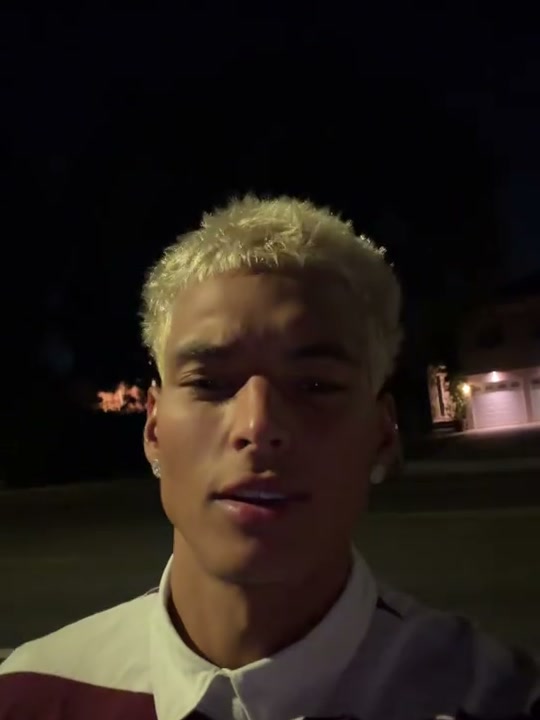
14s · 9:16 · 720p · original sound · ready in a few minutes
The Street Walk
Four beats of effortless night swagger
The reference video delivers a seamless, single-take front-camera stroll along an illuminated downtown sidewalk with steady handheld pacing.
0.0–3.5s: Step onto the avenue
Your subject enters the frame holding the front camera at arm’s length. Their face, hairstyle, skin tone, and streetwear hoodie come directly from your uploaded portrait as they step smoothly along the glowing pavement.
3.5–8.0s: The signature mog beat
As the bass drops, the protagonist turns their head slightly to the side to highlight their jawline under the golden streetlight beams, breaking into a subtle, self-assured smirk.
8.0–11.5s: Unbroken camera connection
Continuing past neon storefront reflections, the walker tilts their head back with effortless confidence, locking direct eye contact with the viewer with a composed, relaxed presence.
11.5–14.0s: The smooth walkout finish
A calm nod and an easy smile close out the 14-second sequence before the loop resets, leaving a clean, high-impact clip ready for social feeds.
Same category
More Transformation templates
 NEW300 CR
 NEW140 CR
 NEW350 CR
 NEW400 CR
 NEW140 CR
 NEW220 CR
 NEW400 CR
 NEW220 CR
 NEW140 CR
 NEW270 CR
 NEW190 CR
 NEW270 CR
Cast Ideas
Who looks best in the Marlon street stroll
Whether you want serious runway energy or hilarious contrast, one clean portrait is all it takes.
Yourself
Experience what it feels like to have peak street aura and effortless swagger walking down a metropolitan boulevard at midnight.
A friend or group chat mate
Surprise your best friend by turning their everyday selfie into a high-fashion, looksmaxxing runway walk that becomes an instant inside joke.
Favorite athletes & footballers
Recreate viral sports edits featuring Premier League or NBA stars strolling confidently through night streets like off-duty superstars.
Gaming & fictional characters
Drop classic video game heroes or anime protagonists into real-world nighttime street scenes for surreal, viral short-form humor.
Input Advice
How to pick the best photo for Kling 4.0
Kling 4.0 maps facial landmarks and contours onto the 3D walking motion. High-clarity inputs yield the sharpest results.
- Use a clear, front-facing selfie or portrait with even lighting across both sides of the face.
- Choose photos where the eyes, eyebrows, nose, and jawline are unobstructed by heavy shadows or hair.
- Avoid photos with dark sunglasses, face masks, or hands covering the mouth or cheeks.
- Avoid low-resolution, blurry, or heavily filtered screenshots that obscure facial textures.
Quick Walkthrough
Generate your Marlon Street AI video in 3 steps
Create your 14-second vertical clip with synchronized background music in minutes.
Upload one portrait
Select a clean JPG, PNG, or WebP photo of one person. The face and distinctive features will be transferred seamlessly onto the street walker.
Generate with Kling 4.0
Click Generate to start the task. Kling 4.0 Video Edit precisely transfers the facial identity while preserving the authentic handheld night walk camera motion. The button confirms the 380-credit cost before you begin.
Download and share
Once processing completes, your video is saved to My Work with ian’s "Magic Johnson" track pre-merged. Preview it directly, download the MP4, and post to TikTok, Instagram Reels, or YouTube Shorts.
Photos: JPG, PNG, WebP, up to 20 MB.
Meme Background
Where the Marlon street walking trend came from
How a Swedish streamer’s midnight IRL broadcasts became the internet’s favorite aura meme.
The Stockholm night walk
The trend originated from Marlon Lundgren Garcia (@marlon3lg), a Swedish internet personality, streamer, and former collegiate basketball player. While doing IRL livestreaming through the streets of Stockholm, Marlon frequently held his phone high in front-camera mode, walking with high-energy confidence and composed facial structure.
Internet communities quickly crowned his stride as the pinnacle of "mogging" (effortlessly outshining others through posture and bone structure) and dubbed his vibe "Infinite Aura."
The TikTok AI wave and soundtrack
In spring 2026, creators began experimenting with AI face replacement tools like Kling AI and CapCut pioneer templates, swapping celebrities, athletes, and everyday selfies into Marlon’s walk.
Paired with ian’s hit single "Magic Johnson" (famous for the lyric "I'm just tryna be myself"), the template exploded across TikTok and YouTube Shorts, racking up tens of millions of views as users turned the stroll into a universal symbol of confidence.
Also Known As
Alternative names for the Marlon Street trend
Creators and communities search for this viral format under several popular phrases.
Marlon AI Walk
The common creator term for generating a simulated front-camera night stroll using one still photo.
Infinite Aura Trend
The meme descriptor highlighting the unbothered, effortless swagger and confidence radiating from the walking subject.
Marlon Mogging Walk
The Looksmaxxing subculture phrase celebrating the sharp jawline reveal and confident facial turn during the beat drop.
Stay On That Side AI
Named after the viral caption phrase frequently paired with Marlon’s original TikTok street walk videos.
Ready to Walk?
Create your Marlon Street AI video today
Upload your favorite photo and let Kling 4.0 bring your night walk to life in 720p HD with original audio for 380 credits.
FAQ
Marlon Street AI FAQ
What photo works best for Marlon Street AI?
A sharp, high-resolution portrait or selfie with clear lighting and a neutral, forward-facing expression works best. Avoid photos where hair, hats, sunglasses, or hands cover key facial features.
How many photos do I need to upload?
Only 1 photo is required. Kling 4.0 transfers your facial likeness and proportions onto the 14-second walking video.
Does the generated video include the original background music?
Yes. The final MP4 automatically remuxes ian’s viral track "Magic Johnson" in high-fidelity stereo sound, matching the exact rhythm of the TikTok trend.
What video resolution and format will I receive?
You will receive a 720p vertical MP4 (9:16 aspect ratio, 576×1024), fully formatted for instant sharing on TikTok, Instagram Reels, and YouTube Shorts.
How many credits does one generation cost?
Generating a 14-second Marlon Street AI video costs 380 credits. The credit amount is displayed on the button before you confirm generation.
Keep scrolling
More viral AI video trends
 NEW240 CR
 NEW400 CR
 NEW270 CR
 NEW380 CR
 NEW350 CR
 NEW270 CR
 NEW380 CR
 NEW240 CR
 NEW320 CR
 NEW400 CR
 NEW270 CR
 NEW240 CR