
Effects · New
AI Skeleton Face Filter Video Generator
Turn one clear portrait into a 10-second 3D skeleton face narrator clip. Kling 4.0 maps your facial structure onto a stylized speaking skull with synced jaw motion and included audio in a 720p vertical MP4 for 270 credits.
AI Skeleton Face Filter · 10s · 9:16
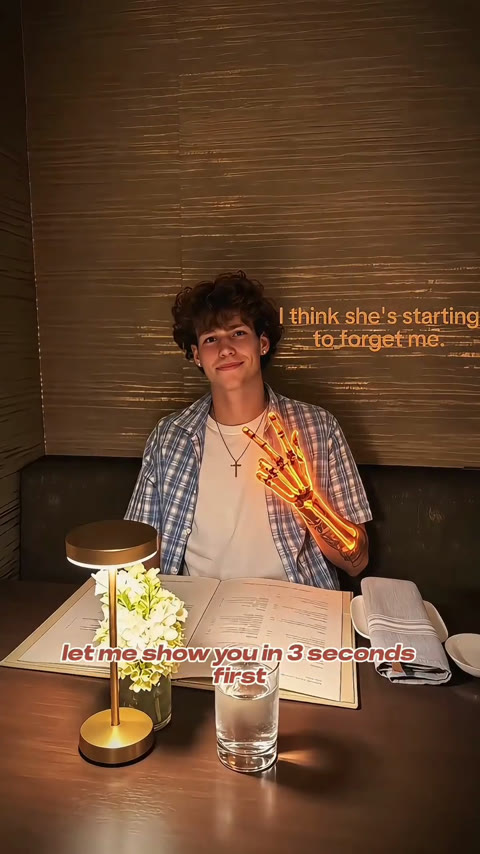
10s · 9:16 · 720p · original sound · ready in a few minutes
Examples
See the 3D skeleton narrator transformation
Watch how a single portrait becomes an expressive 3D skeleton face narrator with synchronized jaw movement, dramatic lighting, and steady portrait framing.
3D Skeleton Face Narrator
The reference clip holds a tight vertical portrait while the face renders as a crisp 3D skull with expressive mouth movement, deep eye sockets, sculpted cheekbones, and smooth conversational pacing from start to finish.
Same category
More Effects templates
 NEW220 CR
 NEW10 CR
 NEW320 CR
 NEW380 CR
 NEW140 CR
 NEW220 CR
 NEW140 CR
 NEW270 CR
 NEW160 CR
 NEW160 CR
 NEW400 CR
 NEW10 CR
Scene breakdown
How the 10-second narrator clip unfolds
The template locks the camera angle, lighting contrast, and narrative timing so your uploaded portrait carries the full 10-second monologue.
Portrait lock and 3D bone surface
In the opening seconds, the camera settles into a clean front-facing close-up. Your uploaded portrait anchors head tilt, shoulder framing, and proportion while the skin surface transitions into detailed, matte-textured 3D bone.
Expressive jaw and brow animation
Through the middle beat, the skull jaw, cheekbones, and brow ridge move in tight sync with the included voiceover track. Subtle head nods and conversational pauses give the animated skeleton genuine comedic and storytelling timing.
Consistent studio lighting to the close
Directional rim lighting and soft shadows across the cheekbones and teeth stay balanced across all 10 seconds. The frame finishes cleanly with the skeleton narrator still centered, keeping the clip ready to loop or cut into a longer edit.
Photo tips
Choose the right portrait photo
Clear, centered portraits give Kling 4.0 accurate facial landmarks so the 3D skeleton alignment stays sharp throughout the clip.
- Pick a crisp front-facing portrait or head-and-shoulders photo looking straight toward the camera lens.
- Use even indoor or daylight illumination so the jawline, eyes, nose bridge, and hairline read clearly.
- Leave a modest margin above the top of the head and around the shoulders so vertical 9:16 framing fits naturally.
- Heavy sunglasses, masks, hands, or loose hair falling across the eyes and mouth that hide facial landmarks.
- Low-resolution screenshots, motion blur, or extreme side-profile angles where half the face is out of view.
How it works
Make your skeleton narrator video in three steps
Go from a single portrait photo to a finished 10-second 720p skeleton narrator MP4 for 270 credits.
Upload one clear portrait
Select a JPG, PNG, or WebP photo up to 20 MB with at least 300 pixels on each side. A bright, front-facing human portrait with clear eyes, nose bridge, and jawline gives the 3D skeleton mapping the strongest bone and jaw alignment.
Generate with Kling 4.0
Check the 270-credit cost on the button and start rendering. Kling 4.0 references the skeleton narrator clip for camera angle, studio lighting, and rhythmic jaw animation while preserving your portrait framing and head posture throughout all 10 seconds.
Review, download, and post
When rendering finishes, open My Work to preview the 10-second 9:16 MP4 with the included narration audio track already muxed in. Save the clean, watermark-free file directly to your device and share.
Photos: JPG, PNG, WebP, up to 20 MB.
Content ideas
Ways creators use the skeleton face filter
Because the 3D skull keeps an expressive, deadpan presence, one 10-second clip works across trivia, comedy, and spooky seasonal edits.
Bite-sized history and weird facts
Pair the skeleton narrator with surprising historical anecdotes, ancient mysteries, or science trivia. Viewers stay glued to the synced jaw movement while taking in fast educational hooks.
Deadpan storytime and hot takes
Deliver sarcastic commentary, relatable work stories, or dry humor through a talking 3D skull. The contrast between serious studio lighting and ridiculous observations lands the punchline immediately.
Halloween intros and gaming clips
Drop the 10-second vertical video at the start of a spooky countdown, horror game recap, or lore breakdown to set an atmospheric mood without building a 3D rig from scratch.
Motivational and late-night thoughts
Turn late-night philosophical quotes or gym reminders into memorable stylized visuals that stand out in vertical feeds compared to standard talking-head footage.
Specifications
What goes in and what comes out
One portrait input delivers a complete 10-second AI skeleton filter video at 720p for 270 credits.
You upload
- 1 front-facing portrait photo (JPG, PNG, or WebP, max 20 MB)
- Minimum 300 pixels per side with an unobstructed view of the eyes, nose, and mouth
- Neutral or lightly expressive face with balanced lighting
You get
- A 10-second vertical 9:16 MP4 video rendered at 720p resolution
- Seamless 3D skeleton facial transformation anchored to your portrait geometry
- Expressive jaw and mouth animation synced with the included audio track
- Clean output without third-party watermarks or burned-in subtitles
| Photos | 1 portrait |
|---|---|
| Model | Kling 4.0 reference-to-video |
| Duration | 10 seconds |
| Resolution | 720p (9:16 vertical) |
| Audio | Included narration track |
| Format | MP4 |
| Credits | 270 per video, refunded if it fails |
FAQ
AI Skeleton Face Filter FAQ
How many photos do I need for the AI Skeleton Face Filter?
This template uses exactly 1 photo. Upload a single clear, front-facing human portrait so Kling 4.0 can map your head angle, eye spacing, and jawline proportions cleanly onto the 3D skeleton character.
What resolution, duration, and aspect ratio does the video have?
Every finished generation is a 10-second vertical 9:16 MP4 at 720p resolution, with the synchronized narration audio track already merged into the downloadable file.
How many credits does one generation cost?
Generating one 10-second AI Skeleton Face Filter video costs 270 credits. The exact credit amount is always displayed on the Generate button before you start rendering.
What kind of portrait produces the cleanest skeleton alignment?
A sharp, well-lit head-and-shoulders photo looking straight at the camera produces the best alignment. Keeping hair, sunglasses, and hands away from your eyes and jaw helps the 3D bone texture and mouth movement stay crisp across all 10 seconds.
Does the finished video include sound and stay free of watermarks?
Yes. The original audio track is merged into your finished MP4 automatically, and the exported file contains no SameVid or third-party watermark overlays so you can post or edit right away.
Keep scrolling
More viral AI video trends
 NEW380 CR
 NEW100–400 CR
 NEW100–400 CR
 NEW220 CR
 NEW320 CR
 NEW100–400 CR
 NEW380 CR
 NEW160 CR
 NEW380 CR
 NEW270 CR
 NEW400 CR
 NEW350 CR