
Effects · New
AI Fluffy Video Generator
Upload one clear portrait to create the 5-second AI Fluffy video in 720p portrait with synced audio for 140 credits. You cup your hands, a glowing fluffy heart appears, and it transforms into a blue-eyed white kitten.
AI Fluffy · 5s · 9:16
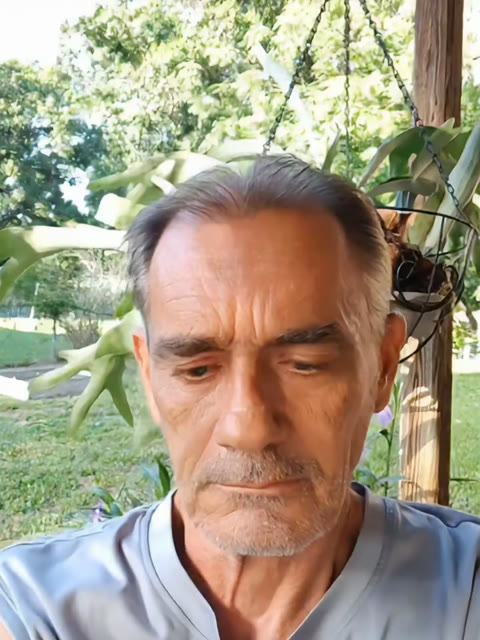
5s · 9:16 · 720p · original sound · ready in a few minutes
Examples
See the AI Fluffy transformation in action
Watch how a single portrait becomes a five-second magic reveal with a glowing fluffy heart and a tiny white kitten.
Palm-to-Kitten Fluffy Reveal
A 5-second 9:16 portrait clip shot in natural outdoor daylight: from 0 to 1.5 seconds the subject looks down gently and brings both empty cupped hands together in front of their chest; from 1.5 to 3.5 seconds a glowing, soft white fluffy heart-shaped cloud materializes in their palms and expands; and from 3.5 to 5.0 seconds the cloud dissolves cleanly into a tiny, ultra-fluffy white kitten with bright blue eyes while the subject lifts their gaze straight to the camera.
Same category
More Effects templates
 NEW220 CR
 NEW10 CR
 NEW320 CR
 NEW380 CR
 NEW140 CR
 NEW220 CR
 NEW140 CR
 NEW270 CR
 NEW160 CR
 NEW160 CR
 NEW400 CR
 NEW10 CR
How it works
How to make an AI Fluffy video in three steps
Upload one clear photo and let the template render the complete 5-second palm-magic clip with synced sound automatically.
Upload one clear photo
Drop a well-lit half-body or front portrait (JPG, PNG, or WebP, at least 300 px wide, up to 10 MB) with your face, hair, and shoulders clearly visible and comfortable space around the upper body.
Generate with Kling 4.0
Click Generate to spend 140 credits. Kling 4.0 reference-to-video maps your face, hairstyle, skin tone, and upper-body clothing onto the 5-second waist-up transformation in 720p vertical 9:16 format with synced original audio.
Download and post
Once rendering finishes, preview the clean 5-second MP4 with zero watermarks or text overlays, save it straight to your device, and share it to Reels, Shorts, or group chats with a single tap.
Photos: JPG, PNG, WebP, up to 20 MB.
From TikTok
Popular AI Fluffy clips from creators
Creators are remixing the fluffy aesthetic into palm-magic reveals and 3D plush character dances.
@donsands
Clean single-shot AI Fluffy filter reveal set outdoors in bright daylight: a glowing white fluffy heart blooms smoothly inside cupped hands and turns into a bright-eyed white kitten sitting calmly in the palms.
@pongo228
3D fluffy character dance remix showing how the cozy plush texture aesthetic carries seamlessly into playful studio character clips, stylized avatars, and tactile felt-inspired animations.
Variants
More playful AI transformation templates
Explore other viral plush, pet, and tactile AI video effects built with the same one-photo workflow.
 NEW140 CR
 NEW270 CR
 NEW380 CR
 NEW220 CR
 NEW270 CR
 NEW320 CR
Ready to post
Captions ready to copy and post
Copy one of these short hooks to build suspense before the white fluffy heart turns into a blue-eyed kitten.
- “#New #AI #filter AI Fluffy”
- “Wait for what appears in my hands 🤍🐱 #aifluffy #fluffyfilter #fyp”
- “Everything feels softer with the AI Fluffy effect ✨🐾 #plushie #aivideo”
- “POV: a tiny fluffy cloud turns into a blue-eyed kitten in your palms #fluffy #catsoftiktok”
- “Tried the viral AI Fluffy trend with one photo and it actually worked ☁️✨”
- “Soft life era unlocked: palm-sized fluffy magic in 5 seconds #fluffyai #trending”
- Keep your hook short in the first line so viewers stay engaged right through the 3.5-second glowing heart-to-kitten reveal.
- Pair the clip with cozy or nostalgic tags like #fluffyfilter, #softlife, #plushie, and #catsoftiktok to reach pet and aesthetic feeds.
- Post the 9:16 720p MP4 natively without cropping so the cupped hands and blue-eyed kitten stay centered in vertical mobile players.
Origin
Where the AI Fluffy trend comes from
From cozy plushie aesthetics to palm-sized AI magic reveals, here is how the fluffy trend evolved online.
From plush culture to AI transformation
The AI Fluffy wave grew out of cozy "soft life" aesthetics and collectible plush toy culture between 2024 and 2026. Early creators turned selfies, coffee cups, and everyday objects into soft felt and cotton-wool textures under phrases like "Everything can be fluffy," "Jellycat AI filter," and "Plush Effect."
By late 2026, the trend evolved into short, heartwarming video reveals—most notably the 5-second palm-magic clip where a glowing white fluffy heart blooms in someone’s cupped hands and transforms into a tiny blue-eyed white kitten as they look back up toward the lens. Similar plush storytelling also reached mainstream audiences through viral animated shorts like Google Gemini’s Mr. Fuzzy’s Big Adventure on YouTube.
Why creators keep coming back to palm-magic reveals
Unlike static plush photo filters that simply apply a wool texture, this 5-second reference-to-video scene creates a full narrative arc in waist-up daylight framing: empty cupped hands, a glowing heart cloud, and a living blue-eyed kitten reveal.
Observed from public posts including @donsands on TikTok (https://www.tiktok.com/@donsands/video/7708872222596746527) and viral plush animation showcases on YouTube (https://www.youtube.com/watch?v=b9qPMHpyZ5Q).
FAQ
AI Fluffy FAQ
What photo works best for the AI Fluffy template?
Use a well-lit, front-facing half-body or chest-up portrait (JPG, PNG, or WebP, at least 300 px wide, up to 10 MB) where your face, hair, and outfit are clearly visible and the background is uncluttered. Leaving comfortable space around your shoulders helps the cupped hands and kitten reveal look natural.
How long is the generated AI Fluffy video and what resolution is it?
The generated clip is 5 seconds long in 720p vertical 9:16 portrait format, matching the exact three-beat pacing of the reference reveal (0–1.5s cupped hands, 1.5–3.5s glowing white fluffy heart, 3.5–5.0s blue-eyed kitten) with synced original audio included.
How many credits does one AI Fluffy generation cost?
Each 5-second 720p generation costs 140 credits, calculated proportionally from the 15-second 400-credit video rate with simple pay-as-you-go credit packs.
Can I make an AI Fluffy video without writing prompts?
Yes. Everything is handled automatically inside the template. You only upload one portrait photo, and SameVid builds the Kling 4.0 reference-to-video motion prompt, renders the transformation, and muxes the audio into a ready-to-share MP4.
Does the output include sound?
Yes. SameVid sends a silent reference clip to Kling 4.0 for clean visual synthesis, then automatically merges the synced audio track onto your finished 720p MP4 so you can download and post immediately.
Can I use photos of friends, family members, or stylized avatars?
Yes. Any clear solo portrait works cleanly—selfies, portraits of friends, family photos, or stylized character portraits all produce a crisp waist-up palm-to-kitten reveal.
Keep scrolling
More viral AI video trends
NEW140 CRNEW270 CRNEW380 CRNEW220 CRNEW320 CR NEW140 CRNEW270 CR
 NEW270 CR
 NEW380 CR
 NEW100–400 CR
 NEW100–400 CR
 NEW220 CR