
Transformation · New
Jellycat Plushie AI Video Generator
Upload one clear photo of your pet, yourself, or a child to this Jellycat Plushie AI Video Generator for a corduroy plush wipe reveal in the exact same pose. Get an 11-second 720p vertical MP4 with original sound for 10 credits.
Jellycat Plushie AI · 11s · 9:16
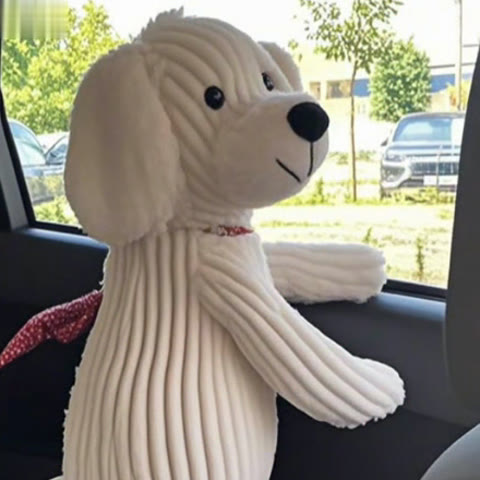
11s · 9:16 · 720p · original sound · ready in a few minutes
Who to put in
Best subjects to turn into a Jellycat Plushie AI video
One clear snapshot of a pet or person becomes a tactile corduroy AI Jellycat doll holding the original pose, colors, and real backdrop.
Dogs, cats, and bunnies with distinctive ears or markings
Pets lead the viral Jellycat filter craze. Floppy spaniel ears, corgi silhouettes, Labrador coats, Dalmatian spots, tabby stripes, and bunny ears translate directly into ribbed wide-wale corduroy, velvety fleece tufts, and glossy beaded eyes while preserving their sitting or car-window pose.
Everyday selfies and standout outfit snapshots
Pick a waist-up or full-length portrait featuring clear hair volume, colorful knitwear, hoodies, denim jackets, or glasses. The Jellycat Plushie AI Video Generator converts garments into cozy stitched plush fabric so your hairstyle silhouette stays recognizable across the plushie filter sweep.
Kids and toddlers in bright cozy clothes
Cheerful photos of kids wearing colorful hoodies, knitted beanies, or patterned sweaters become heartwarming keepsake clips. Rounded stuffed proportions, soft batting fullness, and a curved stitched smile bring the AI Jellycat aesthetic to everyday family memories.
Friends, couples, or pet-and-owner portraits together
When two people or an owner and pet sit together in bright light, the Jellycat Plushie AI effect transforms every companion in the snapshot into coordinated corduroy plushies inside the exact same car seat, sofa, or park scene.
Same category
More Transformation templates
 NEW220 CR
 NEW320 CR
 NEW140 CR
 NEW220 CR
 NEW220 CR
 NEW140 CR
 NEW380 CR
 NEW270 CR
 NEW160 CR
 NEW160 CR
 NEW270 CR
 NEW400 CR
Photo tips
How to choose a photo for the cleanest Jellycat Plushie AI reveal
Stuffed plush designs smooth fine details into rounded silhouettes, so full framing, soft daylight, and crisp outlines elevate every Jellycat filter clip.
- Leave comfortable space around the full body or upper torso so floppy corduroy ears, paws, arms, and rounded plush limbs stay completely inside the frame throughout your Jellycat Plushie AI wipe.
- For dogs, cats, and rabbits, upload a three-quarter or side-seated snapshot that reveals ear shape, coat patches, tail fluff, and collar or bandana accents for unmistakable breed recognition.
- Choose bright, even daylight against a calm setting—such as a car seat, cozy rug, armchair, or sunlit lawn—so real fur or woven fabrics contrast vividly with the ribbed corduroy plushie filter reveal.
- Highlight unmistakable styling cues like curls, bangs, glasses, hats, or bold sweater colors so the completed Jellycat Plushie AI doll feels uniquely personal at a single glance.
How it works
Create your Jellycat Plushie AI wipe video in three steps
Drop in a single JPG, PNG, or WebP snapshot up to 20 MB in your browser to produce a clean 11-second corduroy plush reveal.
Pick one crisp pet or portrait photo
Choose a JPG, PNG, or WebP picture up to 20 MB from your phone or computer. Front or three-quarter framing in soft natural light gives the Jellycat Plushie AI Video Generator rich coat markings, clear ears, and sharp garment colors to work with.
Render the ribbed corduroy plushie twin
Tap Generate so Seedream 5.0 Flash re-sculpts your subject into soft wide-wale corduroy fabric, velvety fleece ears or hair, beaded safety eyes, and an embroidered smile while holding your real pose, lighting, and surrounding room steady.
Save your 11-second vertical plushie MP4
SameVid animates the seven-second reveal wipe gliding down from your original photo into the finished Jellycat Plushie AI plushie, pairs the original soundtrack, and exports a clean 720p vertical 9:16 MP4 ready for social feeds.
Photos: JPG, PNG, WebP, up to 20 MB.
Specs
What goes in and what comes out of Jellycat Plushie AI
One clear snapshot produces an 11-second vertical Jellycat Plushie AI corduroy wipe video with original audio for 10 credits.
You upload
- 1 pet, solo portrait, kid, or companion photo framed with generous breathing room
- Even daylight or clean indoor lighting showing ears, coat patterns, hairstyles, or outfit tones
- JPG, PNG, or WebP image file up to 20 MB
You get
- 1 custom ribbed-corduroy AI Jellycat plush render locked to your real camera angle, pose, and environment
- Smooth 7-second wipe revealing the stuffed plush texture over your original snapshot, followed by a 3-second showcase hold
- 11-second 720p vertical 9:16 MP4 finished with the original soundtrack and crisp framing
| Photos | 1 |
|---|---|
| Model | Seedream 5.0 Flash (Slideshow) |
| Duration | 11 seconds |
| Picture | 720p, 9:16 |
| Audio | Original trend audio |
| File | MP4 |
| Credits | 10 per video, refunded if it fails |
Ready to post
Popular captions for your Jellycat Plushie AI clip
Playful caption hooks inspired by top pet and selfie Jellycat filter reveal posts across short-form feeds.
- “My Jellycat Plushie AI version came out way too cute”
- “Meet the newest corduroy Jellycat in the collection”
- “I mean, that Jellycat filter reveal though...”
- “Tried the plushie filter on my dog and now I need a real shelf twin”
- “POV: your pet just became a limited-edition corduroy plushie”
- “Soft Jellycat Plushie AI corduroy edition unlocked from one photo”
- Put your pet’s name right up front—lines like "Bailey as a Jellycat" naturally spark comments from fellow pet owners.
- Share the 9:16 MP4 with its built-in audio track so the seven-second corduroy sweep lands cleanly on beat.
- Run two different outfits or two pets side by side and invite viewers to vote on which AI Jellycat twin looks closest.
Origin
How the Jellycat Plushie AI filter trend took off
Inspired by the global soft-toy collecting wave and catapulted by viral pet-to-plush wipe videos in early 2025.
From London plush shelves to viral soft-life culture
Founded in London in 1999, Jellycat won collectors worldwide with ultra-soft Bashful Bunnies and smiling Amuseables collectibles. Starting in 2023, the plush craze surged across Gen Z social video feeds, documented by Trill Mag and later covered by The Guardian.
How AI plushie wipe videos swept pet and selfie feeds
In December 2024, early photo-to-toy demos like this standing outfit plush clip introduced the idea of turning everyday snapshots into smiling stuffed dolls. By March 2025, single-frame wipe edits such as this corduroy car-window dog reveal and million-view multi-plush showcases like this 1.8M-view lop bunny edit made the Jellycat filter a staple for pet owners and portrait creators.
The Jellycat Plushie AI Video Generator brings that clean single-frame corduroy wipe straight to the browser, keeping your real scene intact while unveiling a tactile plush version with original audio.
Ready to see your Jellycat Plushie AI twin?
Upload one clear photo of your pet or yourself to the Jellycat Plushie AI Video Generator for an 11-second corduroy plush clip at 10 credits.
FAQ
Jellycat Plushie AI FAQ
What does the Jellycat Plushie AI Video Generator create?
The Jellycat Plushie AI Video Generator creates an 11-second vertical 720p MP4 wipe-reveal video that opens on your real photo, glides smoothly into a ribbed-corduroy Jellycat-style plushie in the exact same pose and setting, and finishes with the original trend soundtrack.
Can I use a photo of my dog, cat, or myself in Jellycat Plushie AI?
Jellycat Plushie AI works smoothly with dogs, cats, rabbits, solo selfies, children, and side-by-side companion portraits. A crisp snapshot framed with comfortable breathing room around the subject gives the corduroy plush silhouette the strongest likeness.
How many credits does one Jellycat Plushie AI video cost?
Each 11-second 720p Jellycat Plushie AI clip costs 10 credits, covering the Seedream 5.0 Flash corduroy plush render, the smooth 7-second reveal wipe, and automatic soundtrack merging. If a generation task is ever interrupted, credits return to your balance automatically.
Do I need to write prompts or install an app to run the Jellycat filter?
The Jellycat Plushie AI Video Generator runs directly inside your mobile or desktop browser with built-in plush styling. Upload a single JPG, PNG, or WebP photo up to 20 MB, tap Generate, and download the finished MP4 straight from My Work.
Is Jellycat Plushie AI a digital video effect or a shipped physical toy?
Jellycat Plushie AI produces a downloadable digital plush-transformation MP4 video crafted for social posts, pet keepsakes, and playful digital greeting cards.
How does Jellycat Plushie AI keep the plushie so recognizable?
Jellycat Plushie AI preserves your original camera angle, daylight, pose, and real-world background while transforming the subject into wide-wale ribbed corduroy, velvety fleece ears or hair, glossy beaded safety eyes, and a stitched smile for a seamless before-and-after wipe.
How is Jellycat Plushie AI different from AI Fluffy and Disney Pet AI?
Jellycat Plushie AI specializes in a single-frame ribbed-corduroy stuffed-toy wipe that holds your real setting steady for 11 seconds at 10 credits, whereas AI Fluffy focuses on a 5-second palm-to-kitten reveal and Disney Pet AI turns pets into 3D animated film characters.
Keep scrolling
More viral AI video trends
 NEW140 CR
 NEW10 CR
 NEW10 CR
 NEW270 CR
 NEW300 CR
 NEW30 CR
 NEW20 CR
 NEW380 CR
 NEW100–400 CR
 NEW100–400 CR
 NEW380 CR
 NEW320 CR