
Transformation · New
Gigachad AI Video Generator
Upload one portrait photo to the Gigachad AI Video Generator for a 6-second 720p vertical video with original bass-drop audio. Watch your shot snap from everyday color to stark black and white with a chiseled jawline and smirk for 160 credits.
Gigachad AI · 6s · 9:16
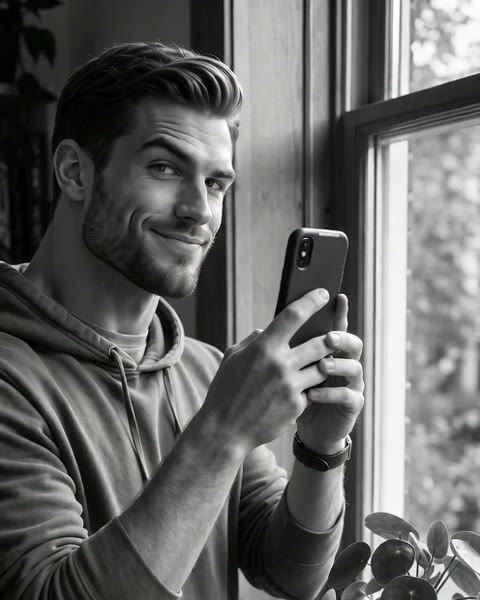
6s · 9:16 · 720p · original sound · ready in a few minutes
Input & output
One photo in, one 6-second Gigachad AI video out
Go straight from one JPG, PNG, or WebP portrait up to 20 MB to a finished Gigachad AI MP4 timed to the bass drop right inside your browser.
You upload
- One clear chest-up or head-and-shoulders photo of yourself, a friend, or a favorite character for the Gigachad AI Video Generator.
- Standard JPG, PNG, or WebP files up to 20 MB upload directly in your browser with automatic keyframe staging.
- Everyday outfits and natural backgrounds remain locked in frame so the Gigachad filter contrast lands with maximum comedic punch.
You get
- A 6-second vertical 9:16 Gigachad AI MP4 rendered at 720p, sized cleanly for short-form feeds, Reels, Shorts, and group chats.
- A locked-identity Gigachad AI transformation that holds your original color portrait for one beat before snapping to stark high-contrast black and white.
- Chiseled square jawline, sharpened cheekbones, swept-back hair, a subtle chin lift, raised eyebrow, and closed-mouth smirk synced to the original bass-drop audio.
| Photos | 1 portrait |
|---|---|
| Model | Kling 4.0 |
| Duration | 6 seconds |
| Resolution | 720p · 9:16 vertical |
| Audio | Original bass-drop track included |
| Format | MP4 video download |
| Credits | 160 per video, refunded if it fails |
Photos: JPG, PNG, WebP, up to 20 MB.
Same category
More Transformation templates
 NEW220 CR
 NEW10 CR
 NEW320 CR
 NEW140 CR
 NEW220 CR
 NEW220 CR
 NEW140 CR
 NEW380 CR
 NEW270 CR
 NEW160 CR
 NEW270 CR
 NEW400 CR
Behind the meme
Where the Gigachad AI filter meme came from
Trace how a Russian high-contrast monochrome photography series evolved into the viral Gigachad filter and today’s 6-second Gigachad AI video reveal.
SLEEK’N’TEARS and the original monochrome portraits
The visual blueprint behind every Gigachad AI portrait began with SLEEK’N’TEARS, a high-contrast black-and-white digital photography project created by Russian artist Krista Sudmalis featuring model Ernest Khalimov. Hard directional side lighting, hyper-symmetrical cheekbones, and statue-like contrast gave the portraits an unmistakable sculpted look.
In October 2017, posts on Reddit’s r/bodybuilding and 4chan coined the name "Gigachad" for the exaggerated alpha-male meme archetype. A parallel set of monochrome portraits from the same photography series also inspired the "Female Gigachad" branch of the trend.
The bass drop, the smirk, and the Gigachad AI video format
By early 2021, those monochrome portraits paired with the heavy synth intro of Bring Me The Horizon’s "Can You Feel My Heart" across "Average Fan vs. Average Enjoyer" edits and deadpan "refuses to elaborate further" punchlines. Soon after, real-time AR Gigachad filter lenses turned everyday selfies into exaggerated chiseled jawlines.
Modern Gigachad AI video templates upgrade static filters into a smooth 6-second reveal: one second of your real everyday photo, a hard bass drop into stark black and white, and a continuous shift into the signature square jaw, raised brow, and smirk while keeping your real clothes and room intact. Historical background is documented on Know Your Meme and Daily Dot.
Simple Gigachad AI credit pricing per 6-second clip
Each 720p clip from the Gigachad AI Video Generator costs 160 credits with the original bass-drop audio track merged into your MP4.
- Basic$9.90400 credits2 videos
- Growth$19.90850 credits5 videos
- Most PopularPro$39.901,800 credits11 videos
- Studio$99.904,800 credits30 videos
- Max$299.9015,000 credits93 videos
Template preview
Watch the 6-second Gigachad AI reveal
Preview how the Gigachad filter shifts a casual color portrait on the beat into stark monochrome lighting, sculpted jawline planes, and a deadpan smirk.
Everyday color to monochrome Gigachad AI smirk
The opening second shows an ordinary color portrait by a window. As the bass drops, color drains into dramatic black and white, the jawline squares out, hair sweeps back, and the subject turns into the lens with a raised brow and confident Gigachad smirk—all in one continuous 6-second shot.
Photo tips
Best portraits for the Gigachad AI filter
Keyframe staging locks your real eyes, nose, outfit, and room—starting with a crisp portrait gives your Gigachad AI jawline sculpt maximum impact.
- Use a clear front-facing or slight three-quarter head-and-shoulders photo where your full jawline and cheekbones are clearly visible.
- Choose even daylight or soft indoor lighting so the Gigachad AI shift into hard black-and-white side light reads sharply.
- Center one person in the frame—gym selfies, desk portraits, casual hoodies, and profile pictures all create strong before-and-after contrast.
- Pick a natural, relaxed expression in your starting photo so the transition into the raised eyebrow and Gigachad smirk lands cleanly on the beat.
- Upload an unedited camera shot with your eyes, brows, and chin fully uncovered so the Gigachad filter maps your exact facial landmarks.
- Keep sharp focus across skin and hair texture to bring out crisp monochrome highlights during the final Gigachad AI reveal.
Ready to drop your Gigachad AI reveal?
Upload one portrait photo to the Gigachad AI Video Generator and render your 6-second 720p monochrome clip with bass-drop audio for 160 credits.
FAQ
Gigachad AI FAQ
What happens to my photo in the Gigachad AI template?
The Gigachad AI Video Generator holds your uploaded portrait in its natural color for the opening beat so viewers recognize the real shot, then snaps the entire frame to high-contrast black and white on the bass drop while squaring the jawline, sharpening cheekbones, sweeping hair back, raising one eyebrow, and locking in a closed-mouth smirk.
Will people still recognize me in a Gigachad AI video?
Gigachad AI preserves your recognizable eyes, nose, age, hair color, beard or stubble length, clothing, and background across all 6 seconds while sculpting the jaw, cheekbones, neck, and monochrome side lighting for a locked-identity meme transformation.
Can women or characters use the Gigachad AI Video Generator?
The Gigachad AI Video Generator adapts naturally to every subject, creating the classic "Female Gigachad" high-contrast monochrome jawline and poised smirk while keeping feminine features intact, and also works smoothly on gaming avatars and stylized portraits.
Why does the Gigachad filter switch to black and white?
The Gigachad filter shifts into stark monochrome photography with hard directional side light to match the signature visual style of the original SLEEK’N’TEARS portraits, giving the 6-second bass-drop reveal immediate contrast and meme recognition.
How is Gigachad AI different from a Sigma face filter or static photo app?
Gigachad AI renders a continuous 6-second animated MP4 with original bass-drop audio directly from one photo, emphasizing a wide chiseled square jaw, monochrome sculpture lighting, and a raised-brow smirk rather than a static image edit or fleeting camera lens.
How long is each Gigachad AI video and does it include audio?
Every Gigachad AI render outputs a 6-second vertical 9:16 MP4 at 720p with the original bass-drop audio track merged in, ready to post to short-form feeds, send as a birthday roast in group chats, or play as a victory reaction clip.
How many credits does one Gigachad AI video cost?
Each 6-second 720p Gigachad AI video costs 160 credits, calculated directly from clip duration, with the exact credit total displayed on the generate button before submission and automatic credit refund if a render fails.
What photo formats and sizes work with the Gigachad AI Video Generator?
The Gigachad AI Video Generator accepts clear JPG, PNG, and WebP portraits up to 20 MB directly inside your mobile or desktop browser, ready to download as an MP4 in minutes.
Keep scrolling
More viral AI video trends
 NEW140 CR
 NEW30 CR
 NEW10 CR
 NEW270 CR
 NEW140 CR
 NEW160 CR
 NEW380 CR
 NEW100–400 CR
 NEW100–400 CR
 NEW380 CR
 NEW320 CR
 NEW100–400 CR