
Anime & Cartoon · New
Nezuko AI Transformation Video Generator
Upload one clear full-body photo to star in the 8-second Nezuko AI Transformation video. Swing a pink prop sword into a full Nezuko kimono cosplay reveal with a smiling peace-sign finish, delivered as a 720p vertical MP4 with synced beat audio for 220 credits.
Nezuko AI Transformation · 8s · 9:16
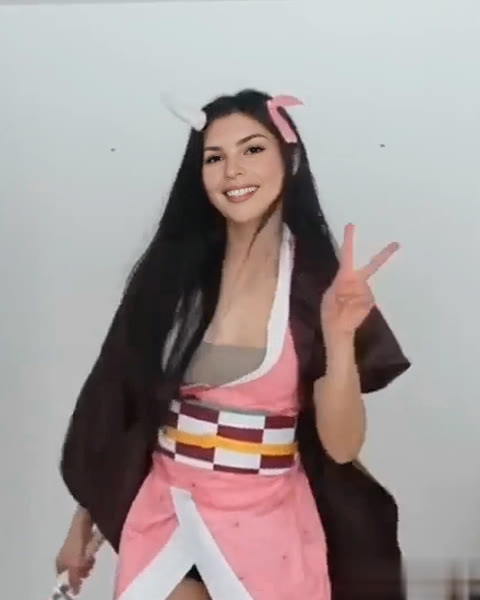
8s · 9:16 · 720p · original sound · ready in a few minutes
How it works
How to make a Nezuko AI Transformation video
Turn one everyday portrait into a beat-synced Nezuko AI Transformation clip in three quick steps, ready to save and share.
Upload one clear full-body photo
Drop a well-lit front portrait or full-body photo of yourself in everyday clothes into the upload slot. Standard JPG, PNG, and WebP files up to 20 MB work smoothly, and a clean single-subject frame keeps your facial identity crisp across every swing.
Start the Kling 4.0 transformation
Select generate to launch the 8-second Nezuko AI Transformation Video Generator (220 credits). Kling 4.0 maps your face, hairstyle, and opening outfit into the bright room, follows the pink prop-sword swings, and triggers the Nezuko kimono reveal right on the beat drop.
Download your 720p vertical clip with sound
Your finished 8-second 9:16 MP4 lands in My Work within a few minutes with the original beat-drop audio track already merged in. Download the clean, watermark-free video to your phone or desktop and post it right away.
Photos: JPG, PNG, WebP, up to 20 MB.
Same category
More Anime & Cartoon templates
 NEW380 CR
 NEW220 CR
 NEW300 CR
 NEW160 CR
 NEW110 CR
 NEW400 CR
 NEW300 CR
 NEW10 CR
 NEW400 CR
 NEW270 CR
 NEW220 CR
 NEW140 CR
The moves
Four beats in the 8-second Nezuko AI Transformation
The Nezuko AI Transformation follows one steady studio camera so your everyday look and your kimono cosplay connect seamlessly on the swing.
1. Everyday stance and sword grip
You open standing squarely in a bright white-walled room wearing the casual outfit from your uploaded photo, holding a slender pink prop sword angled toward the wood floor while looking straight at the camera.
2. Wide-stance overhead swings
As the beat climbs, your feet step wide and both hands whip the pink sword in sweeping arcs overhead. Hair and shoulders move naturally with each slash, building kinetic energy straight into the Nezuko transition drop.
3. Mid-swing Nezuko kimono reveal
Right on the downward slash at the midpoint beat, your casual clothes shift seamlessly into a pink hemp-leaf kimono with white trim, red-and-white checkered obi with yellow cord, dark haori coat, white slouch socks, white horn hairpiece, and pink ribbon.
4. Smiling peace-sign finish
Once the sword settles at your side, you lift one heel playfully and flash a bright smiling peace sign toward the lens, keeping your facial identity clear through the closing Nezuko cosplay hero pose.
Specs & output
What goes into Nezuko AI Transformation and what comes out
Every Nezuko AI Transformation render locks timing, vertical 720p framing, and synced beat audio so your clip stays sharp end to end.
You upload
- One clear, front-facing full-body photo of one person in casual clothes
- Even room or daylight lighting with clearly visible eyes, hairline, and shoulders
- Clean vertical framing that gives the model natural proportions for the kimono reveal
You get
- An 8-second vertical 9:16 MP4 video at 720p resolution with smooth sword motion
- Full casual-to-Nezuko cosplay transformation timed directly to the midpoint beat drop
- Original beat-drop audio track merged cleanly onto your downloadable video
- Watermark-free output saved in My Work with automatic credit protection on interrupted runs
| Photos | 1 |
|---|---|
| Model | Kling |
| Duration | 8 seconds |
| Picture | 720p, 9:16 |
| Audio | Original beat-drop sound included |
| File | MP4, watermark-free |
| Credits | 220 per video, refunded if it fails |
Photo tips
Best photos for a crisp Nezuko AI Transformation reveal
Simple framing choices help the Nezuko AI Transformation Video Generator preserve your face cleanly across fast sword swings.
- Pick a sharp full-body vertical photo facing the camera so the Nezuko AI Transformation captures both your facial features and your standing proportions from head to toe.
- Use bright, even illumination across your face and shoulders; clean natural lighting blends seamlessly with the white studio room and keeps skin tones steady through the outfit swap.
- Frame one solo subject against a tidy background with eyes, hairline, and hands clearly visible for confident identity lock during the peace-sign finish.
- Wear relaxed everyday outfits in your source photo to heighten the visual contrast when the pink hemp-leaf kimono, checkered obi, and dark haori appear mid-swing.
Origin
Where the Nezuko AI Transformation trend comes from
From a breakout anime awakening scene to viral cosplay sword-swing transitions and one-photo AI video templates.
Nezuko Kamado and the iconic costume contrast
Nezuko Kamado is one of the defining heroes of Koyoharu Gotoge’s Demon Slayer: Kimetsu no Yaiba (manga 2016; anime 2019), instantly recognized by her pink hemp-leaf patterned kimono, red-and-white checkered obi, dark haori jacket, and pink hair ribbon. Fans embraced her vivid contrast between warm everyday charm and dramatic awakened demon power.
When the Entertainment District Arc debuted Nezuko’s full awakening in January 2022, short-form anime communities sparked a wave of before-and-after edits pairing her gentle demeanor with high-impact beat drops.
From manual cosplay cuts to Nezuko AI Transformation videos
Cosplayers soon turned the format into live-action room transitions: swinging a prop weapon in street clothes, pausing to dress in full Nezuko kimono regalia, and matching the splice to the beat. Reference-guided AI video models now automate the entire Nezuko AI Transformation from one casual photo.
Also called
Common names around the Nezuko AI Transformation style
Anime fans and creators describe this beat-drop Nezuko AI Transformation format under several closely related terms.
Nezuko AI Transformation
The primary name for AI-generated videos that turn a real person’s photo into a full Nezuko Kamado cosplay reveal in motion.
Nezuko Transition
A choreography-focused phrase for mid-swing outfit reveals where a prop movement triggers the kimono change directly on the beat.
Nezuko Cosplay Transformation
Highlights the live-action wardrobe change from casual street clothes into the pink hemp-leaf kimono, checkered obi, dark haori, and hair accessories.
Demon Slayer AI Filter
A broader phrase carried over from static anime portrait filters, now expanded into animated full-body Nezuko AI Transformation clips.
Ready to swing into your Nezuko AI Transformation?
Upload one full-body photo to the Nezuko AI Transformation Video Generator for an 8-second 720p clip with synced audio (220 credits).
FAQ
Nezuko AI Transformation FAQ
How many photos does the Nezuko AI Transformation template take?
The Nezuko AI Transformation template takes one clear full-body photo of a single person in everyday clothes. A bright, front-facing image gives Kling 4.0 clear facial and body cues from the opening stance through the closing peace-sign reveal.
What duration, resolution, and audio come with a Nezuko AI Transformation video?
Every Nezuko AI Transformation video exports as an 8-second vertical 9:16 MP4 at 720p resolution with the original beat-drop audio track merged in. The preview on this page matches the exact 8-second runtime of your watermark-free download.
How many credits does the Nezuko AI Transformation Video Generator cost?
The Nezuko AI Transformation Video Generator costs 220 credits per 8-second 720p video, scaled proportionally from our standard 15-second rate. Credits are protected automatically and returned whenever a generation is interrupted.
Does the Nezuko AI Transformation require writing prompts or video editing?
The Nezuko AI Transformation handles prompts, wardrobe timing, and audio synchronization automatically from one uploaded photo. You upload your portrait and press generate while the pipeline drives the overhead pink prop-sword swings and mid-motion kimono reveal.
Which AI model powers the Nezuko AI Transformation Video Generator?
The Nezuko AI Transformation Video Generator runs on Kling 4.0 in omni-reference mode. The silent 8-second reference clip guides room framing, lighting, sword choreography, and beat timing while your uploaded photo defines the protagonist.
Does Nezuko AI Transformation preserve my real face after the outfit change?
Nezuko AI Transformation keeps your real facial identity steady across both the casual opening and the kimono cosplay reveal. A front-facing photo with even lighting gives the model crisp eye, hairline, and smile landmarks through the final pose.
What cosplay style does Nezuko AI Transformation use?
Nezuko AI Transformation uses a bright, wholesome studio cosplay presentation centered on the pink hemp-leaf kimono, checkered obi, dark haori, white horn hairpiece, pink ribbon, and cheerful peace-sign ending.
Where did the Nezuko AI Transformation trend originate?
The Nezuko AI Transformation trend grew out of Nezuko Kamado’s iconic Demon Slayer: Kimetsu no Yaiba awakening scenes and real-life cosplay sword-swing transitions, evolving into one-photo AI transformation videos.
Keep scrolling
More viral AI video trends
 NEW270 CR
 NEW320 CR
 NEW270 CR
 NEW220 CR
 NEW10 CR
 NEW320 CR
 NEW100–400 CR
 NEW100–400 CR
 NEW380 CR
 NEW140 CR
 NEW220 CR
 NEW320 CR