
GTA 6 · New
Dropped Truck GTA 6 AI Video Generator
Upload 1 clear front three-quarter truck photo to put your lowered pickup into a 10-second 16:9 Dropped Truck GTA 6 AI street burnout clip at 720p on Kling 4.0, complete with low-angle tracking shots and original audio for 270 credits.
Dropped Truck GTA 6 AI · 10s · 16:9
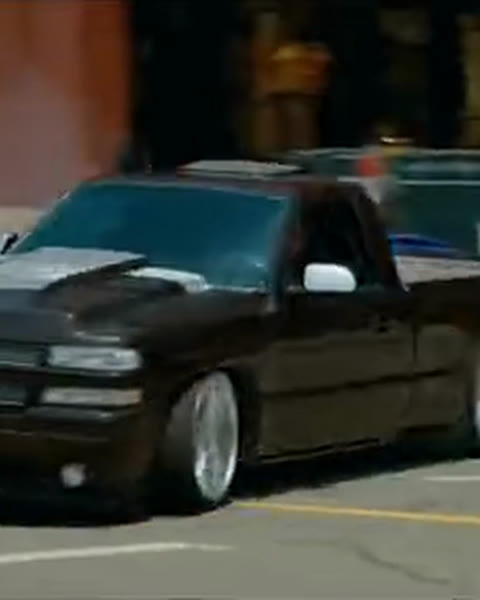
10s · 16:9 · 720p · original sound · ready in a few minutes
Examples
Watch the Dropped Truck GTA 6 AI burnout sequence
Preview the 10-second widescreen Dropped Truck GTA 6 AI edit where a slammed single-cab pickup tears through downtown streets in five fast-paced angles.
Dropped Truck GTA 6 AI downtown burnout & low-angle drift
A 10-second 16:9 720p reference sequence opening with a low rear-chase burnout under a passing helicopter, cutting to a front three-quarter slide, an intersection drift, a side-profile wheel roll, and a tailgate alley exit with the original audio track.
Same category
More GTA 6 templates
 NEW380 CR
 NEW380 CR
 NEW160 CR
 NEW140 CR
 NEW400 CR
 NEW270 CR
 NEW270 CR
 NEW400 CR
 NEW400 CR
 NEW300 CR
 NEW220 CR
 NEW160 CR
How it works
How to make a Dropped Truck GTA 6 AI video in three steps
Turn a single snapshot of your pickup into a 10-second Dropped Truck GTA 6 AI burnout montage in your browser with automatic camera matching.
Upload one clear pickup photo
Click the Your Truck slot and upload one crisp JPG, PNG, or WebP photo up to 20 MB showing your full pickup from a front three-quarter angle so Kling 4.0 captures the grille, headlights, paint finish, cab silhouette, and wheel stance accurately.
Render with Kling 4.0 Reference
Select Generate (270 credits) to launch Kling 4.0 Reference-to-Video. The model swaps your pickup directly into the downtown burnout choreography, preserving your truck design while matching the low-angle tracking shots, intersection smoke, and street lighting.
Download with the original audio
Open your finished 10-second 720p 16:9 MP4 in My Work, verify that your paint color, grille, and tucked wheels stay consistent across every cut, and download the file with the matching audio track ready for Reels, Shorts, or car-club feeds.
Photos: JPG, PNG, WebP, up to 20 MB.
Origin
Where the Dropped Truck GTA 6 AI trend comes from
Lowered pickup builds met Grand Theft Auto VI launch-week car edits, turning classic street-stance culture into a fast 10-second burnout format.
From street stance & GTA V edits to GTA 6 hype
Long before the November 2026 release of Grand Theft Auto VI, custom truck builders and gaming editors were already pairing slammed single-cab pickups—often tied to takuache and street-stance truck culture—with low-slung Rockstar Editor chase angles and thick rear-tire smoke.
During GTA 6 launch week, car enthusiasts started dropping photos of their real-world lowered pickups into AI-driven Vice-style city streets so any driveway build could star in a downtown burnout reel straight from a browser photo upload.
Why low-angle tracking shots define the look
Unlike static loading-screen filters, Dropped Truck GTA 6 AI puts the camera inches off the asphalt. Rear chase framing emphasizes tire smoke billowing out from tucked rear fenders, while the front three-quarter pass highlights the grille, hood lines, and deep-lip wheels in motion.
The scene
Shot-by-shot breakdown of the Dropped Truck GTA 6 AI edit
Kling 4.0 follows five rapid street-level camera setups across the 10-second Dropped Truck GTA 6 AI timeline.
0.0s–2.5s: Rear chase burnout under a city helicopter
The clip opens behind the lowered pickup on a sunlit double-yellow avenue as the rear tires break traction, sending dense white smoke swirling across the asphalt while a helicopter banks overhead.
2.5s–4.5s: Front three-quarter hero angle past traffic
A punchy low-angle cut frames the front grille, headlights, hood contours, and tucked front wheel in crisp afternoon light as blue city traffic passes in the background lane.
4.5s–6.5s: Wide intersection power slide
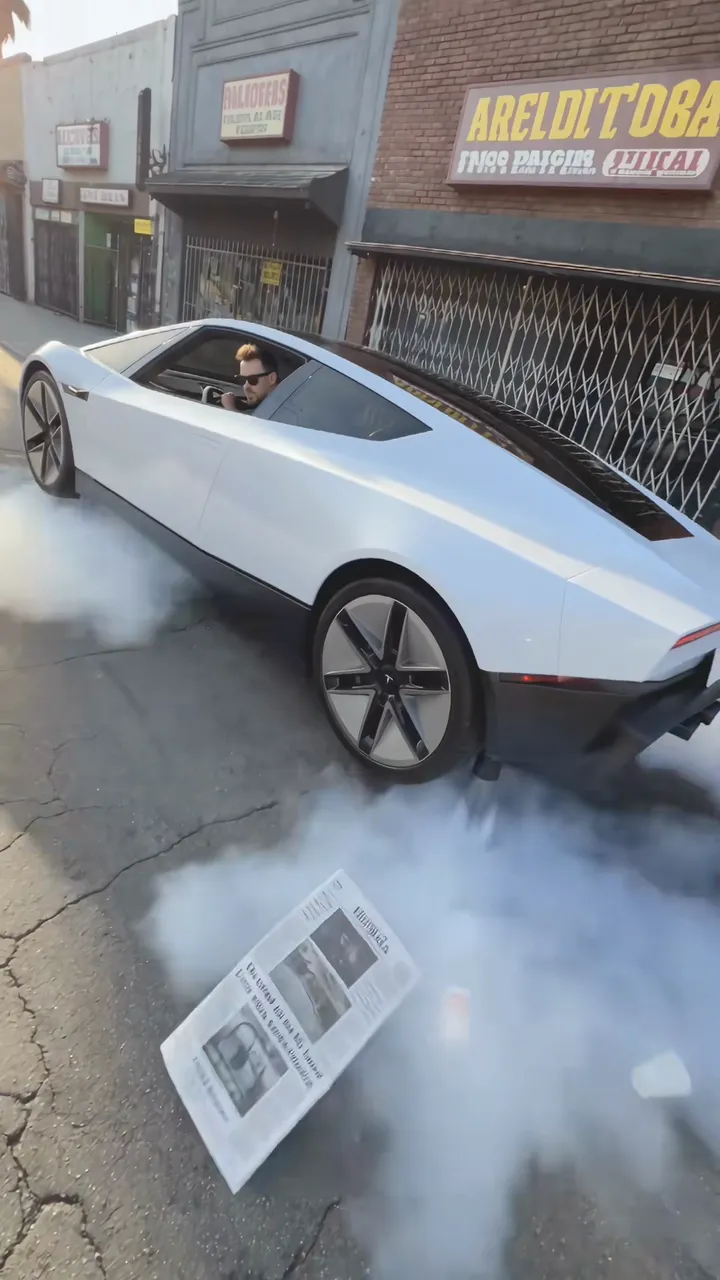
Pulling out to a wide street corner view, the truck whips sideways across the junction, trailing a thick cloud of white tire smoke past brick storefronts and stopped sedans.
6.5s–8.5s: Low side-profile wheel & stance roll
Tracking parallel along the curb, the camera locks onto the slammed rocker panels and spinning oversized silver wheels to show off the full side wheelbase and dropped suspension clearance.
8.5s–10.0s: Rear tailgate pull into the side street
Finishing tight on the rear fender and tailgate, the pickup straightens out of the drift and accelerates into a shaded downtown alley as tire smoke lingers behind.
Photo tips
Best pickup photos for Dropped Truck GTA 6 AI
Give Kling 4.0 clean front, side, and wheel geometry in one shot so your truck stays sharp across every fast camera cut.
- Shoot from a front three-quarter angle showing the grille, headlights, cab, bed, and both left- or right-side wheels together.
- Park in bright daylight or open shade on clean pavement so paint reflections, chrome trim, and wheel spokes stay well defined.
- Keep the entire pickup unobstructed with plenty of breathing room around the front bumper, roof, and rear tailgate.
- Tight bumper-only close-ups or steep top-down angles that hide the wheelbase, cab length, and lowered side stance.
- Parked shots crowded by neighboring cars, garage clutter, or people standing in front of the fenders and grille.
Also called
Terms and styles connected to Dropped Truck GTA 6 AI
Car builders and gaming creators search this lowered-pickup format under several overlapping stance and GTA edit names.
Dropped / Slammed Truck
A pickup lowered via C-notches, air ride, or static drop kits so the frame rails and wheel wells sit tight over oversized billet or street wheels.
Takuache / Street Stance Edit
Short-form truck edits celebrating lowered single-cab GM, Ford, and Ram pickups performing rolling burnouts and intersection slides.
GTA 6 Burnout Edit
AI-generated Vice-style city driving sequences that place real custom vehicles into cinematic multi-angle street chases.
Lowered Pickup Reference-to-Video
A Kling 4.0 workflow that transfers camera speed, smoke physics, and cut timing from a reference clip onto your own uploaded vehicle photo.
Put your pickup in the Dropped Truck GTA 6 AI edit
Upload one front three-quarter truck photo and render your 10-second 720p 16:9 burnout clip on Kling 4.0 for 270 credits.
FAQ
Dropped Truck GTA 6 AI FAQ
What is the Dropped Truck GTA 6 AI Video Generator?
The Dropped Truck GTA 6 AI Video Generator transforms one pickup photo into a 10-second 720p widescreen burnout edit. It uses Kling 4.0 Reference-to-Video to place your vehicle into five low-angle downtown tracking shots with original sound.
What kind of truck photo gives the cleanest result?
A sharp daytime front three-quarter truck photo showing the grille, cab, bed, and wheels gives the cleanest Dropped Truck GTA 6 AI result. Clear separation from surrounding cars helps Kling 4.0 keep your paint color, headlights, and wheel style steady through every cut.
Do I need to write a prompt or pick camera angles?
Dropped Truck GTA 6 AI handles prompting automatically because Kling 4.0 applies pre-tuned camera and burnout direction behind the scenes. Simply upload one truck photo and click Generate to run the five-shot street sequence.
Can I upload a lifted truck, SUV, or custom muscle car?
Lowered pickups match the Dropped Truck GTA 6 AI reference stance most closely, while stock trucks, SUVs, and muscle cars also adapt smoothly. Upload a clean full-body vehicle angle so the proportions translate evenly across all five downtown shots.
What video specs and audio come in the finished download?
Each export is a clean 10-second MP4 in 16:9 widescreen at 720p HD with the matching original audio track mixed in. Finished renders appear in My Work, ready to save and share on Shorts, Reels, or car-community threads.
How many credits does Dropped Truck GTA 6 AI cost?
Each 10-second 720p generation costs 270 credits, scaled proportionally from our 15-second (400-credit) rate, with automatic credit refunds if a task stops before finishing. Browse credit packs on the pricing page, try GTA 6 Fat Jason AI Meme, or explore more AI video effects.
Keep scrolling
More viral AI video trends
 NEW300 CR
 NEW10 CR
 NEW400 CR
 NEW220 CR
 NEW220 CR
 NEW380 CR
 NEW10 CR
 NEW320 CR
 NEW100–400 CR
 NEW100–400 CR
 NEW140 CR
 NEW220 CR