
Effects · New
Glass Trend AI Video Generator
Upload one photo for an 8-second Glass Trend AI clip. Golden glowing turmeric lights up a dark-room water glass to reveal your portrait in 720p vertical MP4 with sound (220 credits).
Glass Trend AI · 8s · 9:16
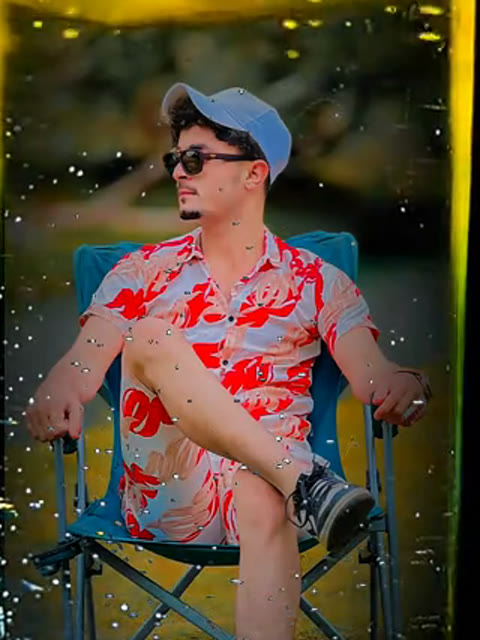
8s · 9:16 · 720p · original sound · ready in a few minutes
Who to put in
Who looks best inside the Glass Trend AI glowing glass
One clear photo places a person, pet, or stylized character inside the luminous golden water glass reveal.
Yourself in a standout solo portrait
A sharp front-facing selfie, seated portrait, or relaxed casual shot turns into a glowing dark-room centerpiece. Because the camera stays locked on the tall glass while golden light blooms from beneath, your face and posture stay unmistakably readable as shimmering bubbles drift past in your Glass Trend AI clip.
A friend for a birthday or shoutout clip
Surprise a close friend, sibling, or partner by putting their favorite photo inside the illuminated water glass. The dramatic transition from a pitch-black room and clear water into warm amber radiance gives birthday shoutout and celebration posts a memorable Glass Trend AI reveal.
Your cat or dog in a glowing showcase
Pets with bright eyes and distinct fur markings pop vividly against the amber backlight and sparkling bubbles. Upload a well-lit front shot of your dog or cat sitting upright to turn everyday pet photos into an eye-catching vertical Glass Trend AI video.
A stylized character, idol, or costume look
Bold outfits, hats, sunglasses, festival wear, or illustrated portraits contrast strongly against the deep black background and neon-yellow rim lighting. Crisp silhouette contours keep the Glass Trend AI portrait bright from the opening pour to the final shimmer.
Same category
More Effects templates
 NEW220 CR
 NEW10 CR
 NEW320 CR
 NEW380 CR
 NEW140 CR
 NEW140 CR
 NEW270 CR
 NEW160 CR
 NEW160 CR
 NEW400 CR
 NEW10 CR
 NEW160 CR
How it works
How to make a Glass Trend AI video in three steps
Go straight from one photo to the finished Glass Trend AI glowing water glass reveal with automatic dark-room lighting and timing.
Pick one clear front-facing photo
Add a well-lit portrait, half-body picture, or seated photo of one person or pet to the upload box. Common image formats (JPG, PNG, and WebP up to 20 MB) load directly, and balanced lighting across the face keeps every feature sharp inside the golden glass.
Run the Kling 4.0 Glass Trend AI Video Generator
Tap Generate to start the 8-second Glass Trend AI Video Generator (220 credits). Kling 4.0 reproduces the backlit glass setup, turmeric spoon pour, amber glow bloom, and rising bubble drift while placing the subject from your photo right inside the cylinder.
Save your 720p vertical MP4 with audio
In a few minutes, your 8-second 9:16 Glass Trend AI video appears in My Work with the original trend music already mixed onto the track. Save the watermark-free MP4 straight to your phone or computer and share it anywhere.
Photos: JPG, PNG, WebP, up to 20 MB.
Specs & output
What goes into Glass Trend AI and what comes out
Every Glass Trend AI render locks the steady dark-room tabletop shot, 8-second pacing, vertical 720p framing, and synced music track.
You upload
- One clear front-facing portrait, half-body, or seated picture of one person or pet
- Balanced natural light with sharp eyes and clearly visible facial features
- A clean backdrop so the subject stands out vividly through the illuminated amber water
You get
- An 8-second vertical 9:16 MP4 at 720p resolution with shimmering rising bubbles
- A continuous dark-room spoon pour and neon-golden glow reveal centered on your photo
- Original trend music merged directly into the downloadable Glass Trend AI video
- Clean watermark-free output stored in My Work with automatic credit refund protection
| Photos | 1 |
|---|---|
| Model | Kling |
| Duration | 8 seconds |
| Picture | 720p, 9:16 |
| Audio | Original track included |
| File | MP4, watermark-free |
| Credits | 220 per video, refunded if it fails |
Ready to post
Captions and posting ideas for your Glass Trend AI clip
Pair the golden dark-room reveal with a short caption that highlights the midnight glow, mood shift, or friend surprise.
- “Tried the Glass Trend AI reveal with my own photo and the golden glow actually hit different ✨”
- “One spoon of gold light and suddenly the whole main character energy unlocked 🥂”
- “POV: turning the lights off just to watch this portrait light up inside the glass 💛”
- “Full golden turmeric glass trend glow in 8 seconds straight from one photo 🔥”
- “New Glass Trend check—put my favorite photo inside the amber bubbles and kept rewatching it”
- “When a regular afternoon photo gets the midnight flashlight Glass Trend AI upgrade ✨”
- Share the clip in full 9:16 vertical framing so both the warm orange flashlight rim at the base and the bright golden surface bloom at the top stay visible.
- Place a short curiosity hook in the opening second while the water is still clear—viewers watch past the 1.5-second golden ignition to see who appears inside.
- Pick bold warm or high-contrast outfits (red, crisp white, denim, or dark jackets) so your Glass Trend AI portrait stays vivid behind the glowing yellow bubbles.
Origin
Where the Glass Trend comes from
How a dark-room flashlight and turmeric water trick grew into the viral glowing portrait reveal across short-form video.
The glowing turmeric water glass optical trick
In June 2025, creators across South Asia popularized a striking low-light tabletop visual under the #glasstrend tag: placing a tall transparent glass of water directly over a phone flashlight in a dark room, then tipping a small spoonful of turmeric powder (haldi) onto the surface. As the yellow grains swirl downward through the upward beam, the cylinder lights up with a vivid neon-amber glow.
Soon after, video editors began compositing personal portraits into the heart of the illuminated water glass so the subject materializes inside the sparkling bubbles the instant the spoon touches the water. A widely shared post from abbasutman2 on TikTok helped establish the "New Glass Trend" portrait-in-a-glass look across the broader #glasstrend community.
Why creators moved to one-photo Glass Trend AI videos
Recreating the practical setup manually takes a pitch-black room, steady tripod framing, bright base illumination, and detailed masking to blend a portrait cleanly behind rising bubbles with smooth glass refraction. The Glass Trend AI Video Generator brings that full dark-room optical reveal into a single photo upload, keeping the 0-to-2-second glow ignition and drifting golden particles intact across one seamless 8-second clip.
Also known as
Other names people use for the Glass Trend
Creators describe this glowing water glass portrait format under several closely linked names across social feeds.
New Glass Trend
The signature caption phrase used on short-form videos where a dark-room water glass ignites in bright gold to unveil a portrait inside.
Turmeric Glass Trend (Haldi Glass Trend)
Names the physical light experiment of pouring turmeric powder into backlit water so swirling neon-yellow clouds illuminate the glass.
Person in a Glass Effect
Refers to the portrait-reveal variation where one uploaded photo appears centered inside a tall clear glass surrounded by sparkling bubbles.
Glowing Water Glass Reveal
Highlights the visual shift from clear unlit water in the opening second to warm amber radiance that unveils the subject in the Glass Trend AI clip.
FAQ
Glass Trend AI FAQ
How many photos do I need for the Glass Trend AI Video Generator?
The Glass Trend AI Video Generator needs just one clear photo to build the full 8-second glowing water glass reveal. Upload a front-facing portrait, half-body shot, or seated picture of one person or pet, and Kling 4.0 places your subject right inside the illuminated glass.
What kind of photo gives the sharpest Glass Trend AI result?
Glass Trend AI produces the sharpest reveal from an evenly lit, front-facing photo with clear eyes, natural posture, and a tidy background. Bold colors and crisp facial contours stay vivid as golden turmeric clouds and sparkling bubbles drift around the glass.
How long is a Glass Trend AI video and what format do I get?
Each Glass Trend AI video runs for 8 seconds in 720p vertical 9:16 MP4 format with the original music track merged in. Your finished clip is delivered watermark-free inside My Work, ready to download and share immediately.
How many credits does one Glass Trend AI video cost?
One 8-second Glass Trend AI render costs 220 credits at 720p vertical resolution. Every generation includes automatic credit protection so your balance is returned promptly whenever a render pauses early.
Can I put my cat or dog into the Glass Trend AI Video Generator?
The Glass Trend AI Video Generator works smoothly with cats, dogs, and other pets as well as human portraits. A clear front-facing pet photo preserves distinct fur markings, ears, and bright eyes right behind the glowing golden bubbles.
Do I need to write a prompt or edit my Glass Trend AI clip?
The Glass Trend AI Video Generator handles the entire visual pipeline automatically from your single photo upload. Dark-room backlighting, spoon pour timing, golden glow bloom, bubble motion, and music mixing are all pre-configured inside the template.
What happens during the 8-second Glass Trend AI reveal?
Glass Trend AI opens on a tall clear water glass resting over a warm glowing base in a dark room as a spoon pours golden turmeric onto the surface. Within the first two seconds, the water bursts into bright neon-amber light that unveils your portrait amid shimmering bubbles through second 8.
Where did the viral Glass Trend originate?
The Glass Trend originated in June 2025 as a viral dark-room flashlight and turmeric water optical trick shared under #glasstrend. Creators soon layered personal portraits inside the glowing glass, turning the "New Glass Trend" into one of the signature glowing-reveal edits online.
Keep scrolling
More viral AI video trends
 NEW320 CR
 NEW140 CR
 NEW190 CR
 NEW160 CR
 NEW380 CR
 NEW100–400 CR
 NEW100–400 CR
 NEW220 CR
 NEW320 CR
 NEW100–400 CR
 NEW380 CR
 NEW160 CR