
Music · New
Christmas Photobooth AI Video Generator
Turn 1 or 2 portraits into a 15s 9:16 Christmas Photobooth AI strip video. Kling 4.0 pans across tilted vintage sepia booth prints with Wham! "Last Christmas" poses and audio in 720p MP4 for 400 credits.
Christmas Photobooth AI · 15s · 9:16
Choose either role or both—every slot is optional; add at least one clear portrait to star inside the animated Christmas photobooth strips.
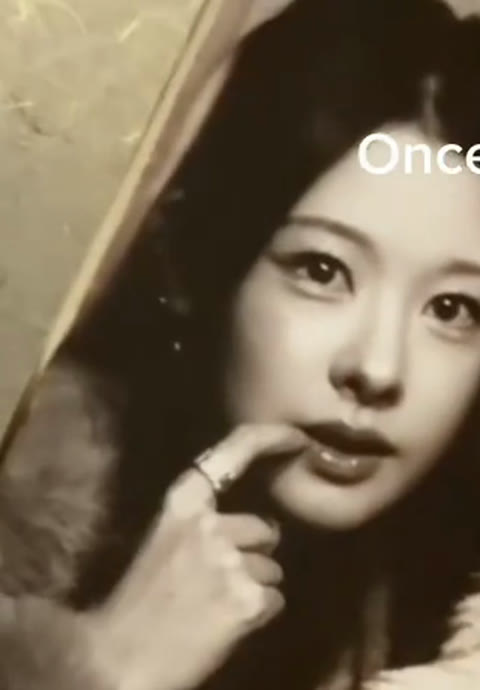
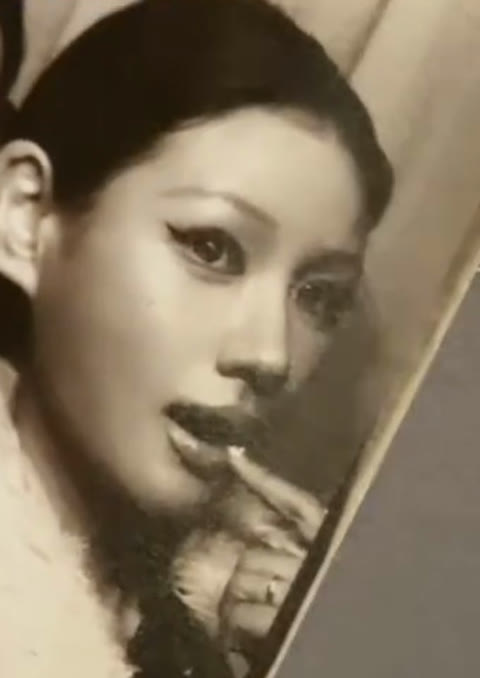
15s · 9:16 · 720p · original sound · ready in a few minutes
Specs & Output
What goes into Christmas Photobooth AI and what comes out
Upload one or two portraits into Christmas Photobooth AI to get a 15-second vintage sepia strip video ready for holiday sharing.
You upload
- 1 or 2 clear front-facing portraits (Left Person and/or Right Person) for Christmas Photobooth AI
- Well-lit framing from the chest or shoulders up so hands and faces read clearly across every panel
- Original everyday photos in cozy sweaters, winter knits, or casual holiday outfits
- Single-subject shots for each uploaded slot so identities map cleanly into every strip frame
You get
- 15-second 9:16 vertical 720p MP4 Christmas Photobooth AI video panning smoothly across two tilted strips
- Warm vintage sepia monochrome booth styling with ribbed curtain backdrop and paper strip borders
- Seven playful Last Christmas pose frames featuring finger-on-lip, shy hand-cover, ear whisper, and shared finger-heart beats
- Synced 15-second Wham! "Last Christmas" sound track remuxed onto the clean MP4 with zero watermarks
| Photos | 1 or 2 portraits (both roles optional) |
|---|---|
| Model | Kling 4.0 Omni Reference |
| Duration | 15 seconds (7 animated panels) |
| Picture | 720p, 9:16 vertical MP4 |
| Audio | Wham! "Last Christmas" clip synced |
| Output | Watermark-free downloadable MP4 |
| Credits | 400 per video, refunded if it fails |
Same category
More Music templates
 NEW300 CR
 NEW240 CR
 NEW400 CR
 NEW400 CR
 NEW400 CR
 NEW380 CR
 NEW300 CR
 NEW400 CR
 NEW400 CR
 NEW270 CR
 NEW400 CR
 NEW380 CR
How It Works
How to make the Christmas Photobooth AI video in 4 steps
Skip shooting eight separate booth poses or syncing lyric edits—one or two clear portraits power the entire Christmas Photobooth AI pan.
Choose Left Person, Right Person, or both
Every Christmas Photobooth AI slot is optional, so you can cast two portraits together or upload just one photo and keep the partner from the reference clip. Pick JPG, PNG, or WebP images up to 20 MB with a clear front-facing view.
Match each face to its strip side
Place your first subject into the Left Person slot and your second subject into the Right Person slot. Keeping one person per uploaded photo helps Kling 4.0 preserve hair, glasses, eyes, and expressions across every sepia panel.
Generate your 15-second Christmas Photobooth AI reel
Click Generate (400 credits). SameVid AI runs a silent 15-second motion reference through Kling 4.0 at 720p, keeping the vintage booth pan intact while rebuilding each panel around your uploaded portraits.
Download with Last Christmas audio ready
Open My Work once processing finishes to watch the full 15-second Christmas Photobooth AI strip glide from top to bottom, then download the watermark-free 720p MP4 with synced audio ready for Reels, Shorts, or holiday group chats.
Photos: JPG, PNG, WebP, up to 20 MB.
The Scene
What happens across the 7 Christmas Photobooth AI panels
An overhead camera glides smoothly down two tilted sepia photo strips, matching seven playful gestures to the chorus of "Last Christmas."
0–3 s · "Once bitten, and twice shy" opener
The Christmas Photobooth AI shot opens under a round brass knob at the top of the first tilted sepia strip. Left Person rests a fingertip lightly near the corner of their smile while Right Person glances sideways, then glides to Panel 2 where both playfully shield their faces with open fingers.
3–6 s · "I keep my distance" palm pose
As the camera moves down the first paper strip, Panel 3 shows both subjects raising open palms cheerfully toward the booth lens to act out keeping a playful distance against the ribbed curtain backdrop.
6–9 s · "But you still catch my eye" strip pan
In Panel 4, Left Person forms a playful finger-circle around one eye while Right Person points toward the camera. The lens then sweeps diagonally across the matte grey tabletop onto the second tilted sepia strip.
9–12 s · "Tell me, baby, do you recognise me?"
Starting under the top brass knob on Strip 2, Panel 5 catches Right Person cupping both hands in a playful whisper beside Left Person’s ear, followed by Panel 6 where both lean in with bright, surprised smiles.
12–15 s · "Well, it’s been a year" finger-heart finale
The Christmas Photobooth AI glide settles cleanly on Panel 7 as both subjects bring their hands together in the center to form a shared finger-heart sign with cheerful winks and grins through the final beat.
Simple credit pricing for Christmas Photobooth AI clips
Each 15-second 720p Christmas Photobooth AI video costs 400 credits, with automatic refunds if any generation fails.
- Basic$9.9400 credits1 video
- Growth$19.9850 credits2 videos
- Most PopularPro$39.91,800 credits4 videos
- Studio$99.94,800 credits12 videos
- Max$299.915,000 credits37 videos
Ready to Post
Captions to post with your Christmas Photobooth AI video
- “Cutest Christmas Photobooth AI trend for the holidays 🎄🎞️”
- “6 weeks left till Christmas — our vintage strip era 🎅🏻✨”
- “Once bitten, twice shy, seven photobooth frames later 🎞️❤️”
- “POV: we skipped the mall line and made our own holiday photo strip 🎄”
- “Getting in the mood for Christmas one sepia frame at a time 🧣🎞️”
- “Our holiday booth, frame by frame — see you on the nice list ✨”
- Pair your Christmas Photobooth AI clip with #christmasphotobooth, #photoboothtrend, #lastchristmas, and #holidayseason for seasonal discovery.
- Add your own date stamp or initials in a short video editor after downloading if you want a custom keepsake card.
- Post alongside the "6 weeks till Christmas" countdown format with your best friend, partner, sibling, or travel buddy.
Also Called
Other names for the Christmas Photobooth AI trend
Creators search the Christmas Photobooth AI vintage two-strip format under several seasonal and music-led titles.
Last Christmas Photobooth Trend
Named after Wham!’s 1984 holiday classic "Last Christmas," whose "Once bitten, and twice shy" bridge cues each pose change across the Christmas Photobooth AI strip.
Christmas Photo Strip AI
Refers to the Life4Cuts and Photogray-inspired multi-panel printed paper strip aesthetic brought to life with an overhead camera glide.
Animated Holiday Photobooth Strip
Highlights the key difference between a static four-photo collage and a moving 15-second video where both subjects animate inside every printed frame.
Black-and-White Christmas Strip AI
Describes the warm sepia monochrome film grading, soft booth flash highlights, and ribbed curtain background seen across viral holiday edits.
Once Bitten Twice Shy Photobooth
A lyric-first nickname used by creators searching specifically for the seven-pose sequence mapped to the bridge of the song.
FAQ
Christmas Photobooth AI FAQ
What is the Christmas Photobooth AI trend?
The Christmas Photobooth AI trend animates two tilted vintage sepia photo strips so both people change poses frame by frame to Wham! "Last Christmas." Each printed panel shifts expression in time with the chorus while an overhead camera glides smoothly from Strip 1 to Strip 2.
What does the Christmas Photobooth AI video generator create?
The Christmas Photobooth AI generator creates a 15-second vertical 9:16 MP4 at 720p with seven animated booth poses. Your uploaded portraits appear inside warm monochrome prints with ribbed booth curtains, paper borders, and synced holiday audio.
How many photos does Christmas Photobooth AI need?
Christmas Photobooth AI needs one or two separate portraits because both Left Person and Right Person are optional slots. Upload two photos to cast both sides of every strip frame, or upload one photo and let the open slot keep the reference co-star.
How many credits does a Christmas Photobooth AI video cost?
Generating one 15-second 720p Christmas Photobooth AI video costs 400 credits and refunds automatically if a render fails. Pricing follows our 15-second = 400 credits rate with zero extra fees for audio syncing.
What kind of portraits work best in Christmas Photobooth AI?
Clear, evenly lit front-facing photos showing the face, shoulders, and upper chest give Kling 4.0 the strongest identity anchor across all seven panels. Original camera-roll portraits in cozy sweaters or everyday tops look especially natural in sepia lighting.
Do I need to pose for seven photos or wear holiday outfits first?
One or two regular portraits are enough because Christmas Photobooth AI stages every pose, paper border, and camera move automatically. The preset generates the ribbed booth curtain, warm sepia grain, and seven lyric-timed gestures for you.
Can I use a group photo for Christmas Photobooth AI?
Cropping each subject into a separate solo portrait before uploading gives Christmas Photobooth AI the cleanest left-and-right mapping. Placing one person in the Left Person card and one person in the Right Person card keeps both identities sharp across every panel.
Does Christmas Photobooth AI include Last Christmas audio without watermarks?
Every finished Christmas Photobooth AI download is a watermark-free 720p MP4 with the 15-second Wham! "Last Christmas" clip remuxed onto the file. You can preview the synced clip inside My Work and share it directly.
Keep scrolling
More viral AI video trends
 NEW240 CR
 NEW320 CR
 NEW400 CR
 NEW400 CR
 NEW380 CR
 NEW350 CR
 NEW350 CR
 NEW270 CR
 NEW380 CR
 NEW240 CR
 NEW320 CR
 NEW400 CR