
Music · Trending
BigXthaPlug Give It All AI Video Generator
Upload one portrait to create a 12-second BigXthaPlug Give It All AI video. Step up to the hanging vintage microphone surrounded by a packed crowd in warm neon lighting, grinning and clapping along to "Give It All" by BigXthaPlug in a 720p vertical MP4 for 320 credits.
BigXthaPlug Give It All AI · 12s · 9:16
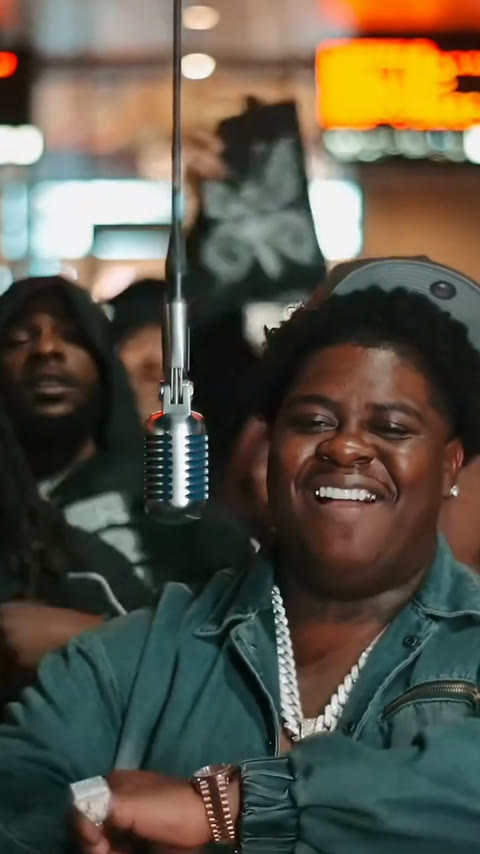
12s · 9:16 · 720p · original sound · ready in a few minutes
Live Block Performance
Three beats of effortless street swagger at the hanging mic
The reference performance captures an authentic street session with a vintage chrome microphone suspended in front of an enthusiastic, tightly packed crowd.
0.0–3.5s: Step up to the hanging vintage mic
Your subject takes the lead spot directly behind the vertically suspended silver microphone. Their natural facial contours, hairstyle, and expression come seamlessly from your uploaded portrait, grooving with relaxed shoulders and a confident grin as the heavy 808 bassline rolls in.
3.5–8.0s: The infectious hook drop & crowd bounce
As the vocal hook kicks in, the performer beams warmly and gestures with one hand toward the camera and the cheering crowd behind them. Warm amber neon lights trace their silhouette while the crew sways and hypes up the moment in perfect synchronization.
8.0–11.8s: Rhythm clapping and magnetic close-up
The artist brings both hands together in natural rhythm claps to the downbeat, exchanging nods of approval with the surrounding crowd before delivering a final charismatic smile straight down the lens to complete a memorable 12-second performance.
Same category
More Music templates
 NEW300 CR
 NEW240 CR
 NEW400 CR
 NEW400 CR
 NEW400 CR
 NEW380 CR
 NEW300 CR
 NEW400 CR
 NEW400 CR
 NEW270 CR
 NEW400 CR
 NEW380 CR
Cast Ideas
Who looks best commanding the From The Block mic
Whether you want authentic underground rap energy or hilarious comedic contrast, one clean portrait is all you need.
Yourself
Step into the shoes of a breakout Dallas hip-hop headliner. Experience what it feels like to front an electric street cypher with dozens of supporters backing your every verse.
Group chat friends & roommates
Turn your quietest roommate or closest friend into the undisputed neighborhood star. Their everyday expression paired with Texas trap cadence makes for an unforgettable group chat sensation.
Corporate professionals & coworkers
Drop accountants, software developers, managers, or teachers into the middle of a high-energy urban rap performance. The pure contrast between formal office demeanor and raw street hype delivers instant viral comedy.
Gaming & pop culture avatars
Reimagine iconic video game protagonists, comic book characters, or retro cartoon figures singing at the vintage microphone for surreal and engaging social content.
Quick Walkthrough
Generate your BigXthaPlug Give It All AI video in 3 steps
Create your 12-second vertical performance video with synchronized original audio in minutes.
Upload one portrait
Select a clear front-facing JPG, PNG, or WebP photo of one person. The face and expression will be transferred onto the lead performer while your hairstyle and neckline are preserved.
Generate with Kling 4.0
Click Generate to start the rendering task. Kling 4.0 Video Edit precisely transfers the facial identity while preserving the authentic From The Block crowd motion, neon lighting, and camera tracking. The button confirms the 320-credit cost before you begin.
Download and share
Once processing completes, your video is saved to My Work with BigXthaPlug’s "Give It All" hook pre-merged in high-fidelity stereo sound. Preview it directly, download the MP4, and share to TikTok, Instagram Reels, or YouTube Shorts.
Photos: JPG, PNG, WebP, up to 20 MB.
Output Deliverables
Everything included in your finished performance clip
Each generation outputs a complete, broadcast-ready vertical video engineered specifically for maximum retention on short-form feeds.
You upload
- 1 clear front-facing portrait or selfie (JPG, PNG, or WebP up to 20MB)
- Natural facial expression with good lighting on both sides of the face
- Head, neck, and upper shoulders clearly visible without heavy obstructions
You get
- A complete 12-second performance clip rendered in sharp 720p HD resolution
- Standard 9:16 vertical aspect ratio optimized for TikTok, Reels, and Shorts
- Studio-mastered audio featuring the authentic "Give It All" hook by BigXthaPlug
- Clean presentation with zero third-party watermarks, logos, or burned-in subtitles
- Format
- MP4 (H.264 video, AAC stereo audio)
- Resolution
- 720p HD (720×1280 vertical 9:16)
- Duration
- 12 seconds (exact performance match)
- Audio Sync
- Pre-mixed "Give It All" hook by BigXthaPlug
- Engine
- Kling 4.0 Video Edit (kwaivgi/kling-v4.0/video-edit)
- Credits
- 320 per video, refunded if it fails
Input Advice
How to select the ideal photo for Kling 4.0
Kling 4.0 maps intricate facial landmarks onto 3D performance dynamics. Clear, evenly lit source images produce the most striking results.
- Use a high-resolution, forward-facing portrait where your eyes, nose, mouth, and jawline are crisply focused.
- Choose an image with natural, balanced lighting across the face to help the model recreate authentic stage shadows.
- Avoid photos with dark sunglasses, face masks, or hands covering your mouth, cheeks, or chin.
- Avoid severe angles, extreme close-ups that crop your forehead, or blurry low-light screenshots.
Creator Showcase
Trending creator takes on the Give It All trend
See how creators across social media are utilizing the hanging mic setup to craft viral entertainment.
@@c889977
A clean casual portrait replacement showing a white tee protagonist naturally grooving to the Texas bounce rhythm behind the hanging mic.
@@ela75857
A stylish street fashion demonstration highlighting sharp facial fidelity and natural crowd energy during the beat drop.
Meme Background
How BigXthaPlug and From The Block sparked a viral AI movement
From a gritty neighborhood performance in Dallas to the latest global short-form phenomenon.
The rise of BigXthaPlug and Better Over Time
BigXthaPlug, born Xavier Landum in Dallas, Texas, has emerged as one of Southern hip-hop’s most compelling new voices. Known for his heavyweight frame, commanding baritone delivery, and charismatic smile, he seamlessly pairs modern trap production with classic Texas bounce rhythm.
On October 30, 2026, BigXthaPlug released his critically acclaimed sophomore studio project, "BETTER OVER TIME." Among the album's standout cuts, "GIVE IT ALL" captured immediate viral traction, rapidly ascending to the #2 position on the Shazam charts in the United States within days of release.
The From The Block performance series by 4 Shooters Only
To support the track, YouTube street music platform 4 Shooters Only hosted BigXthaPlug for their renowned "From The Block Performance" series in early November 2026. The format stripped away traditional stage lighting and elaborate sets, placing the artist in front of a raw urban backdrop with a vintage studio condenser microphone hanging on a simple cable from above.
What made the video explode—gathering over 830,000 views within its initial six days—was the sheer warmth and collective joy of the performance. Surrounded by a tightly packed group of friends, hype men, and community members bobbing to every downbeat, BigXthaPlug beamed with genuine happiness as he performed the opening hook.
The TikTok AI wave and viral template evolution
By November 7, 2026, AI creators on TikTok began isolating the 12-second opening sequence of the From The Block session. Using advanced video generation engines like Kling AI and Seedance 2.5, creators began swapping everyday selfies, fictional characters, and celebrities into the lead performer’s spot.
The infectious nature of the clip stemmed from its effortless juxtaposition: anyone could suddenly become the beloved neighborhood headliner at the center of an electric street performance. Within a week, specialized generators appeared across the web, cementing BigXthaPlug Give It All AI as one of late 2026’s defining musical video trends.
FAQ
BigXthaPlug Give It All AI FAQ
What photo should I upload for the best Give It All AI video?
Upload a clear, front-facing portrait or selfie with even lighting and a natural expression. Ensure your face, hairstyle, and jawline are unobstructed by heavy shadows, hands, or dark sunglasses.
How many photos are required to generate this video?
Only 1 photo is needed. Kling 4.0 transfers your facial identity and hair directly onto the lead performer in the 12-second From The Block scene while preserving the original crowd and background.
Will the original artist’s hat and jewelry appear on my person?
No. Kling 4.0 Video Edit is specifically instructed to replace the original performer’s cap and heavy chains, preserving your own natural hairstyle, clothing neckline, and facial profile.
Does the generated video include the original music?
Yes. Your finished MP4 comes pre-remuxed with the high-fidelity stereo audio track of BigXthaPlug’s "Give It All" hook, matching the exact timing and gestures of the video.
Which AI model powers the performance generation?
This template runs on Kling 4.0 Video Edit (kwaivgi/kling-v4.0/video-edit), which preserves the full background crowd movement, authentic lighting, and camera tracking while accurately mapping your facial likeness onto the lead performer.
How many credits does one video generation cost?
Generating one 12-second BigXthaPlug Give It All AI video costs 320 credits, calculated proportionally at the standard 15-second / 400-credit benchmark.
What happens if the video generation fails or times out?
If a video render ever encounters a provider timeout or technical failure, all 320 credits are automatically and immediately refunded to your account balance. Failed renders are always free.
Keep scrolling
More viral AI video trends
 NEW270 CR
 NEW350 CR
 NEW380 CR
 HOT270 CR
 NEW350 CR
 NEW270 CR
 NEW380 CR
 NEW240 CR
 NEW320 CR
 NEW400 CR
 NEW140 CR
 NEW270 CR