
Transformation · New
Object Morph AI Video Generator
Upload one clear object photo and turn it into a 10-second Object Morph AI reveal. Without locking into a fixed reference video, Kling 4.0 Omni Reference places your object in one hand, freely animates an imaginative unfolding transformation suited to its shape and materials, and generates synchronized foley sound for 270 credits.
Object Morph AI · 10s · 9:16
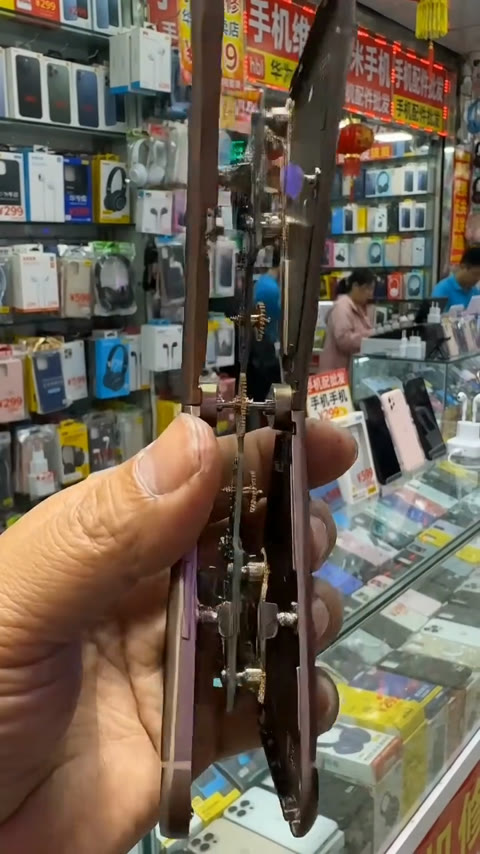
10s · 9:16 · 720p · original sound · ready in a few minutes
Three clear steps
How to make an Object Morph AI video
Object Morph AI starts with one object photo and generates a custom hand-held transformation directly from your image and our multi-stage morph prompt—so any everyday item can evolve into an imaginative new creation.
Upload one clear object photo
Choose a photo that shows one compact object from edge to edge, with its material, color and distinctive details easy to read. A key fob, small toy, watch, product package, figurine, controller or desk item gives the Object Morph AI model a strong starting form for the hand-held reveal.
Generate your 270-credit Object Morph AI reveal
Press Generate to place your object at the center of the continuous hand-held shot. Instead of forcing your item to follow a pre-recorded phone video, Kling 4.0 Reference-to-Video analyzes your object’s geometry and textures to invent a smooth mechanical or material morph into a polished new form.
Play the finished video and share the reveal
Your completed vertical MP4 appears in My Work with synchronized tactile foley sound generated for the transformation. Watch the full reveal, download the file and post it as a TikTok, Reel or Short when the final object is ready to take the spotlight.
Photos: JPG, PNG, WebP, up to 20 MB.
Same category
More Transformation templates
 NEW300 CR
 NEW140 CR
 NEW350 CR
 NEW400 CR
 NEW140 CR
 NEW220 CR
 NEW400 CR
 NEW220 CR
 NEW140 CR
 NEW270 CR
 NEW190 CR
 NEW270 CR
From TikTok
Hand-held Object Morph AI ideas from TikTok
These three clean, one-shot phone transformations show why the effect reads so quickly: a hand establishes the object, the center shape changes in view, and the final device gets a satisfying reveal beat.
@anastechverse
A hand presents a compact hourglass-shaped object, then its frame, panels and reflective surfaces unfold into a folding smartphone. The uninterrupted grip makes the transformation easy to follow from the first frame through the finished reveal.
@anastechverse
A round device shifts through mechanical layers before resolving as a slim smartphone. The close framing makes the shape changes feel like one connected product mechanism rather than separate scenes.
@anastechverse
A stone-like object breaks open into a phone, combining textured material changes with a final glossy device reveal. It is a strong reference for turning a simple everyday shape into a surprising new form.
Input, output and specifications
What your Object Morph AI photo becomes
One clear object photo becomes one complete Object Morph AI hand-held reveal for 270 credits. Because the generator runs in reference-image-to-video mode without a fixed source video, the transformation adapts freely to whatever object you upload.
You upload
- One clear JPG, PNG or WebP photo of one compact object (no reference video required)
- A fully visible outline, readable material and distinctive surface details
- A balanced, well-lit view that gives the hand-held transformation a strong opening form
You get
- One 10-second vertical MP4 at 720p
- Your uploaded object held at the center of the frame as the recognizable starting form
- An autonomous, physically believable sequence of unfolding shapes, material shifts and a polished finished creation inspired by your object’s design DNA
- Smooth one-shot hand-held camera movement and natural finger grip
- Synchronized tactile mechanical and material foley audio generated with the video
- A saved video in My Work for replay, download and sharing
| Photos | 1 clear object photo (no reference video) |
|---|---|
| Model | Kling 4.0 Reference-to-Video (Image Reference) |
| Duration | 10 seconds |
| Picture | 720p · 9:16 vertical |
| Audio | Synchronized mechanical & morphing foley sound |
| File | MP4 |
| Credits | 270 per video, refunded if it fails |
Make the final form the punchline
Object Morph AI ideas worth revealing
Start with something simple and recognizable, then choose a final form that feels delightfully larger, smarter or more imaginative than the opening object.
A pocket gadget becomes your dream device
Use a clean photo of a key fob, compact camera, game controller or old phone. The reveal can resolve as a sleek concept gadget that still keeps the opening object’s color, texture and recognizable character.
A desk object becomes a creative tool
Pens, notebook clips, headphones, watches and small lamps make satisfying starters. Let the central object open into an imaginative drawing tool, studio device or tiny robot designed around the same core silhouette.
A favorite collectible gets a new purpose
Try a figurine, souvenir, toy car or charm from your shelf. The hand-held reveal can turn it into a fantasy artifact, futuristic vehicle or polished display piece with a familiar detail carried into the final form.
A product concept reveals its next edition
Creators and small teams can begin with packaging, a sample bottle, a device mockup or a product icon. The transformation gives the post a compact visual story before the final product detail takes center stage.
A gift reveal starts with a tiny clue
Film the idea as a birthday, launch-day or group-chat surprise: a small recognizable object in hand evolves into the larger thing you are excited to share.
One object photo, one complete morph for 270 credits
Your 270 credits create one 10-second Object Morph AI video in a vertical 720p frame. The finished MP4 is saved in My Work, ready to play, download and share.
- Basic$9.9400 credits1 video
- Growth$19.9850 credits3 videos
- Most PopularPro$39.91,800 credits6 videos
- Studio$99.94,800 credits17 videos
- Max$299.915,000 credits55 videos
Give your everyday object a new form
Upload one clear object photo and create your hand-held Object Morph AI reveal for 270 credits.
FAQ
Object Morph AI FAQ
What is an Object Morph AI video?
An Object Morph AI video turns one clear object photo into a 10-second hand-held transformation reveal. Instead of copying a fixed reference video, Kling 4.0 Reference-to-Video places your uploaded object in one hand and freely animates an imaginative sequence of unfolding panels, shifting textures and connected forms that resolve into a polished new creation.
How do I make an Object Morph AI video?
Choose one clear photo of your object, upload it to the “Your object” slot and select Generate. SameVid uses Kling 4.0 Reference-to-Video with your photo and a structured three-stage morph prompt to build a custom one-shot hand-held transformation around your object’s silhouette, material and details. One 10-second vertical MP4 costs 270 credits and appears in My Work when it is ready.
What kind of object photo works best?
Choose one object with a clear outline, visible edges and readable material details. A key fob, compact camera, small toy, watch, product package, figurine, controller or desk item gives the model a strong opening form. Bright, even light and a clean view of the full object help the final transformation keep its recognizable visual character.
How many photos do I need?
One photo is enough, and no reference video upload is needed. This template has one visual protagonist: the object held at the center of the frame. Your photo supplies its shape, colors, surface details and recognizable features through the full transformation sequence.
Why doesn’t Object Morph AI lock my photo to a fixed reference video?
Every object has a different geometry, material and creative potential. By driving Kling 4.0 Reference-to-Video directly from your uploaded image and prompt rather than a fixed phone-morph reference clip, the model can invent unfolding hinges, telescoping parts or material transitions that fit your specific object instead of forcing every item into a smartphone.
Does the finished Object Morph AI video include sound?
Yes. Kling 4.0 generates synchronized close-mic foley audio—subtle finger grip sounds, mechanical clicks, sliding hinges and material resonance—directly alongside the visual transformation so the completed MP4 is ready for TikTok, Reels or Shorts.
What format will I receive?
You receive a 10-second MP4 at 720p in a 9:16 vertical frame. The hand-held composition fills a phone screen naturally, and the completed video stays in My Work for replay, download and sharing whenever you are ready.
How many credits does Object Morph AI cost?
Each Object Morph AI video costs 270 credits. The Generate button shows the exact amount before rendering, and the completed 10-second MP4 is added to My Work for playback and download.
Keep scrolling
More viral AI video trends
 NEW140 CR
 NEW140 CR
 NEW220 CR
 NEW350 CR
 NEW270 CR
 NEW380 CR
 NEW240 CR
 NEW320 CR
 NEW400 CR
 NEW270 CR
 NEW240 CR
 NEW400 CR