
Funny · New
Twins at The Carousel AI Video Generator
Turn one front-facing portrait into the 10-second Twins at The Carousel AI meme. Your deadpan face holds center frame while miniature clones dance in a circle around your head to Kikuo's track, exported in 720p vertical 9:16 with audio for 270 credits.
Twins at The Carousel AI · 10s · 9:16
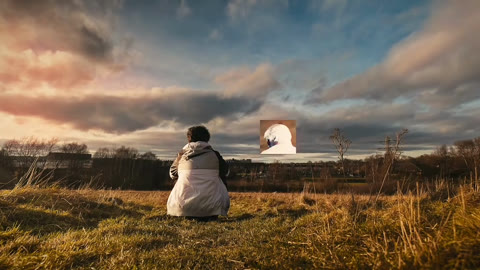
10s · 9:16 · 720p · original sound · ready in a few minutes
Similar templates
More deadpan and solo meme templates to try
If you like surreal single-portrait comedy, explore these related one-photo templates built with the same fast setup.
 NEW220 CR
 NEW140 CR
 NEW380 CR
Same category
More Funny templates
 NEW380 CR
 NEW320 CR
 NEW100–400 CR
 NEW100–400 CR
 NEW140 CR
 NEW100–400 CR
 NEW380 CR
 NEW160 CR
 NEW270 CR
 NEW160 CR
 NEW350 CR
 NEW100–400 CR
From TikTok
See the Twins at The Carousel format in motion
This reference take shows how the static central expression contrasts with the orbiting dancers to sell the joke in ten seconds.
@memorimori
Set to Kikuo’s "Twins at The Carousel," the central character stays completely still and unbothered while smaller doubles spin and bounce around the frame. That sharp contrast between calm exhaustion and chaotic motion is what makes the loop instantly recognizable.
The moves
How the 10-second carousel routine plays out
Kling 4.0 keeps your facial identity anchored in the foreground while driving the miniature dancers through a continuous circular loop.
The centered deadpan anchor (0–3s)
The clip opens with your uploaded portrait locked squarely in the middle of the 9:16 vertical frame. Your expression stays calm, flat, and unblinking, establishing the visual punchline before your attention even drifts to the background movement.
Miniature clones enter orbit (3–6s)
Tiny versions of your character bounce into a ring around your head, stepping and waving in time with the upbeat melody. Keeping the central face steady makes the lively choreography behind it read clearly on small phone screens.
Full carousel spin and bounce (6–9s)
The orbiting doubles pick up energy, circling smoothly behind and beside the protagonist without obscuring the main face. Consistent lighting and color balance tie the central portrait and the dancing clones into a single unified shot.
Clean loop finish with synced audio (9–10s)
The final second completes the rhythmic rotation while preserving your neutral gaze, then SameVid merges the original audio track onto the silent render so the video lands ready to play and loop cleanly.
Ideas
Clever ways creators use the carousel meme
Pair the deadpan stare and circling clones with short on-screen captions to turn everyday stress into quick comedy.
Me vs. my intrusive thoughts
Use a blank-faced selfie to represent trying to focus at work or in class while the dancing mini-clones symbolize every random song, snack craving, and unfinished chore bouncing around in your head.
Monday morning brain fog
Contrast a tired coffee-less stare with the hyperactive carousel to joke about surviving an early meeting, an all-night study session, or a packed commute with only half a battery left.
Pet energy overload
Try a calm front-facing portrait of a friend or a stoic house pet to capture the exact feeling of sitting quietly on the couch while three chaotic thoughts compete for attention at midnight.
Decision paralysis moments
Post the loop with a quick overlay about choosing dinner, picking an outfit, or debating whether to hit snooze again while your inner chorus throws a tiny parade.
Origin
Where Twins at The Carousel comes from
The trend pairs Kikuo’s whimsical 2023 track "Twins at The Carousel" with a surreal visual gag about internal mental noise.
Music and early animation edits
Japanese Vocaloid producer Kikuo released "Twins at The Carousel" (also known by its carnival-like synth melody) in 2023. Its playful yet slightly eerie tempo made it a favorite soundtrack for animation edits where characters look calm on the outside while frantic motion unfolds around them.
Creators on TikTok adapted the audio into a repeatable visual meme by placing one blank-faced character in the foreground and looping miniature copies dancing in a ring. Because the entire gag rests on one face and one rhythm, it translated smoothly into single-photo AI templates.
Why one clear photo carries the joke
Unlike complex multi-cut edits, the carousel template keeps the camera framing fixed for all 10 seconds. That gives Kling 4.0 room to preserve your eyes, hair, and neutral expression in the center while driving the orbiting dancers from the reference clip.
SameVid strips the reference audio during generation and merges the original track back onto the finished 720p MP4 afterward, ensuring clean visuals free of watermark artifacts.
Who to put in
Best subjects for the Protagonist slot
This template accepts one front-facing portrait photo for the single Protagonist role.
Calm, deadpan selfie
A straight-on portrait of yourself with relaxed shoulders and a neutral expression matches the contrast between stillness and the chaotic dancing carousel.
A friend caught staring blankly
Pick a sharp candid or ID-style photo of a friend looking right at the lens to turn their trademark poker face into a shareable 10-second loop.
Expressive character or pet portrait
A clear front portrait of a costumed character or a front-facing pet with both eyes visible gives the model strong landmarks for both the centerpiece and the mini-clones.
Photos: JPG, PNG, WebP, up to 20 MB.
Ready to post
Caption ideas for your finished video
Drop one of these lines above your head or in your post description once your 720p clip finishes rendering.
- “My last two brain cells during a serious meeting:”
- “Me trying to act normal while my thoughts throw a carnival”
- “Zero focus, maximum carousel energy”
- “POV: you asked me what I’m thinking about and it’s literally this”
- “Smile? Optional. Tiny dancing clones? Mandatory.”
- Upload a JPG, PNG, or WebP portrait at least 300 pixels wide (up to 20 MB) with even lighting and no sunglasses.
- Keep text overlays small and near the upper corner so they do not cover the orbiting dancers around your head.
FAQ
Twins at The Carousel AI FAQ
How does Twins at The Carousel AI work?
Upload one clear front portrait into the Protagonist slot and click Generate. Kling 4.0 uses your photo for both the still central character and the miniature clones dancing in a circle around their head, following the 10-second reference motion and merging the original audio onto a 720p 9:16 MP4.
What photo works best for the deadpan carousel effect?
Choose a sharp, well-lit, front-facing portrait where your eyes, eyebrows, hair, and shoulders are clearly visible. A neutral or slightly unimpressed expression makes the contrast with the energetic dancing clones much funnier.
How long is the generated video and what is the resolution?
Every Twins at The Carousel AI export is a 10-second vertical 9:16 MP4 rendered at 720p resolution, ready for mobile feeds without extra cropping.
How many credits does one generation cost, and does it include sound?
Generating one 10-second video costs 270 credits, displayed on the Generate button before you start. The finished MP4 includes the synced Kikuo carousel soundtrack merged directly into the file, and credits automatically return if a job fails.
Can I put a friend or a pet in the Protagonist slot?
Yes. Any clear single-subject front portrait works well—you can feature yourself, surprise a friend, or upload a front-facing portrait of a dog or cat with both eyes clearly lit.
Keep scrolling
More viral AI video trends
 NEW240 CR
 NEW220 CR
 NEW10 CR
 NEW380 CR
 NEW220 CR
 NEW220 CR
 NEW320 CR
 NEW140 CR
 NEW380 CR
 NEW160 CR
 NEW270 CR
 NEW400 CR