
Funny · New
Get a Job AI Video Generator
Turn one photo of you, a friend, or your pet into the 13-second Get a Job AI meme video. Ask ChatGPT how to become a millionaire in 30 days, freeze at the "Get a job." reply, and export a 720p 9:16 MP4 with original audio for 350 credits.
Get a Job AI · 13s · 9:16
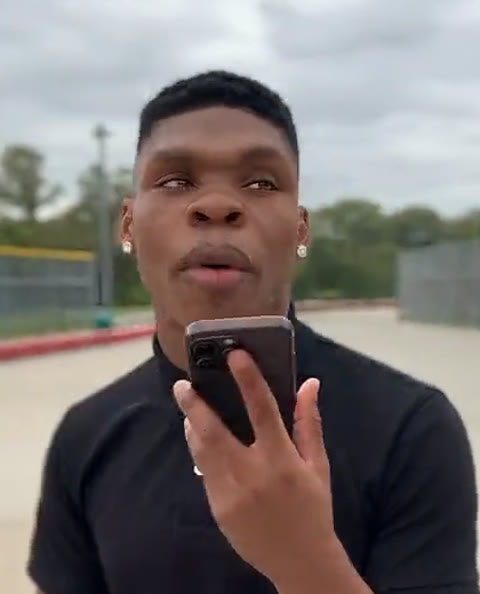
13s · 9:16 · 720p · original sound · ready in a few minutes
Who to put in
Best Subjects for the Get a Job AI Meme
One clear portrait is all a Get a Job AI video needs—the deadpan phone punchline lands hardest on anyone chasing an overnight shortcut.
Yourself or Your Group-Chat Dreamer
Upload a sharp front-facing selfie of yourself or the friend who constantly pitches side hustles instead of clocking in. Our Get a Job AI template keeps their real face, hairstyle, and everyday outfit while animating the walkie-talkie phone hold and shocked stare straight into the lens.
Dogs and Cats Who Refuse to Pay Rent
Pet editions are among the most replayed Get a Job AI videos online. Drop in a clear front portrait of your dog or cat and watch them stand upright outdoors, clutch a smartphone in their paws, ask how to make a million in 30 days, and freeze in disbelief when told to get a job.
Coworkers, Roommates, and Study Partners
Turn Monday-morning burnout, finals week procrastination, or a casual office banter thread into a 13-second skit. Because the template preserves natural facial reactions and everyday clothes, the punchline feels like an impromptu parking-lot clip filmed on the spot.
Animated Avatars and Original Characters
Illustrated personas, game avatars, and stylized portraits also transfer cleanly into the handheld outdoor courtyard framing. Clear eyes and distinct facial contours let the eyebrow raise and jaw-drop reaction read unmistakably on mobile screens.
Same category
More Funny templates
 NEW380 CR
 NEW320 CR
 NEW100–400 CR
 NEW100–400 CR
 NEW140 CR
 NEW100–400 CR
 NEW380 CR
 NEW160 CR
 NEW270 CR
 NEW160 CR
 NEW100–400 CR
 NEW320 CR
How it works
How to Make a Get a Job AI Video in Three Steps
Skip manual lip-sync editing and prompt writing—upload one photo and let the 13-second Get a Job AI template handle the timing.
Upload One Clear Portrait Photo
Drop a single JPG, PNG, or WebP photo up to 20 MB into the You or Pet slot. Pick a well-lit front-facing shot of one person or one pet with eyes clearly visible so the surprised double-take reads cleanly.
Generate with Kling 4.0 Reference Timing
Click Generate to lock in the 13-second Get a Job AI outdoor handheld performance for 350 credits. Kling 4.0 Reference-to-Video maps your subject onto the phone-holding gestures, screen glance, and comedic shock beat while preserving their identity and outfit.
Download Your 720p Vertical MP4 with Audio
Within a few minutes your finished 9:16 MP4 appears in My Work with the original English comedic dialogue track synced cleanly onto the clip—ready to share directly to Reels, Shorts, or group chats.
Photos: JPG, PNG, WebP, up to 20 MB.
Output details
What Goes Into a Get a Job AI Video and What Comes Out
One portrait photo goes in; a clean, watermark-free 13-second vertical comedy skit synced to the viral audio track comes out.
You upload
- One clear front-facing photo of a person, dog, cat, or character
- Standard portrait or half-body framing with even daylight or indoor lighting
- Zero prompt engineering, green screens, or manual timeline cuts required
You get
- 13-second 9:16 vertical Get a Job AI MP4 rendered at crisp 720p resolution
- Full outdoor courtyard skit with walkie-talkie phone hold and shocked reaction beat
- Original viral English dialogue track remuxed cleanly onto the finished video
- Saved to My Work for instant download, with automatic credit refund if a run ever fails
| Photos | 1 (person or pet) |
|---|---|
| Model | Kling 4.0 Reference-to-Video |
| Duration | 13 seconds |
| Picture | 720p, 9:16 vertical |
| Audio | Original English meme dialogue |
| File | Clean MP4 in My Work |
| Credits | 350 per video, refunded if it fails |
Meme origin
Where the Get a Job AI ChatGPT Meme Came From
A 13-second outdoor comedy skit about asking AI for a fast-track fortune turned into one of the fall’s biggest single-photo remix formats.
The original September 2026 outdoor skit
The format started on September 18, 2026, when comedy creator Noah (@glowboynoah on Instagram and @glowboynoah7 on TikTok) posted a handheld outdoor skit captioned "the one friend that asks chat gbt everything:". Standing on a concrete courtyard and holding his phone like a walkie-talkie, he asks, "ChatGPT, how I become a millionaire in 30 days?"—only for the flat AI voice to answer, "Get a job."
His stunned stare into the camera ("Bro, what are they talking about?") and stubborn follow-up ("What if you don’t wanna get a job?") became the exact 13-second audio clip that creators began remaking as Get a Job AI videos across TikTok, Instagram Reels, and YouTube Shorts in October 2026.
Why it took off as a single-photo AI trend
The joke taps into two familiar internet running gags at once: the long-running "Job Application Form" meme and years of social-media parody aimed at overnight "get rich with AI in 30 days" hustle threads. Pairing that deadpan punchline with single-photo AI video meant anyone—especially pet owners turning dogs and cats into upright phone-holding freeloaders—could star in a Get a Job AI clip in minutes.
Sources: TikTok (@glowboynoah7), the archived full skit on YouTube, and Job Application Form history on Know Your Meme.
Photo tips
Photo Tips for a Crisp Get a Job AI Reaction
The punchline lives in the eye-widening double-take at the halfway mark—give the model a clean, well-lit face to work from.
- Use a bright, front-facing head-and-shoulders or half-body portrait so both eyes, eyebrows, and mouth contours stay sharp throughout the phone conversation.
- Keep one subject centered in the frame. Solo human portraits and solo upright or seated pet photos map cleanly onto the single handheld actor.
- Choose everyday casual clothes you want to keep in the finished clip—hoodies, tees, jackets, and collars carry naturally into the overcast courtyard lighting.
- Heavy sunglasses, hands covering the mouth, or deep backlit shadows soften the shocked facial expression; swap in an unobstructed daylight portrait for the crispest comedy beat.
- Crowded group photos or sharp side profiles give the model competing faces to track; cropping tightly to one clear front-facing subject produces the cleanest result.
Ready to post
Caption Ideas for Your Get a Job AI Clip
Copy a ready-made punchline below to match the 13-second ChatGPT millionaire audio when you share your finished video.
- “Day 1 of asking ChatGPT how to become a millionaire in 30 days (it humbled me immediately).”
- “The one friend who refuses to get a job and asks AI for cheat codes instead.”
- “Me consulting artificial intelligence on how to escape the 9-to-5 by Friday.”
- “My dog really thought ChatGPT was going to pay his rent this month.”
- “Bro got genuinely offended by a two-word answer from his own phone.”
- “Asking ChatGPT for my first million because scrolling all afternoon still hasn’t worked.”
- Pair with tags like #getajob #chatgptmemes #millionaire #ai #comedy #relatable for quick discovery.
- Post the 9:16 clip full-screen with sound on—the deadpan "Get a job." line hits right around the five-second mark.
Also called
Other Names for the Get a Job AI Trend
Creators across short-form feeds refer to the same 13-second Get a Job AI skit under a handful of overlapping titles.
ChatGPT Millionaire AI
The most common alternate title, highlighting the opening question about becoming a millionaire in 30 days before the blunt two-word shutdown.
How I Become a Millionaire in 30 Days AI
Named directly after the spoken opening line that kicks off the clip while the subject holds the smartphone up like a walkie-talkie.
ChatGBT Kid Meme
A playful nod to the intentionally misspelled "chat gbt" caption from the original September 2026 outdoor skit that sparked the remix wave.
FAQ
Get a Job AI FAQ
What happens in the Get a Job AI video template?
Your uploaded subject stands outdoors on a concrete courtyard holding a smartphone near their mouth, asks ChatGPT how to become a millionaire in 30 days, freezes in shocked disbelief when the phone replies "Get a job.", and fires back a frustrated follow-up question across 13 seconds.
How many photos do I need to upload for Get a Job AI?
Just one clear front-facing photo (JPG, PNG, or WebP up to 20 MB). You can upload a solo portrait of yourself, a friend, a dog, a cat, or an illustrated character.
Does the Get a Job AI template work with pet photos like dogs and cats?
Yes. Kling 4.0 Reference-to-Video adapts both humans and pets cleanly, animating dogs or cats standing upright outdoors while holding the smartphone in their paws and reacting to the punchline.
Does the finished video include the original "Get a job." audio?
Yes. Every export includes the original 13-second English comedic dialogue track remuxed onto the clean 720p vertical MP4 so it is ready to post with sound on.
How long is the generated video and how many credits does it cost?
Each Get a Job AI generation produces a 13-second 9:16 vertical MP4 at 720p resolution for 350 credits. You can see the exact credit total on the Generate button or check one-time packs on our pricing page.
Will the generated video have subtitles or watermarks burned in?
No. The reference footage is cleaned before generation and your finished 720p MP4 exports without burned-in captions or watermarks so you can add your own text in any social app.
What happens if a generation fails?
If a video run ever fails before completing, your credits are automatically refunded to your account balance so you can retry with a fresh photo right away, or explore more funny AI video templates.
Keep scrolling
More viral AI video trends
 NEW220 CR
 NEW300 CR
 NEW220 CR
 NEW220 CR
 NEW10 CR
 NEW380 CR
 NEW220 CR
 NEW220 CR
 NEW320 CR
 NEW140 CR
 NEW380 CR
 NEW160 CR