
Effects · New
I Miss You AI Video Generator
Upload one portrait to make a 15-second I Miss You AI video: a warm hallway smile, reaching behind the back, and revealing a giant pink rose bouquet in 720p MP4 with original audio for 400 credits.
I Miss You AI · 15s · 9:16
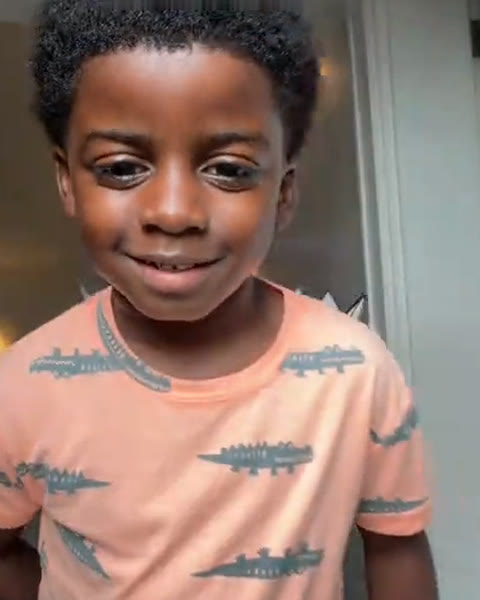
15s · 9:16 · 720p · original sound · ready in a few minutes
The scene
How the 15-second I Miss You AI bouquet reveal unfolds
Every I Miss You AI clip follows this four-beat surprise reveal from a hallway smile to a frame-filling pink rose bouquet.
0–2.5 s: The warm hallway greeting
Your subject stands centered in a softly lit hallway, smiling warmly into the camera with both hands behind their back.
2.5–5.5 s: Reaching behind the back
Keeping a soft smile and eye contact, the protagonist shifts and reaches both arms behind their back for the hidden bouquet.
5.5–8.0 s: Pulling out the pink roses
An oversized pastel pink rose bouquet wrapped in crisp white and dark-trimmed paper swings smoothly forward in both hands.
8.0–15 s: Presenting the bouquet to camera
The protagonist holds the pink roses high toward the lens, filling the center frame as the original sound finishes.
Same category
More Effects templates
 NEW220 CR
 NEW10 CR
 NEW320 CR
 NEW380 CR
 NEW140 CR
 NEW220 CR
 NEW140 CR
 NEW270 CR
 NEW160 CR
 NEW160 CR
 NEW400 CR
 NEW10 CR
Input and output
What goes into and out of an I Miss You AI video
One clear portrait goes in; one 15-second vertical I Miss You AI video with the rose bouquet reveal and original audio comes out.
You upload
- One JPG, PNG or WebP photo of a single person
- Half-body or full-body framing with the face and shoulders clearly lit
- At least 300 pixels per side, up to 20 MB per image file
- Browser upload with automatic framing fit and zero prompt writing
You get
- Clean 15-second vertical 9:16 MP4 rendered at 720p, watermark-free
- Consistent identity keeping your face, hairstyle, skin tone and outfit
- Warm hallway setting, behind-the-back reach and oversized pink rose bouquet
- Original audio merged cleanly onto your I Miss You AI clip in My Work
- Automatic full credit refund whenever a generation task fails
| Photos | 1 |
|---|---|
| Model | Kling 4.0 |
| Duration | 15 seconds |
| Picture | 720p, 9:16 |
| Audio | Original sound merged |
| File | MP4 |
| Credits | 400 per video, refunded if it fails |
Photos: JPG, PNG, WebP, up to 20 MB.
Who to put in
Who to put in your I Miss You AI video
Anyone you want to send a warm hello or surprise rose reveal to fits naturally in this I Miss You AI scene.
Yourself for a long-distance partner
Upload a sharp, smiling half-body portrait to send a sweet virtual rose bouquet across miles. The warm lighting makes the I Miss You AI clip personal for anniversaries and late-night check-ins.
A close friend or college roommate
Put your best friend or out-of-state roommate into the I Miss You AI hallway reveal to say you miss hanging out. Their outfit and expression carry straight into group chats or story replies.
Parents, grandparents or family members
Use a bright family portrait of Mom, Dad or a sibling to create a cheerful I Miss You AI bouquet greeting for Mother’s Day, Father’s Day, birthdays or holiday family threads.
A nostalgic throwback portrait
Old printed photos or scanned vintage portraits also fit the classic I Miss You AI tradition of bringing cherished pictures to life. Pick a clean, front-facing scan with clear eyes.
Origin
Where the I Miss You AI trend comes from
From 2021 portrait animation filters to 2026 bouquet-reveal reels, I Miss You AI videos blend nostalgia with personal greetings.
From Deep Nostalgia and Photo Animation to 2026 reels
The I Miss You AI wave began in February 2021 with MyHeritage Deep Nostalgia (Know Your Meme), followed in July 2021 by TikTok’s Photo Animation filter (Know Your Meme; Business Insider), animating old family portraits so loved ones could blink and smile.
By 2025 and 2026, generative models like Kling (CNET) expanded those clips into full-body I Miss You AI scenes pairing heartfelt audio with gestures like presenting flowers.
The hallway pink rose bouquet reveal
Across social feeds, "I miss you" clips range from beach calligraphy and cartoon greetings to surprise gift reels. A standout live-action format is the indoor hallway reveal (TikTok): standing calmly before swinging out a huge pink rose bouquet.
SameVid builds this I Miss You AI template around that 15-second hallway reveal using Kling 4.0 reference-to-video, keeping your uploaded photo recognizable from the opening smile to the final rose presentation.
Ready to post
Real captions for I Miss You AI videos
Copy or adapt popular community captions paired with I Miss You AI videos on TikTok and Reels.
- “Send this to the person you miss the most! 🥺 #missyou #fyp #love”
- “Send this to your loved ones. ❤️ #imissyou #fyp #wholesome”
- “When I miss you… Feel free to tag someone you’re really missing right now 💕”
- “Who do you miss today? ❤️ #imissyou #foryou #viral”
- “I really miss you 💚 #missyou #love #fyp”
- “A little pink rose surprise for the one I miss most 🌹 #imissyou #longdistance”
- Tag your friend, partner or family member in the caption so they spot the rose reveal right away.
- Keep the opening words brief so viewers watch through the bouquet reveal at second 6.
- Share your I Miss You AI clip in vertical 9:16 on TikTok, Reels or WhatsApp Status.
Make your I Miss You AI video now
Upload one clear portrait to create a 15-second 720p I Miss You AI bouquet reveal with original audio for 400 credits.
FAQ
I Miss You AI FAQ
What photo works best for the I Miss You AI Video Generator?
I Miss You AI works best with one bright, front-facing half-body or full-body portrait of a single person in JPG, PNG or WebP (minimum 300 px per side, up to 20 MB) with both eyes and shoulders clearly visible for Kling 4.0.
How many credits does one I Miss You AI video cost?
I Miss You AI costs 400 credits per 15-second 720p vertical video (15 seconds = 400 credits) on the SameVid AI pricing page, and failed jobs refund credits automatically.
Which AI model powers I Miss You AI and does it include audio?
I Miss You AI runs on Kling 4.0 in reference-to-video mode at 720p in a 9:16 vertical frame, using the muted hallway motion reference and merging the original audio track into your downloadable MP4.
Can I use vintage, black-and-white or scanned family photos in I Miss You AI?
I Miss You AI supports clear vintage portraits and sharp scans of printed family photos in JPG, PNG or WebP (at least 300 px per side, under 20 MB), and lightly restoring creases first yields crisp facial detail.
How long is an I Miss You AI video and is it watermark-free?
I Miss You AI delivers a 15-second 720p vertical MP4 (576×1024, 9:16 ratio) that downloads watermark-free straight from My Work, ready for social feeds or private chats.
How does I Miss You AI differ from Can I Help You Miss AI and Crying AI?
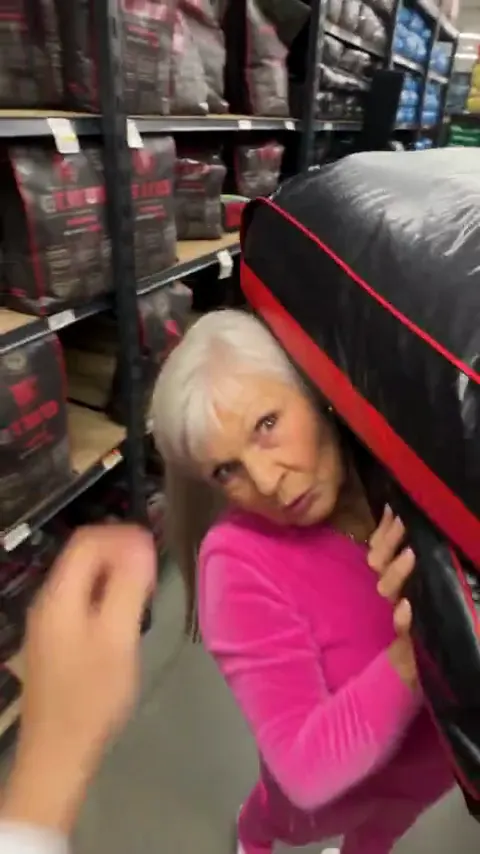
I Miss You AI creates a 15-second hallway pink rose bouquet reveal, whereas Can I Help You Miss AI recreates the supermarket dog-food skit and Crying AI creates an emotional night close-up; browse all styles in AI video effects.
Are uploaded portraits in I Miss You AI kept private?
I Miss You AI keeps uploaded portraits private inside your account, using your photo solely to generate your video in your personal My Work library rather than any public gallery.
Keep scrolling
More viral AI video trends
 NEW270 CR
 NEW320 CR
 NEW240 CR
 NEW190 CR
 NEW30 CR
 NEW220 CR
 NEW270 CR
 NEW400 CR
 NEW220 CR
 NEW380 CR
 NEW380 CR
 NEW100–400 CR