
Effects · New
Walking Confidently AI Video Generator
Walking Confidently AI turns one photo into a nine-second confident walk toward the camera. It keeps the full-body stride, brick walkway and forward-facing camera rhythm of the trend, then adds its original sound to your 720p vertical MP4 for 240 credits.
Walking Confidently AI · 9s · 9:16
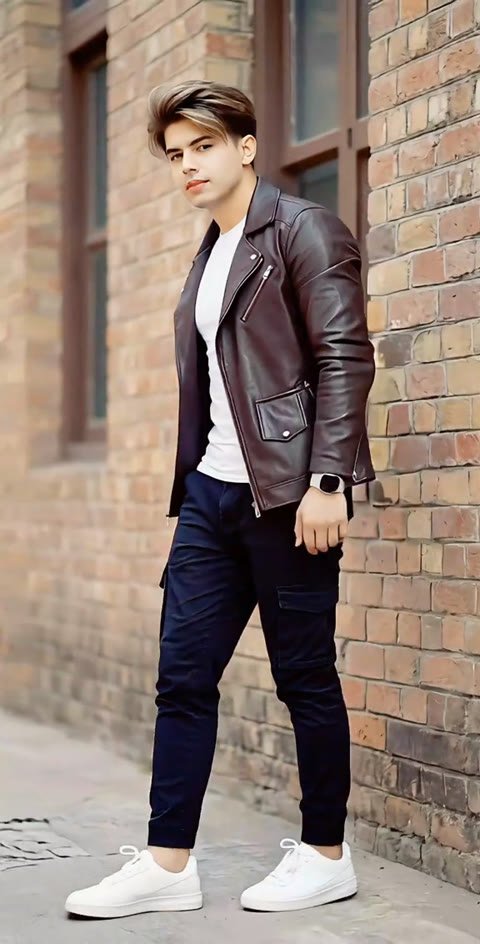
9s · 9:16 · 720p · original sound · ready in a few minutes
The walk
A confident walk built around one clean shot
The reference is a simple full-body walk with a steady camera, so your photo stays the focus from the first step through the final frame.
Take the center
Your person enters the brick-lined walkway in a full-body view. Their outfit, face and hairstyle come from the photo, while the open path gives every stride room to read clearly.
Keep the stride moving
The walk settles into a smooth, deliberate pace toward the lens. Relaxed shoulders, a lifted chin and an easy arm swing create the self-assured body language behind the trend.
Hold the camera connection
The camera stays at a natural standing height and travels with the subject’s approach. The face remains visible as the person moves from a wide full-body frame into a closer view.
Finish in motion
The final stride carries naturally through the end of the clip. It leaves a clean runway-style moment that works for a personal post, an outfit reveal or a playful group-chat update.
Same category
More Effects templates
 NEW270 CR
 NEW240 CR
 NEW140 CR
 NEW270 CR
 NEW140 CR
 NEW270 CR
 NEW140 CR
 NEW140 CR
 NEW400 CR
 NEW270 CR
 NEW140 CR
 NEW190 CR
Also called
Names creators use for this walking effect
TikTok creators use a few closely related names for the same one-photo, forward-walking format.
Walks confidently AI filter
A creator label for the vertical clip where one person takes a composed full-body walk toward the camera.
AI walking effect
A broad name for turning a still portrait into a moving walk with a defined subject, setting and camera path.
Cinematic confident walk effect
A name used when the result gives the walk a polished location, steady pacing and a clear camera-facing arrival.
Model walk effect
A fashion-forward variation that emphasizes posture, an even stride and a full-body outfit view.
Ready to post
Caption ideas for your confident walk
Pair the finished clip with a short line that lets the stride do the talking.
- “Walking in like the day already knows my name.”
- “One good outfit, one clear direction, one confident step at a time.”
- “The camera caught me on my way to a better mood.”
- “Main-character walk, saved as a nine-second clip.”
- “A little extra posture changes the whole entrance.”
- Start with one sentence and let the original sound carry the rest of the post.
- For an outfit reveal, name one detail from the photo so the caption and video feel connected.
- For a friend, turn the first line into an inside joke and keep the walk as the punchline.
Quick walkthrough
Make a Walking Confidently AI video from one photo
One clear portrait becomes a nine-second vertical walk in three steps for 240 credits.
Add a photo of one person
Choose a clear JPG, PNG or WebP photo with one visible person. A half-body or full-body photo gives Kling a strong starting point for the face, hairstyle, clothes and walking silhouette.
Generate the confident walk
Select Generate to turn the photo into a 9:16, 720p Walking Confidently AI video. The template supplies the brick walkway, camera path and steady forward stride while your photo defines the person on screen. The button shows the 240-credit cost before the task starts.
Play, save and share
The finished MP4 appears in My Work with the original sound merged to the final video. Play it on the page, download it when it is ready, then share the full-body entrance wherever your short videos live.
Photos: JPG, PNG, WebP, up to 20 MB.
The trend
What Walking Confidently AI videos show
A simple, camera-facing walk is the whole idea: one person, one clear stride and one steady approach.
The reference moment
The reference clip follows one person in a dark jacket along a brick-lined outdoor walkway. The body stays fully visible as the subject walks forward with an even stride, while the camera holds the approach in a single uninterrupted view.
That simple framing is what makes the format flexible. A portrait of you, a friend or a family member can take the lead while the setting, walking pace and camera rhythm stay consistent.
How creators name it
TikTok creators use labels such as “walks confidently AI filter” and “AI walking effect” for these clips. @pardesi.kanxa.0x3’s brick-walk video is the reference used here for its clear single-person walk and clean outdoor frame.
The format also appears with street, airport, park and outfit-focused settings. The shared visual is a person who owns the frame while walking toward the camera with a composed, natural pace.
Why one photo is enough
The scene has one core participant. Your photo establishes the person viewers recognize, and the template supplies the supporting location and camera movement that make the walk feel like a finished short clip.
Give your photo a confident entrance
Pick one clear portrait and turn it into a nine-second camera-facing walk with original sound at 720p. Your Walking Confidently AI video costs 240 credits.
FAQ
Walking Confidently AI FAQ
What is Walking Confidently AI?
Walking Confidently AI is a one-photo video template that turns a person from your image into the lead of a full-body walk toward the camera. The result follows the trend’s steady stride, brick-walkway setting and forward-facing camera rhythm in a nine-second vertical MP4 with original sound.
How do I make a Walking Confidently AI video?
Add one clear photo, select Generate and open My Work when the video is ready. Kling 4.0 uses your photo for the person on screen and the template supplies the walking scene, camera motion and soundtrack. One nine-second 720p video costs 240 credits.
What kind of photo works best?
Choose a clear photo with one visible person, a readable face and some space around the body. A front-facing half-body or full-body portrait gives the model useful detail for your face, hair, clothing and walking silhouette. JPG, PNG and WebP files up to 20 MB work in the upload slot.
Can I use a photo of a friend or family member?
Yes. The template takes one person per video, so it works well for your own portrait, a friend, a partner or a family member. Pick a photo where that person is easy to recognize and the scene will give them the confident camera-facing walk.
How long is the video and what format does it use?
Each Walking Confidently AI video runs for nine seconds. The download is a 720p vertical 9:16 MP4, sized for TikTok, Reels and Shorts while keeping the whole walking figure in frame.
How many credits does Walking Confidently AI cost?
One nine-second Walking Confidently AI video costs 240 credits. The price follows the SameVid 15-second, 400-credit baseline and appears on the Generate button before the task begins.
Does the finished MP4 include sound?
Yes. SameVid keeps the model reference silent while it creates the new walk, then merges the reference clip’s original sound under the completed video. Your downloaded MP4 arrives with picture and audio together.
Can I download the finished Walking Confidently AI video?
Yes. After generation completes, My Work provides playback and a download for the MP4. The same result stays available with your other SameVid creations, ready for a post or a personal save.
Keep scrolling
More viral AI video trends
 NEW320 CR
 NEW380 CR
 NEW140 CR
 NEW350 CR
 NEW380 CR
 NEW320 CR
 NEW400 CR
 NEW300 CR
 NEW350 CR
 NEW400 CR
 NEW240 CR
 NEW400 CR