
Effects · New
Winter Bus AI Video Generator
Upload one clear photo to create the 12-second Winter Bus AI ride: board a snowy fairy-lit coach, sip warm matcha, and smile to Be The One For You. Kling 4.0 renders 720p 9:16 MP4 with original audio for 320 credits.
Winter Bus AI · 12s · 9:16
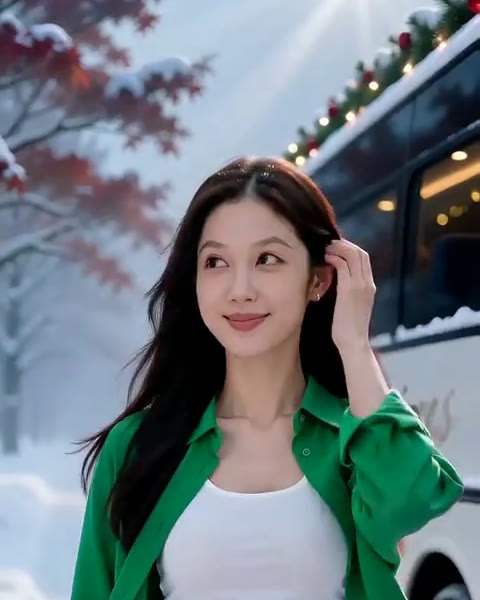
12s · 9:16 · 720p · original sound · ready in a few minutes
Who to put in
Who fits the Winter Bus AI seat best
One clear portrait powers all six Winter Bus AI scenes, from stepping aboard outside in crisp snow to resting beside the frosted window.
Your own everyday portrait
Use a bright front-facing selfie or half-body photo taken indoors or outdoors. Warm-weather tops, light shirts, and casual denim transition smoothly into the crisp snowy exterior and golden cabin lights of the Winter Bus AI clip, whether your original snapshot comes from a sunny afternoon or a chilly morning.
A friend who lives somewhere warm
Surprise a friend in a tropical or sunny city with an instant Winter Bus AI snow-day commute. The cold blue pine forest outside and steaming green matcha latte inside make the 12-second render feel like a real holiday postcard from a mountain road trip.
Traditional or festive outfits
Detailed embroidery, bright scarves, winter coats, or formal wear carry cleanly through the Winter Bus AI boarding aisle and window close-ups, turning one portrait into a seasonal greeting or year-end avatar video for family chats.
A calm close-up for cinematic edits
Because the middle and closing Winter Bus AI shots move in closely on the face, eyes, and wireless earbuds, a sharp portrait with relaxed shoulders and an open gaze delivers strong facial likeness through every Kling 4.0 cut.
Same category
More Effects templates
 NEW220 CR
 NEW10 CR
 NEW320 CR
 NEW380 CR
 NEW140 CR
 NEW220 CR
 NEW140 CR
 NEW270 CR
 NEW160 CR
 NEW160 CR
 NEW400 CR
 NEW10 CR
Ready to post
Winter Bus AI captions for your snowy ride
Short lines inspired by real Winter Bus AI posts—built for cozy winter travel vibes, snow-day escapes, and quiet headphone moments.
- “Winter arrived before the bus did. #winterbus #wintervibes #aivideo”
- “Taking the Winter Bus AI straight into snow season, hot matcha in hand. #winterbus #cozyvibes”
- “Sunny outside today, so I boarded the Winter Bus AI instead. #winterwonderland #aieffect”
- “Warm fairy lights, cold frosted glass, and the best seat on the Winter Bus AI. #snowyescape #winterbus”
- “Headphones on, snow falling outside, and a quiet Winter Bus AI ride home. #slowliving #winterbus #aitrend”
- “POV: you caught the cozy Winter Bus AI coach just as dusk settled in. #winterbus #cozyaesthetic”
- Keep the default Jonah Vell track Be The One For You on your Winter Bus AI clip for the signature soft indie pacing, or pair the visual edit with a regional winter ballad or acoustic holiday song inside your social editor.
- Add a local city temperature tag when sharing a Winter Bus AI clip from a warm climate—viewers immediately connect with the instant snow-day contrast.
The scene
Six Winter Bus AI story beats across 12 seconds
Every shot follows the exact rhythm of the viral Winter Bus AI montage, moving from crisp snow daylight into a warm fairy-lit cabin.
0–2s · Snowy arrival outside the Winter Bus AI coach
The Winter Bus AI clip opens outside a white tour coach framed by snow-laden pines, evergreen garlands, and warm bulb lights. You face the camera with a gentle smile, tucking hair back in crisp pale-blue winter daylight before turning toward the open doorway.
2–4s · Climbing the steps and garland aisle
The camera follows from behind as you step up the softly lit bus stairs holding the handrail and stroll down the center aisle between deep navy seats and overhead pine garlands glowing with golden fairy lights.
4–6.5s · Steaming matcha latte by the snow window
Seated beside a frosted panoramic window with snowy evergreen woods passing outside, you hold a clear glass mug of green matcha latte and take a slow, comforting sip as warm cabin sconces balance the cold blue winter sky.
6.5–8.5s · Checking your phone and fitting earbuds
A closer Winter Bus AI window-seat angle shows you glancing down at a smartphone with a quiet smile, then lifting one hand to place a white wireless earbud into your ear while golden bokeh fairy lights shimmer behind you.
8.5–10s · Window gaze and luminous eye close-up
You look gently upward toward the snowfall outside, followed by a brief macro close-up of one eye catching the bright winter daylight—giving the Winter Bus AI sequence its distinct short-film finish.
10–12s · Folded arms and peaceful eyes-closed smile
The closing Winter Bus AI beat pulls back to a calm medium close-up by the glass. With arms loosely folded, you gaze out at the twilight snow and let your eyes drift shut in a relaxed, content smile to complete the 12-second ride.
Origin
Where the Winter Bus AI trend came from
How seasonal AI snow portraits evolved into the one-photo 12-second Winter Bus AI snowy coach short film.
From the AI Snow Trend to the Winter Bus AI ride
The Winter Bus AI format grew directly out of the broader viral AI Snow Trend that surged in late 2025, when snow-portrait filters and winter photoshoot prompts let people in warm regions turn ordinary selfies into cinema-lit snowy postcards—covered by Pakistan Today, Prestige Online, and Lifestyle Asia.
Alongside cozy snowy sleeper-bus ambience clips across social feeds, creators on TikTok began sharing a 12-second one-photo "Winter Bus" AI effect in mid-November 2026 built inside the TikTok Effect House ecosystem—shifting the Winter Bus AI aesthetic from static snowy photos into a personal multi-shot holiday commute.
Why this 12-second Winter Bus AI sequence caught on
Unlike single-shot snowfall overlays, the Winter Bus AI edit tells a complete mini-story in twelve seconds: boarding from bright snow into warm garlands, sipping hot matcha, putting in earbuds, and resting by the glass. Most Winter Bus AI posts pair the montage with Jonah Vell’s "Be The One For You," giving the six cuts a soft, nostalgic rhythm that fits casual, winter, and festive outfits alike.
Also called
Other names for the Winter Bus AI trend
Creators across English and Southeast Asian feeds tag the same 12-second Winter Bus AI coach clip under several closely related names.
Winter Bus AI Effect / Filter
The most direct name used on short-form feeds for the 12-second Winter Bus AI photo-to-video snow coach transformation featuring garlands, matcha, and wireless earbuds.
AI Snow Bus Ride
Used when viewers highlight the cold-outside, warm-inside Winter Bus AI transit aesthetic—stepping out of crisp snowfall into a glowing holiday cabin.
Cozy Winter Bus Trip AI
Connects the personal Winter Bus AI portrait montage to the wider cozy snowy-bus and sleeper-coach ambience wave popular on winter travel and slow-living channels.
Efek AI Winter Bus / Foto Bergerak
The Indonesian phrasing ("moving photo AI effect") that helped propel the earliest wave of everyday selfie transformations into the Winter Bus AI sequence.
Specs
What goes into your Winter Bus AI video
Go straight from one portrait to a complete 12-second Winter Bus AI snowy coach montage in 720p 9:16 with synchronized sound.
You upload
- Upload one clear front-facing portrait or upper-body photo in JPG, PNG, or WebP (up to 10 MB) taken with even lighting and an open, clearly visible face.
- Any season or background works smoothly—Kling 4.0 relights your portrait for bright outdoor snow and warm amber Winter Bus AI cabin reflections automatically.
You get
- A complete 12-second vertical 9:16 Winter Bus AI MP4 at 720p following all six story beats from exterior snow arrival to window-seat rest.
- Synchronized original audio featuring Be The One For You by Jonah Vell, saved straight to My Work ready for vertical social posting.
- Rendered with Kling 4.0 reference-to-video for 320 credits so camera pacing, holiday garland lighting, and facial identity stay consistent across every cut.
| Photos | 1 clear portrait |
|---|---|
| Model | Kling 4.0 |
| Duration | 12 seconds |
| Picture | 720p, 9:16 vertical |
| Audio | Original track (Be The One For You) |
| File | MP4, ready to post |
| Credits | 320 per video, refunded if it fails |
Photos: JPG, PNG, WebP, up to 20 MB.
FAQ
Winter Bus AI FAQ
What is the Winter Bus AI video generator?
The Winter Bus AI video generator turns one portrait into a 12-second vertical 9:16 snowy holiday coach montage powered by Kling 4.0: standing beside a snow-dusted bus lined with warm fairy lights, climbing aboard down a garland-trimmed aisle, sipping warm green matcha by a frosted window, putting in wireless earbuds, and closing with a calm eyes-closed smile. If you also enjoy snowy portrait effects, explore AI Snow.
What kind of photo gives the cleanest Winter Bus AI result?
A sharp, evenly lit front-facing portrait or half-body photo with your eyes and face clearly visible gives the strongest likeness. Clear lighting helps Kling 4.0 preserve your facial features and hairstyle across the exterior snow shot, the matcha latte close-up, and the eye detail shot. Upload JPG, PNG, or WebP files up to 10 MB.
Can I upload a summer or indoor everyday portrait for Winter Bus AI?
Yes—any season works great for Winter Bus AI. Upload a normal indoor or warm-weather portrait, and Kling 4.0 keeps your face, hair, and outfit style while blending crisp snowy daylight outdoors with warm amber fairy-light reflections inside the bus.
How long is the Winter Bus AI video and how many credits does it cost?
Every Winter Bus AI render is 12 seconds long in 720p vertical 9:16 MP4 format, matching the full six-beat sequence shown in the preview. It includes the synchronized reference track Be The One For You by Jonah Vell and costs 320 credits per generation; see bundle options on the SameVid pricing page.
Can I make a Winter Bus AI video directly on my phone?
Yes. The Winter Bus AI generator runs directly in mobile and desktop web browsers—pick a photo from your camera roll, start the 720p 9:16 Kling 4.0 render, and download the finished MP4 from My Work in a few minutes. You can browse all AI video effects and templates right from the same browser.
How are my credits protected during a Winter Bus AI render?
Your uploaded photo is used solely to render your Winter Bus AI video, and automatic credit protection returns the full 320-credit balance to your account whenever a job stops short of completion.
Keep scrolling
More viral AI video trends
 NEW190 CR
 NEW400 CR
 NEW400 CR
 NEW320 CR
 NEW320 CR
 NEW10 CR
 NEW400 CR
 NEW380 CR
 NEW100–400 CR
 NEW100–400 CR
 NEW220 CR
 NEW320 CR