
Funny · New
Who Said Something About Oil? AI Video Generator
Upload 1 to 3 clear portraits or pet photos to star in this 15-second 720p 16:9 press-conference meme. Lead the table, deflect the oil question, knock over the water pitcher, and bolt with original audio for 400 credits.
Who Said Something About Oil? AI · 15s · 16:9
Pick one, two, or all three press-table seats. Every slot is optional; add at least one clear front photo to start.
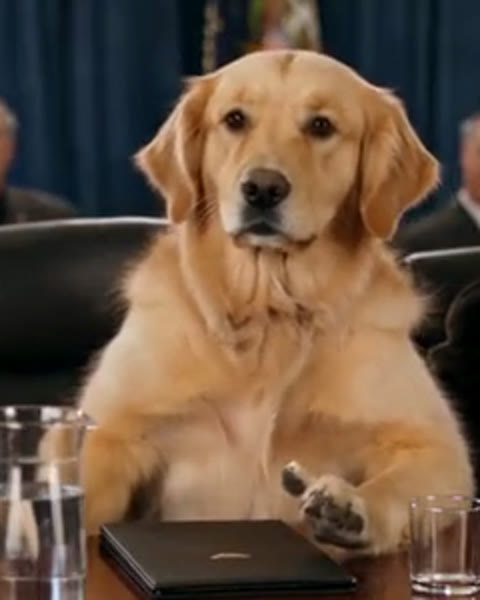 Center SpeakerOptional · Front portrait
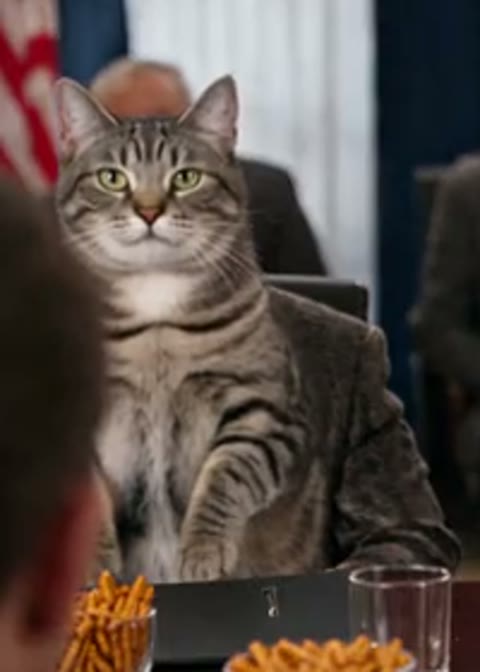 Left AdvisorOptional · Front portrait
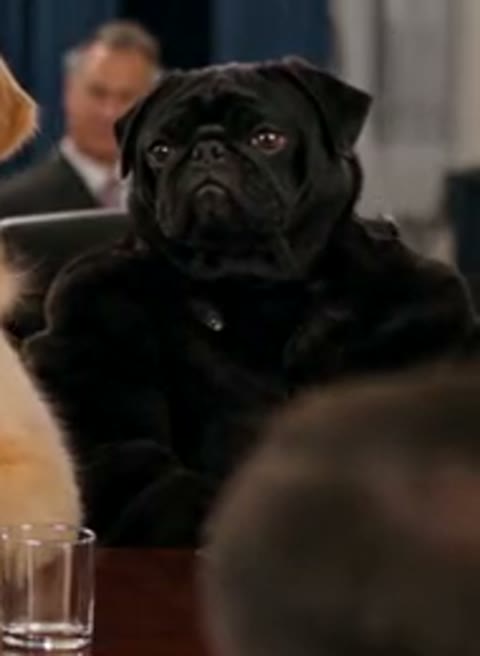 Right AdvisorOptional · Front portrait
15s · 16:9 · 720p · original sound · ready in a few minutes
Ready to post
Captions for your Who Said Something About Oil? AI clip
Pair your 15-second press-conference video with short captions built around the sudden deflection and table escape.
- “Huh? Oil? Who said something about oil, you cookin’?”
- “Me when the group chat brings up last weekend’s receipt”
- “Wait, who said oil? Breaking news from the living room desk”
- “When someone asks who ate the last slice in the fridge”
- “Who said oil? Gotta go, meeting adjourned”
- “Our dog acting completely innocent after chewing the sofa”
- “Who said something about oil?! Wrap it up, we are leaving”
- “Pov: you got caught mid-excuse and knocked over the water pitcher”
- Keep your setup line short in the top caption so the press-table punchline lands cleanly right when the center speaker turns their head.
- Tag the two friends you cast in the left and right advisor seats so the reaction comment thread starts as soon as the video loops.
- Trim your post description around a relatable everyday accusation like snacks, rent, chores, or forgotten plans to boost shares.
Same category
More Funny templates
 NEW380 CR
 NEW320 CR
 NEW100–400 CR
 NEW100–400 CR
 NEW140 CR
 NEW100–400 CR
 NEW380 CR
 NEW160 CR
 NEW270 CR
 NEW160 CR
 NEW350 CR
 NEW100–400 CR
Origin
Where the Who Said Something About Oil? meme came from
A 2004 late-night sketch grew into a decades-long reaction quote and a 2026 AI press-desk remix trend.
The 2004 Chappelle’s Show "Black Bush" sketch
The audio and staging come from the "Black Bush" sketch in Season 2, Episode 13 of Chappelle’s Show, which originally aired on April 14, 2004 (listed on Rotten Tomatoes and uploaded on Comedy Central’s official YouTube channel, where it has passed 15.7 million views). In the scene, Dave Chappelle plays a satirical president fielding White House press questions.
When an off-camera reporter asks what he says to critics claiming the administration only cares about oil, the speaker stalls in mock disbelief, waves both hands, accuses the reporter of making things up, sweeps the glass water pitcher across the table, and sprints out of the room with his cabinet.
From social reaction audio to AI cast swaps
Over the years, short clips of the 15-second exchange became shorthand across Reddit, X, and short-form video feeds for anyone dodging an obvious question—ranging from political commentary covered by The Root to everyday pet and roommate jokes.
By early and late 2026, creators pushed the format into AI video remixes—swapping friends, pets, and comic characters directly into the blue-draped briefing desk so every head turn, paw raise, and water-pitcher exit plays out with new faces behind the microphones.
What you get
What goes in and what comes out
Upload one to three portraits or pet photos and get a widescreen 720p MP4 synced to the original press-conference dialogue.
You upload
- 1 to 3 clear front-facing photos (people or pets; JPG, PNG, or WebP up to 20 MB)
- Optional casting across Center Speaker, Left Advisor, and Right Advisor seats
- Single-subject framing in bright, even light so faces and outfits carry cleanly
You get
- A 15-second widescreen 16:9 MP4 rendered at 720p via Kling 4.0
- Original press-conference audio track remixed over your generated clip
- Automatic identity lock for uploaded seats while open seats keep reference characters
| Photos | 1–3 (all optional, min 1) |
|---|---|
| Model | Kling 4.0 Reference |
| Duration | 15 seconds |
| Picture | 720p, 16:9 widescreen |
| Audio | Original dialogue track |
| File | MP4 (watermark-free) |
| Credits | 400 per video, refunded if it fails |
How it works
How to make your Who Said Something About Oil? AI video
Turn one to three portraits into a 15-second press-conference meltdown in three quick steps without editing.
Pick 1 to 3 press-table seats
Upload at least one clear front-facing photo (JPG, PNG, or WebP up to 20 MB) into Center Speaker, Left Advisor, or Right Advisor. Leave any extra chair open to keep the reference character in place.
Generate with Kling 4.0 motion
Tap Generate to launch the 15-second Kling 4.0 reference pass. Each uploaded subject keeps their own look and clothing while matching the defensive gestures, glances, and table exit.
Download your 720p MP4 with sound
Wait a few minutes for rendering and audio remixing to finish, then download the widescreen 720p MP4 from My Work ready for group chats and short-form feeds.
Photos: JPG, PNG, WebP, up to 20 MB.
Ideas
Best ways to cast Who Said Something About Oil? AI
Every seat is optional, making the press table work equally well for solo jokes, trio friend roasts, and pet comedy.
Put your dog or cat in the hot seat
Dogs and cats look hilarious behind a presidential desk—cast your golden retriever, pug, or tabby cat as the defensive Center Speaker who sweeps the water pitcher and bolts.
Three-friend group chat confession
Drop three roommates or coworkers into the Center Speaker and two Advisor chairs whenever someone denies eating the shared groceries or forgetting a deadline.
Solo spotlight with built-in advisors
Upload just one selfie into the Center Speaker slot and let the reference advisors flank you, shrugging silently right before you clear the table and run.
Workplace or sports banter
Cast your fantasy-league rival or team captain at the podium dodging tough post-game questions before ending the press briefing in three seconds flat.
The scene
Second-by-second breakdown of the 15s press conference
Four clear comedy beats pack the reporter question, defensive reaction, advisor glance, and table exit into fifteen seconds.
0.0s – 4.0s · Calm listening setup behind the desk
All three figures sit upright behind the polished wooden press table with blue curtains and the flag behind them, listening calmly while the off-screen reporter poses the oil question.
4.0s – 8.0s · Head turn, squint, and defensive hand raise
The Center Speaker snaps their head slightly sideways, squints in mock outrage, and lifts both paws or hands defensively on "Huh? Oil? Who said something about oil?"
8.0s – 12.0s · Double-down denial and glance to the right advisor
Gesturing toward the reporters on "You cookin’?", the Center Speaker leans back and flashes a quick side glance at the Right Advisor, who stays deadpan and quiet.
12.0s – 15.0s · Pitcher knock-over and full-room exit
The Center Speaker lunges out of the executive chair, knocks the clear glass water pitcher across the desk, and bolts toward the left side of the briefing room with both advisors scrambling behind.
FAQ
Who Said Something About Oil? AI FAQ
How many photos do I need for Who Said Something About Oil? AI?
Who Said Something About Oil? AI takes 1 to 3 photos across Center Speaker, Left Advisor, and Right Advisor. Every seat is optional once at least one role has a photo.
Can I use dogs, cats, or pets in Who Said Something About Oil? AI?
Who Said Something About Oil? AI supports front-facing photos of dogs, cats, and people across all three seats. You can cast pets, friends, or a mix of both at the press table.
What happens to empty seats in Who Said Something About Oil? AI?
Any unuploaded seat in Who Said Something About Oil? AI keeps its original reference character, position, and timing. One photo is enough to drive the full three-seat press conference.
What photo framing works best for Who Said Something About Oil? AI?
Who Said Something About Oil? AI works best with a bright, clear front-facing chest-up or head-and-shoulders photo. Keep a single subject centered with face and eyes clearly visible.
Does Who Said Something About Oil? AI include the original dialogue audio?
Every Who Said Something About Oil? AI export merges the original Chappelle’s Show "Black Bush" dialogue track onto the 15-second 720p 16:9 MP4 so every beat lands with sound.
How many credits does one Who Said Something About Oil? AI video cost?
Who Said Something About Oil? AI costs 400 credits per 15-second 720p widescreen Kling 4.0 video. Credits are calculated linearly from the 15-second rate and refunded automatically if a run fails.
Will uploaded subjects keep the outfits from their photos?
Kling 4.0 carries each subject’s likeness and photo outfit directly into their Who Said Something About Oil? AI press seat while matching head turns, paw or hand gestures, and the water-pitcher exit.
Keep scrolling
More viral AI video trends
 NEW400 CR
 NEW320 CR
 NEW220 CR
 NEW220 CR
 NEW400 CR
 NEW350 CR
 HOT270 CR
 NEW270 CR
 NEW220 CR
 NEW10 CR
 NEW380 CR
 NEW220 CR