
Effects · New
Golden Swag AI Video Generator
Turn one front portrait into an 11-second Golden Swag AI sunset motorcycle video on Kling 4.0. Step into the golden-hour street edit beside a blue R15 sport bike and palm trees in 720p 9:16 with original sound for 300 credits.
Golden Swag AI · 11s · 9:16
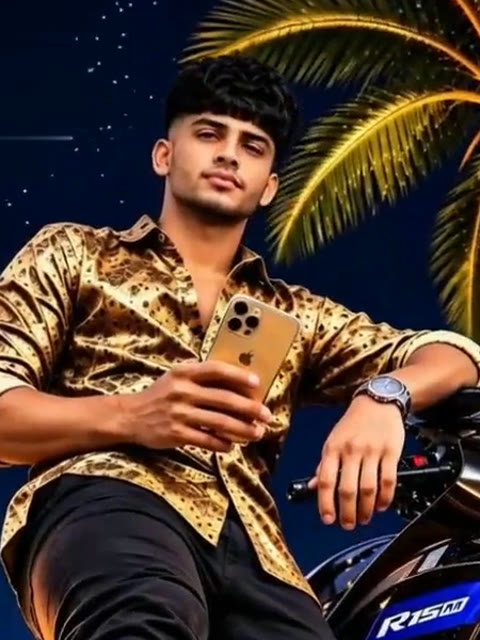
11s · 9:16 · 720p · original sound · ready in a few minutes
Origin
Where the Golden Swag AI motorcycle edit came from
Golden Swag AI adapts the one-photo street-style motorcycle edit launched in November 2026 into an instant browser video.
From a viral one-photo CapCut template to AI video
The Golden Swag AI trend broke out on November 21, 2026, when TikTok creator Kayopi (original post) shared a 1-photo Golden Swag CapCut template that crossed 621,000 views and 197,000 likes within its first day. The tagline, "Step Into the Golden Glow (Add 1 Photo)," promised an effortless inner-city street look from a single selfie.
Before this release, the phrase "golden swag" on social feeds mostly meant playful golden retriever clips or classic video-game quest guides. Kayopi paired the long-running Yamaha R15 Monster "1 photo bike edit" format with warm sunset palm-tree lighting, high-contrast color inversion flashes, and crisp gold-and-black streetwear, turning Golden Swag AI into a fast-rising portrait glow-up template.
Why the low-angle sunset framing stands out
Rather than a static portrait filter, the Golden Swag AI edit uses a dramatic ground-up camera perspective beside a glossy blue Yamaha R15 Monster sport bike. Warm amber rim light wraps the gold patterned shirt, striped slides, palm silhouette, and ocean horizon, while beat-timed thermal flashes and a sunset sky wipe keep every second of the 11-second loop dynamic on mobile feeds.
Same category
More Effects templates
 NEW220 CR
 NEW10 CR
 NEW320 CR
 NEW380 CR
 NEW140 CR
 NEW220 CR
 NEW140 CR
 NEW270 CR
 NEW160 CR
 NEW160 CR
 NEW400 CR
 NEW10 CR
The scene
Inside the 11-second Golden Swag AI sunset edit
Each Golden Swag AI render locks the low-angle beach sunset composition and beat-timed flash transitions around your portrait.
0.0s–3.5s · Low-angle golden-hour bike pose
The Golden Swag AI clip opens on a dramatic upward shot of the rider leaning calmly back against a blue Yamaha R15 Monster motorcycle, dressed in a gold-and-black patterned shirt, slim black jeans, and striped slides, holding a gold phone under starry palm trees.
3.5s–6.0s · Neon thermal flashes and sunset sky wipe
Right on the beat, vibrant neon-inverted color flashes pulse across the rider and fairing before wiping cleanly into a calm lavender-and-amber ocean horizon at dusk.
6.0s–8.5s · Warm amber glow return
A soft sunset fade and brief orange duotone flash bring the rider and R15 sport bike back into focus as golden light sweeps from the sand upward.
8.5s–11.0s · Moonlit golden swagger finish
The final beat settles into crisp golden-hour lighting beneath a bright moon and swaying palm fronds, locking your likeness cleanly onto the street-style hero pose.
Who to cast
Who looks great in a Golden Swag AI video
Because Golden Swag AI centers on one confident street-style rider, a single clear portrait fits almost any social mood.
Your own selfie for an instant feed glow-up
Drop one sharp front-facing selfie into Golden Swag AI to picture yourself in a sunset coastal photoshoot beside a sport bike without booking a studio or location shoot.
A friend who loves motorcycles or streetwear
Surprise a biking buddy, sibling, or partner with their permission by casting them on the R15 Monster bike in gold-and-black street style for a birthday shoutout or group-chat reaction.
Casual home snapshots turned cinematic
Transform an everyday hoodie or indoor desk photo into a warm Golden Swag AI sunset portrait complete with dramatic low-angle framing, ocean dusk colors, and glowing rim light.
Creators testing themed street-style reels
Use Golden Swag AI as a fast 9:16 opener for vertical Reels, TikTok edits, or music promos when you want high-contrast color flashes and clean vertical framing.
Specs and output
What goes in and what comes out of Golden Swag AI
Everything needed for Golden Swag AI is pre-configured—supply one clear portrait and download a finished vertical MP4.
You upload
- 1 clear solo front-facing portrait of yourself or an agreeing friend
- JPG, PNG, or WebP photo up to 20 MB with both eyes and jawline unobstructed
- Even daylight or soft indoor lighting with a neutral or confident expression
You get
- 11-second vertical 9:16 MP4 at 720p powered by Kling 4.0 Reference-to-Video
- Original viral Golden Swag sound track muxed cleanly onto the finished video
- Low-angle Yamaha R15 Monster bike pose, gold patterned outfit, and sunset flashes
- Saved to My Work with automatic credit refund if any render fails
| Photos | 1 |
|---|---|
| Model | Kling 4.0 |
| Duration | 11 seconds |
| Picture | 720p, 9:16 |
| Audio | Original sound |
| File | MP4 |
| Credits | 300 per video, refunded if it fails |
How it works
How to make a Golden Swag AI video in three steps
Skip phone template links and manual timeline cuts—render your Golden Swag AI clip directly in the browser.
Upload one clear front portrait
Add one solo JPG, PNG, or WebP photo (up to 20 MB) into the You upload slot. A centered head-and-shoulders shot with clean lighting lets Kling 4.0 lock onto your facial features right away.
Generate with Kling 4.0 Reference-to-Video
Click Generate to start the 300-credit Golden Swag AI render (browse packages on the SameVid AI pricing page). Your photo supplies the face and hairstyle while the silent reference clip drives the R15 bike pose, sunset lighting, and color-flash timing.
Save and share your vertical MP4
Watch your 11-second 720p 9:16 Golden Swag AI video with original sound in My Work, download the clean MP4, and share it or browse more AI Video Effects and portrait glow-ups like Skull Cap AI.
Photos: JPG, PNG, WebP, up to 20 MB.
Reference clip
See the Golden Swag AI rhythm before you generate
Preview the exact 11-second composition, outfit styling, and color-flash timing your uploaded portrait steps into.
Golden Swag AI · 11-second reference edit
This 11-second vertical reference clip shows the full low-angle Yamaha R15 Monster pose, sunset palm backdrop, thermal color flashes, ocean dusk wipe, and warm golden finish with original sound. Uploading your photo keeps this framing and audio while replacing the rider face.
Step into the Golden Swag AI sunset edit
Upload one front portrait and let Kling 4.0 render your 11-second 720p 9:16 Golden Swag AI motorcycle video with original sound for 300 credits.
FAQ
Golden Swag AI FAQ
What is the Golden Swag AI video generator?
Golden Swag AI is a one-photo video template powered by Kling 4.0 Reference-to-Video. It places your uploaded portrait onto the viral street-style rider pose—leaning against a blue Yamaha R15 Monster motorcycle in a gold-and-black patterned shirt under sunset palm trees—complete with beat-synced thermal flashes and original audio.
How many photos do I need for Golden Swag AI?
Golden Swag AI requires just one solo front-facing portrait. All camera angles, motorcycle details, streetwear styling, sunset wipes, and audio cues are pre-configured in the template so you never need to write prompts.
What length, resolution, and credits does Golden Swag AI use?
Each Golden Swag AI video costs 300 credits for an 11-second 720p vertical 9:16 MP4 with original sound. New accounts start with 10 free credits, the 400-credit Basic pack covers one Golden Swag AI render (with 850-credit Growth and 1,800-credit Pro packs for multiple clips), and any failed render refunds automatically; view current prices on the SameVid AI pricing page.
What kind of portrait photo gives the best Golden Swag AI likeness?
Choose a sharp, well-lit front portrait where your whole face, eyes, and hairline are clearly visible against a simple background. Even daylight or balanced indoor lighting helps Kling 4.0 preserve your skin tone and expression through the warm sunset glow and flash transitions.
Does Golden Swag AI keep the original viral sound?
Yes. While Kling 4.0 renders the visuals from a silent motion reference so no unwanted audio artifacts appear, SameVid AI automatically muxes the clean 11-second original sound back onto your finished Golden Swag AI MP4.
Do I need the CapCut app or prompt engineering to make Golden Swag AI?
No external editor or prompt writing is needed. Upload one photo right here, click Generate, and download your finished 9:16 clip from My Work, or explore similar AI Transformation Video Templates like Tom Hardy Legend Edit AI.
Keep scrolling
More viral AI video trends
 NEW400 CR
 NEW320 CR
 NEW400 CR
 NEW300 CR
 HOT300 CR
 NEW270 CR
 NEW400 CR
 NEW140 CR
 NEW380 CR
 NEW100–400 CR
 NEW100–400 CR
 NEW220 CR