
Funny · New
Rollie on My Wrist AI Video Generator
Upload one or two photos to star in the 9-second Rollie on My Wrist AI shoulder-carry 180-degree spin and lip-sync challenge. Rendered in crisp 720p vertical 9:16 with synced "Famous (I'm The One)" sped-up audio for 240 credits.
Rollie on My Wrist AI · 9s · 9:16
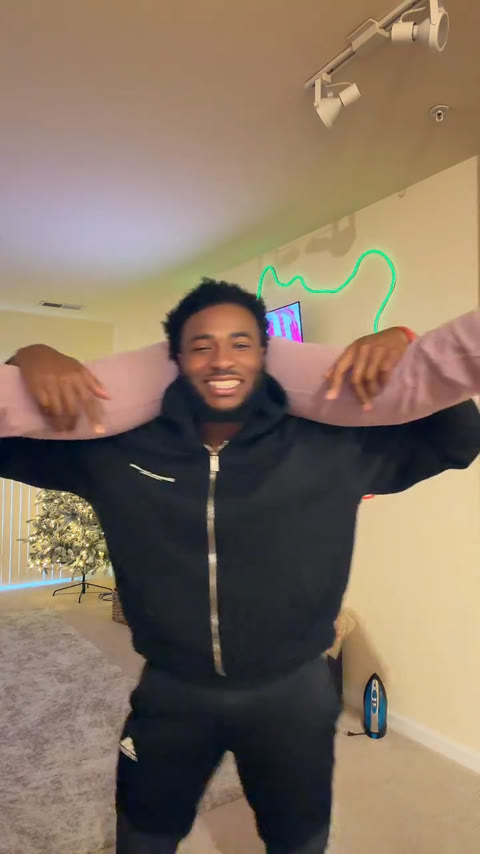
9s · 9:16 · 720p · original sound · ready in a few minutes
Variants
More viral duo trends like Rollie on My Wrist AI
Jump into another two-person skit or rhythm challenge using the same quick portrait upload flow.
 NEW380 CR
 NEW320 CR
 NEW140 CR
 NEW270 CR
Same category
More Funny templates
 NEW380 CR
 NEW320 CR
 NEW100–400 CR
 NEW100–400 CR
 NEW140 CR
 NEW100–400 CR
 NEW380 CR
 NEW160 CR
 NEW270 CR
 NEW160 CR
 NEW350 CR
 NEW100–400 CR
Ideas
Fun pairings and captions for Rollie on My Wrist AI
Height and size contrast duos
Put a shorter friend in the Carrier slot and a taller friend on top as the Rider. Because the Rollie on My Wrist AI Video Generator animates the entire lift and 180-degree spin, you get pure comedic contrast without anyone needing to support real weight.
Couples and role-reversal flips
Render two Rollie on My Wrist AI clips back to back with your partner—one with you carrying and one with your partner carrying. Posting both clips side by side invites comments about who nailed the lip-sync better.
Best friends, siblings, and family surprises
Pair two siblings, roommates, or a parent and adult child for an unexpected foreground reveal when the Rider spins forward. Clear front-facing portraits keep both faces sharp through every frame of your Rollie on My Wrist AI video.
Costumes, characters, and cozy loungewear
Use photos in matching pajamas, party outfits, or cosplay looks. Bold outfit colors help both participants stand out cleanly from the indoor room background during the mid-clip rotation in the Rollie on My Wrist AI Video Generator.
Ready-to-post lyric captions
Pair your Rollie on My Wrist AI export with short captions that match the audio beat, such as "Put the Rollie on my wrist", "Can yall tell whose idea this was?", or "Zero risk, full 180 flip" alongside #rollieonmywrist and #shouldercarry.
How it works
How to make a Rollie on My Wrist AI video
Cast one or both roles in seconds with the Rollie on My Wrist AI Video Generator—no real lifting or manual editing needed.
Choose your Carrier and Rider photos
Pick one or both optional slots: Person carrying (Carrier) opens the clip holding the pose, and Person on shoulders (Rider) spins forward for the punchline. Upload clear JPG, PNG, or WebP portraits (up to 20 MB each); any unuploaded slot keeps the reference cast member.
Generate with Kling 4.0 Video Edit
Click Generate for 240 credits. Kling 4.0 Video Edit processes the silent 9-second vertical 9:16 reference sequence so your portraits follow the exact shoulder-carry posture, forward rotation arc, and lip-sync timing at 720p resolution.
Download your Rollie on My Wrist AI clip
Your finished MP4 arrives with the sped-up "Famous (I'm The One)" track already merged and aligned to the wrist gesture and spin reveal. Save it straight to your device and share to TikTok, Reels, or Shorts.
Photos: JPG, PNG, WebP, up to 20 MB.
The moves
How the 9-second Rollie on My Wrist AI spin plays out
Every beat of the Rollie on My Wrist AI clip maps cleanly from the opening shoulder hold to the front-facing reveal.
0.0s – 3.5s · Shoulder hold & opening lip-sync
The Carrier stands centered facing the lens with the Rider balanced horizontally across their shoulders. On the opening bars ("don't even make sense with the rollie on my wrist"), the Carrier lip-syncs and flashes a confident wrist gesture.
3.5s – 5.5s · The 180-degree forward spin
As the beat builds, the Carrier grips the Rider securely and rotates them 180 degrees forward off the shoulders into a front-facing lean. Sharp front portraits keep facial features clear through this fast mid-clip arc.
5.5s – 9.0s · Foreground reveal & closing beat
The Rider lands right in front of the camera for the closing line ("cause I'm the one"), delivering expressive lip-syncing, pointing toward the lens, and playful hand movements before the Rollie on My Wrist AI loop finishes.
Ready to create your Rollie on My Wrist AI video?
Upload one or two clear portraits and render your 9-second 720p vertical clip with synced audio for 240 credits.
FAQ
Rollie on My Wrist AI FAQ
Can I upload one photo or do I need two for Rollie on My Wrist AI?
You can upload one or two photos to generate a Rollie on My Wrist AI video. Both the Carrier and Rider slots are optional as long as at least one portrait is provided, and any empty slot keeps the original cast member from the reference clip.
What kind of photos work best for the Carrier and Rider?
Sharp, front-facing portraits in even indoor or daylight lighting give the cleanest likeness in the Rollie on My Wrist AI Video Generator. Because the Rider lands close to the lens in the second half, choose an unobstructed front portrait showing clear eyes and jawline.
What song is used in the Rollie on My Wrist AI trend?
The Rollie on My Wrist AI template uses a sped-up remix of "Famous (I'm The One)" by Mozzy featuring Iamsu!, Yo Gotti, and DeJ Loaf. Our pipeline merges the original audio after rendering so lip-syncing and the 180-degree spin stay locked on beat.
Do we have to lift someone in real life to make this video?
No physical lifting is required to make a Rollie on My Wrist AI video. You only upload static portraits, and Kling 4.0 Video Edit animates the shoulder-carry posture and 180-degree forward spin safely on screen.
How long is each Rollie on My Wrist AI video and what format do I get?
Each Rollie on My Wrist AI generation outputs a 9-second watermark-free MP4 in 720p vertical 9:16 format with synced audio. It is ready for immediate sharing on TikTok, Instagram Reels, or YouTube Shorts.
How many credits does the Rollie on My Wrist AI Video Generator cost?
Each 9-second 720p Rollie on My Wrist AI generation costs 240 credits, scaled proportionally from our 15-second baseline rate of 400 credits. You always see the exact credit cost before starting.
Keep scrolling
More viral AI video trends
NEW380 CRNEW320 CRNEW140 CRNEW270 CR NEW220 CR
 NEW10 CR
 NEW380 CR
 NEW220 CR
 NEW220 CR
 NEW320 CR
 NEW140 CR
 NEW380 CR