
Funny · New
Fruit Baby AI Video Generator
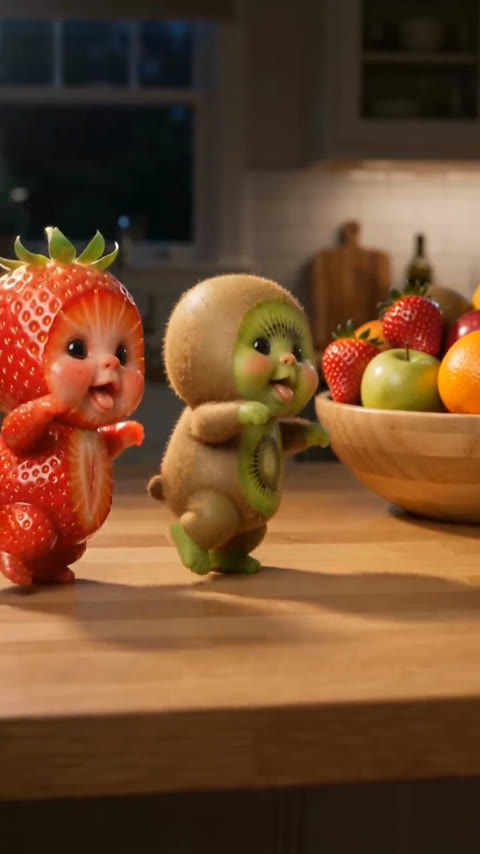
Turn one clear photo into a 10-second animated fruit baby clip. Kling 4.0 morphs your subject into a cute, expressive 3D fruit character following the viral dance movement in a 720p vertical MP4 with included audio for 270 credits.
Fruit Baby AI · 10s · 9:16
10s · 9:16 · 720p · original sound · ready in a few minutes
From TikTok
See the viral Fruit Baby format in action
The trend pairs tiny 3D fruit-textured baby characters with bouncy, joyful movement and bright expressive faces.
@LittleBerryTV
A playful fruit baby character dances cleanly in vertical 9:16 framing, showing off vivid glossy fruit textures, rounded proportions, bouncy rhythm, and expressive eyes that keep viewers smiling and replaying through the whole 10-second loop.
Same category
More Funny templates
 NEW380 CR
 NEW320 CR
 NEW100–400 CR
 NEW100–400 CR
 NEW140 CR
 NEW100–400 CR
 NEW380 CR
 NEW160 CR
 NEW270 CR
 NEW160 CR
 NEW350 CR
 NEW100–400 CR
The scene
How your 10-second fruit baby clip unfolds
Kling 4.0 transfers the cheerful rhythm, soft lighting, and playful character proportions of the reference clip onto your uploaded person.
0–3s: Cute fruit-character reveal
Your uploaded portrait takes shape as an adorable miniature fruit baby character in bright studio light. Facial features stay expressive and crisp while rounded fruit textures, glossy highlights, and tiny leafy accents frame the head and outfit.
3–7s: Bouncy groove and character charm
Through the middle seconds, the tiny fruit character moves with lively, rhythmic bounces, playful arm gestures, and bright eye contact matched cleanly to the reference pacing and cheerful vertical camera framing.
7–10s: Expressive upbeat finish
The final beat keeps the lighting soft and colors saturated while the fruit baby wraps up its playful routine cleanly in frame, leaving an eye-catching character clip ready to loop in short feeds or share in group chats.
Who to put in
Who makes the funniest Fruit Baby
Upload 1 clear photo of yourself, a friend, or a family member to create a surreal and wholesome miniature fruit character.
Yourself in surreal 3D style
Drop in 1 clear full-body or front-facing portrait photo to see your own eyes, smile, and expression translated into a tiny, bouncy 3D fruit baby avatar.
Friends for instant group-chat laughs
Pick a funny, celebratory, or deadpan photo of a friend—the contrast between their unmistakable expression and a tiny dancing fruit body delivers immediate comedy everyone replays.
Partners and siblings
Turn a favorite weekend snapshot of someone close to you into a lighthearted, wholesome 10-second character clip they will laugh at and share right away.
Photo tips
Photo tips for crisp character morphing
Clear facial expressions and full-body or upper-body framing help Kling 4.0 blend human likeness seamlessly with cute fruit textures.
- Choose a bright, front-facing full-body or clear portrait photo where eyes, eyebrows, cheeks, and smile read effortlessly from a slight distance.
- Pick images with even daylight or soft indoor lighting and minimal clutter behind the person for clean figure separation.
- Use photos with cheerful, surprised, or expressive faces that look hilarious and unmistakable when placed on a miniature fruit character.
- Dark shadows across the eyes, heavy sunglasses, or hats that cover the top of the head.
- Low-resolution screenshots or busy crowd photos with multiple people overlapping.
How it works
Generate your Fruit Baby AI video in three steps
Upload one clear photo and create a 10-second 720p fruit baby character clip with audio for 270 credits.
Upload one clear photo
Select a JPG, PNG, or WebP file up to 20 MB with at least 300 pixels on each side. A sharp full-body or front-facing portrait gives Kling 4.0 strong likeness, expression, and color details to translate cleanly into the 3D fruit baby character.
Run the Kling 4.0 morph
Verify the 270-credit price on Generate and launch your render. Kling 4.0 references the viral fruit baby movement, soft studio lighting, playful textures, and 10-second pacing while preserving recognizable facial charm from your photo.
Download and share from My Work
Once rendering wraps up, open My Work to play your 10-second 720p vertical 9:16 MP4 with the included audio track already merged. Save the clean, watermark-free clip directly to your device and share it anywhere.
Photos: JPG, PNG, WebP, up to 20 MB.
Specifications
What goes in and what comes out
Upload one clear photo and receive a complete 10-second 720p dancing Fruit Baby MP4 with audio for 270 credits.
You upload
- 1 clear full-body or front portrait photo (JPG, PNG, or WebP, max 20 MB)
- Minimum 300 pixels per side with crisp eyes, smile, and facial expression
- Bright, even lighting against an uncluttered background
You get
- A 10-second vertical 9:16 MP4 video rendered at 720p resolution
- Playful 3D fruit baby transformation driven by Kling 4.0 reference-to-video
- Expressive facial features and bouncy character movement synced to the beat
- Included reference audio merged cleanly with zero watermark overlays
| Photos | 1 photo |
|---|---|
| Model | Kling 4.0 reference-to-video |
| Duration | 10 seconds |
| Resolution | 720p (9:16 vertical) |
| Audio | Included playful track |
| Format | MP4 |
| Credits | 270 per video, refunded if it fails |
Turn any portrait into a viral Fruit Baby
Upload one clear full-body or front-facing portrait photo and let SameVid generate your 10-second 720p vertical Fruit Baby AI video with included audio and clean export for 270 credits.
FAQ
Fruit Baby AI FAQ
How many photos do I need for Fruit Baby AI?
You only need 1 photo. Upload one clear full-body or front-facing portrait photo of the person you want morphed into a cute, expressive 3D fruit baby character.
How long is the finished video and how much does it cost?
Every Fruit Baby AI video is 10 seconds long in 720p vertical 9:16 MP4 format and costs 270 credits per generation, shown on the Generate button beforehand.
What photo formats and dimensions are supported?
SameVid accepts JPG, PNG, and WebP photos up to 20 MB, with at least 300 pixels on each side so facial features stay sharp inside the fruit character.
Does the generated video include sound?
Yes. The synced audio track is merged automatically into your finished 10-second MP4 file with zero watermark overlays so it is ready to post right away.
Where do I view and download my completed Fruit Baby clip?
As soon as rendering finishes, your video appears in My Work, ready to stream and download directly to your phone or computer.
Keep scrolling
More viral AI video trends
 NEW220 CR
 NEW10 CR
 NEW380 CR
 NEW220 CR
 NEW220 CR
 NEW320 CR
 NEW140 CR
 NEW380 CR
 NEW160 CR
 NEW270 CR
 NEW400 CR
 NEW400 CR