
Transformation · New
Cooking Animation Pop AI Video Generator
Upload one front-facing photo to star as the animated chef in a 10-second rhythmic cooking pop clip. Kling 4.0 renders a 720p vertical MP4 with synced beat-drop audio for 270 credits.
Cooking Animation Pop AI · 10s · 9:16
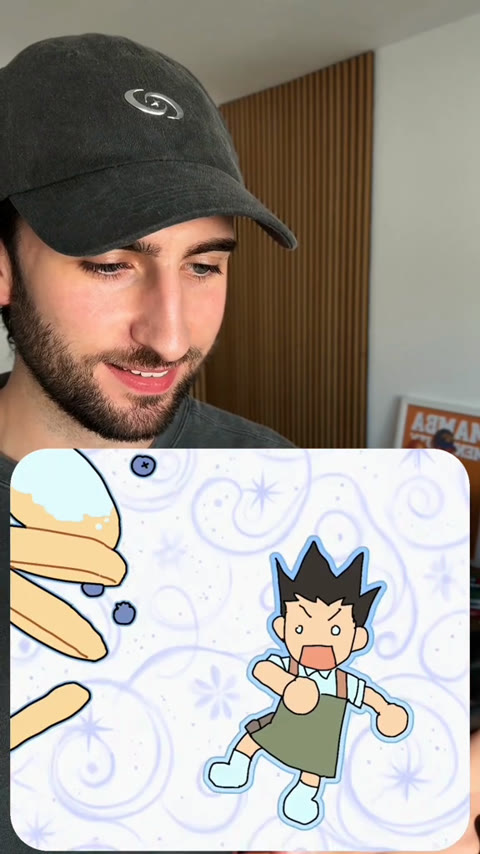
10s · 9:16 · 720p · original sound · ready in a few minutes
Story beats
How the 10-second cooking pop animation unfolds
Three rhythmic acts sync ingredient prep, beat-drop chopping, and the final dish reveal.
0–3s: Pop-animated ingredient prep
Your uploaded portrait steps in as the animated chef at the kitchen counter as fresh ingredients bounce into place with crisp, stylized pop-animation motion and upbeat visual energy.
3.5–7s: Beat-drop rhythmic chopping
Right on the musical drop at 3.5 seconds, the pacing snaps into rapid, satisfying vegetable chopping and lively kitchen rhythm locked cleanly to the camera path of the reference animation.
7–10s: Final culinary creation reveal
The sequence wraps with a celebratory plated dish reveal and expressive chef finish, delivering a tight 10-second vertical loop built for short-form food and meme feeds.
Same category
More Transformation templates
 NEW220 CR
 NEW10 CR
 NEW320 CR
 NEW140 CR
 NEW220 CR
 NEW220 CR
 NEW140 CR
 NEW380 CR
 NEW270 CR
 NEW160 CR
 NEW160 CR
 NEW270 CR
Trends
Fun ways to use the Cooking Animation Pop template
Turn everyday foodies, home cooks, or friends into lively animated chefs.
Saturday brunch & recipe teasers
Use the 10-second animated chef sequence as a playful opener before cutting to your real pancake stack, homemade pasta, or weekend baking creation.
The friend who claims they can cook
Cast the friend famous for burning toast or living on takeout as a hyper-skilled pop-animation head chef for instant laughs in the group chat.
Stylized kitchen persona reels
Turn a clean portrait into a vibrant animated persona synced to catchy pop rhythm without spending hours drawing frames or aligning audio timelines.
Food blog & dinner party invites
Send a custom 10-second animated chef clip to announce Taco Tuesday, Sunday brunch, or a roommate cook-off.
Ready to post
Ready-to-post cooking pop captions
Pair your 10-second animated kitchen video with short, punchy captions and photo prep reminders.
- “Pop! Pop! Entering my animated head-chef era.”
- “Ten seconds from raw ingredients to a five-star reveal.”
- “When the kitchen playlist hits and the chopping locks onto the beat.”
- “POV: turning one selfie into an animated cooking episode.”
- “Who let me cook? Apparently Kling 4.0 did.”
- Upload a bright, front-facing photo of one person in JPG, PNG, or WebP format (at least 300 px per side, up to 20 MB).
- Keep eyes and facial contours clear of sunglasses or heavy shadows so your likeness carries cleanly into the stylized chef character.
- Starting from a group shot? Crop tightly to one face directly inside the uploader before hitting Generate.
How it works
How to generate your Cooking Animation Pop video
Three quick steps turn one Chef portrait into a 10-second animated MP4 for 270 credits.
Upload one Chef portrait
Drop a clear, front-facing portrait of one person into the Chef slot. Even daylight or clean indoor lighting and an unobstructed face help Kling 4.0 preserve your expression across every animated beat from ingredient prep to final dish reveal. Accepted formats are JPG, PNG, and WebP (300 px minimum per side, max 20 MB).
Generate with Kling 4.0
Check the 270-credit price on Generate and start your task. Kling 4.0 reference-to-video follows the reference clip’s camera path, stylized pop-animation aesthetic, and 10-second rhythmic chopping pacing automatically with zero prompts to write or timelines to align.
Download your 10-second MP4
Rendering finishes in a few minutes and continues running safely in the background if you switch tabs or close the window. Open My Work on this page to preview the 720p vertical 9:16 MP4 with synced rhythmic audio and download it directly.
Photos: JPG, PNG, WebP, up to 20 MB.
Details
What goes in and what comes out
One Chef photo in; one 10-second 720p vertical animation out.
You upload
- 1 front-facing portrait in the Chef slot
- JPG, PNG, or WebP, at least 300 px per side, max 20 MB
- Group pictures can be cropped to one person right in the uploader
- No animation keyframes, prompts, or kitchen footage required
You get
- A 10-second vertical 9:16 MP4 rendered at 720p resolution
- Stylized cooking pop animation synced to the 3.5s chopping beat drop
- Original rhythmic audio merged cleanly with zero watermarks or text overlays
- Accessible in My Work for instant playback and direct MP4 download
| Photos | 1 |
|---|---|
| Model | Kling 4.0 (reference-to-video) |
| Duration | 10 seconds |
| Quality | 720p, 9:16 vertical |
| Audio | Original synced audio |
| File | MP4 |
| Credits | 270 per video, refunded if it fails |
Start creating
Ready to step into the animated kitchen?
Upload one Chef portrait and render your 10-second animation for 270 credits.
FAQ
Cooking Animation Pop AI FAQ
What photo works best for the Chef slot?
A clear, well-lit, front-facing portrait of one person works best. Use JPG, PNG, or WebP at 300 pixels or larger on each side (up to 20 MB), and crop to one person right inside the uploader if starting from a group photo.
How long is the Cooking Animation Pop video?
Each generated clip runs for 10 seconds in vertical 9:16 aspect ratio at 720p resolution, covering ingredient prep (0–3s), the 3.5-second chopping beat drop, and the final dish reveal (7–10s).
How many credits does one generation cost?
Generating one 10-second Cooking Animation Pop AI video costs 270 credits, shown right on the Generate button before you start. Credits refund automatically if a task fails.
Do I need to be in a kitchen in my uploaded photo?
Any clear front-facing portrait works—whether taken indoors, outdoors, or at a desk—because the kitchen counter, stylized animation setting, ingredients, and camera path all come from the reference clip.
Is the rhythmic audio included in the MP4?
Yes. SameVid merges the synced rhythmic audio track from the reference clip onto your finished 10-second MP4 automatically, keeping the 3.5-second chopping beat drop aligned cleanly with zero burned-in subtitles, logos, or watermarks.
How long does rendering take, and what if a task fails?
Kling 4.0 typically finishes rendering in a few minutes. You can close or switch tabs while it runs safely in the background, and your completed 720p vertical MP4 waits in My Work. If any task fails, charged credits return automatically.
Keep scrolling
More viral AI video trends
 NEW380 CR
 NEW100–400 CR
 NEW100–400 CR
 NEW380 CR
 NEW320 CR
 NEW100–400 CR
 NEW380 CR
 NEW160 CR
 NEW400 CR
 NEW400 CR
 NEW350 CR
 NEW100–400 CR