
Transformation · New
Bikini AI Video Generator
Upload one clear full-body photo to spin from your everyday outfit onto a sunny tropical beach in matching swimwear. Kling 4.0 renders a 6-second 9:16 vertical MP4 at 720p with sound for 160 credits, keeping your face and body consistent.
Bikini AI · 6s · 9:16
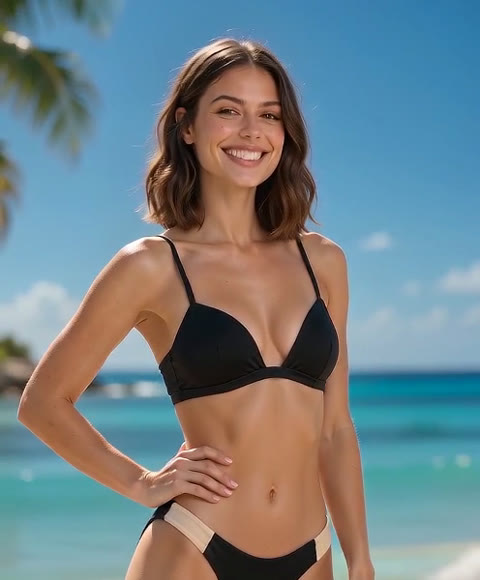
6s · 9:16 · 720p · original sound · ready in a few minutes
Origin
Where the Bikini AI beach transition trend comes from
The spin-to-beach swimwear reveal grew out of creator outfit transitions before single-photo AI video automated the cut.
From DIY outfit jump-cuts to CapCut spin templates
Beachwear reveal videos took off on TikTok in 2020 when creators started indoors in casual loungewear and used beat-synced jump-cuts, lens wipes, or quick camera turns to appear poolside in swimwear. By 2022 and 2024, automated CapCut spin and whip-pan templates made the transition effortless for vacation countdowns, though creators still had to film two separate clips in different locations.
One-photo AI spin-to-beach video effects
In 2025 and 2026, image-to-video models turned the two-clip trick into a single-photo effect: upload one clothed photo and watch the subject spin in place while the room dissolves into turquoise water and color-matched beachwear. The broader phrase also hit mainstream headlines in late 2025 and early 2026 during public debates over consent and safety guardrails on X, covered by Wikipedia and Beebom.
How Bikini AI keeps the spin clean and consistent
Instead of writing long prompts or dealing with shaky phone cuts, Bikini AI on SameVid pairs your single adult photo with a steady 6-second 9:16 reference clip in Kling 4.0. Your face, hair, and proportions stay anchored while the camera motion, warm sunlight sweep, and original audio play seamlessly from start to finish alongside sibling outfit effects like Clothes Swap AI and AI Dress Trend.
Same category
More Transformation templates
 NEW220 CR
 NEW10 CR
 NEW320 CR
 NEW140 CR
 NEW220 CR
 NEW220 CR
 NEW140 CR
 NEW380 CR
 NEW270 CR
 NEW160 CR
 NEW160 CR
 NEW270 CR
Variants
More AI outfit and style transformation templates
Explore other single-photo wardrobe swaps and visual transformations built on the same clean workflow.
 NEW400 CR
 NEW400 CR
 NEW320 CR
 NEW140 CR
Photo tips
Photo tips for crisp Bikini AI renders
Upload a clear JPG, PNG, or WebP portrait up to 20 MB—your starting outfit color and lighting guide the entire beach reveal.
- Use a sharp full-body or waist-up photo of one adult (18+) standing straight in even, bright daylight.
- Wear a solid or high-contrast outfit color such as black, red, cobalt, or cream so the swimwear palette matches cleanly.
- Keep your face, hairline, and shoulders unobstructed so Kling 4.0 locks your likeness across the full 360-degree turn.
- Skip heavy backlighting, night grain, or motion blur that obscures facial features or washes out fabric colors.
- Leave out oversized coats or bulky bags that hide your posture and silhouette before the spin begins.
- Choose a solo frame rather than a group snapshot so the model tracks one person cleanly through the entire clip.
The scene
Beat-by-beat breakdown of the 6-second beach reveal
Four clear moments unfold in one continuous vertical shot—from your everyday terrace pose to the sunny shoreline finish.
0.0–1.5 s · Your Everyday Terrace Opening
The clip opens with a steady vertical shot matching your uploaded photo: standing front-facing on a stone terrace in golden-hour light with your casual top and shorts or dress clearly framed.
1.5–3.2 s · The 360-Degree Spin & Backdrop Dissolve
You turn smoothly in a complete 360-degree spin. As you rotate away from the lens, the outdoor balcony fades into a sunlit tropical shoreline with turquoise waves, palm fronds, and bright sand.
3.2–4.5 s · Warm Light Sweep & Color-Matched Swimwear
As you complete the turn back toward the camera, a warm golden sunlight flare sweeps across the frame and transitions your clothes into a coordinated bikini—or knee-length swim shorts for men—drawn from your original outfit tones.
4.5–6.0 s · Smiling Finish on the Beach
You settle into a relaxed front-facing pose on the warm sand with one hand on your hip and a natural smile, finishing the 6-second MP4 ready for Reels, Shorts, or TikTok.
Who to put in
Who to put in the Bikini AI video template
One solo photo works for creators, travelers, and original adult characters looking for an instant summer clip.
Vacation Countdown Creators
Turn an everyday mirror photo or airport outfit into a sunny 6-second beach tease before your trip even starts, keeping your face and hairstyle completely recognizable.
Color-Match Fashion Reels
Test how an emerald dress, burgundy camisole, or classic black-and-cream look translates into matching beach swimwear in a single continuous spin.
Men’s Swim Shorts Transformation
Upload a casual shirt-and-shorts photo of yourself to spin onto the same tropical shoreline wearing color-matched knee-length swim shorts.
Adult Original & AI Characters
Bring a full-body illustration or consistent adult digital character onto warm sand for summer seasonal posts without re-drawing outfits frame by frame.
Photos: JPG, PNG, WebP, up to 20 MB.
Spin onto the beach in 6 seconds
Upload one clear full-body photo to generate your 720p 9:16 Bikini AI clip with sound for 160 credits.
FAQ
Bikini AI FAQ
How does the Bikini AI Video Generator work?
Bikini AI takes one clear full-body or waist-up photo of an adult (18+) and uses Kling 4.0 to animate a 6-second spin-to-beach transition. You turn 360 degrees as the terrace backdrop dissolves into a sunny tropical beach and your everyday clothes morph into color-matched swimwear.
How are the bikini colors chosen?
Bikini AI pulls its swimwear palette directly from the outfit in your uploaded photo. A solid-color dress or top produces matching swimwear tones, while two-tone outfits carry your main top and bottom colors into the beach look.
Does Bikini AI work for men too?
Bikini AI works for men as well—uploading a clear photo of an adult man transitions his everyday outfit into shirtless knee-length swim shorts matched to the original outfit color while keeping his face, hair, and build consistent.
What photo format and framing give the cleanest result?
Bikini AI delivers the cleanest proportions from a well-lit JPG, PNG, or WebP photo (max 20 MB) showing one adult facing forward with head, shoulders, and torso or full body clearly visible.
Will my face, hair, and body stay consistent?
Bikini AI locks onto your facial features, hair color, hairstyle, and natural body proportions from the opening terrace frame to the final beach smile, changing only the setting and swimwear.
How long is the video and how many credits does it cost?
Bikini AI renders a 6-second vertical 9:16 MP4 at 720p with the synced soundtrack included for 160 credits, scaled linearly from our 15-second 400-credit rate on our pricing page, with automatic credit refunds if a render fails.
Do I need to write a prompt or edit the audio?
Bikini AI requires no prompt writing or video editor because the spin timing, warm sunlight sweep, tropical beach setting, and synced audio track are built right into the template.
Keep scrolling
More viral AI video trends
NEW400 CRNEW400 CRNEW320 CRNEW140 CR NEW240 CR
 NEW380 CR
 NEW100–400 CR
 NEW100–400 CR
 NEW380 CR
 NEW320 CR
 NEW100–400 CR
 NEW380 CR