
Transformation · New
AI Dress Trend Video Generator
Drop in one clear portrait or full-body photo to star in the 15-second overhead ceiling-fan dress transition. Every sweep of the spinning fan blade swaps your look across four distinct dresses in 720p vertical MP4 with original sound for 400 credits.
AI Dress Trend · 15s · 9:16
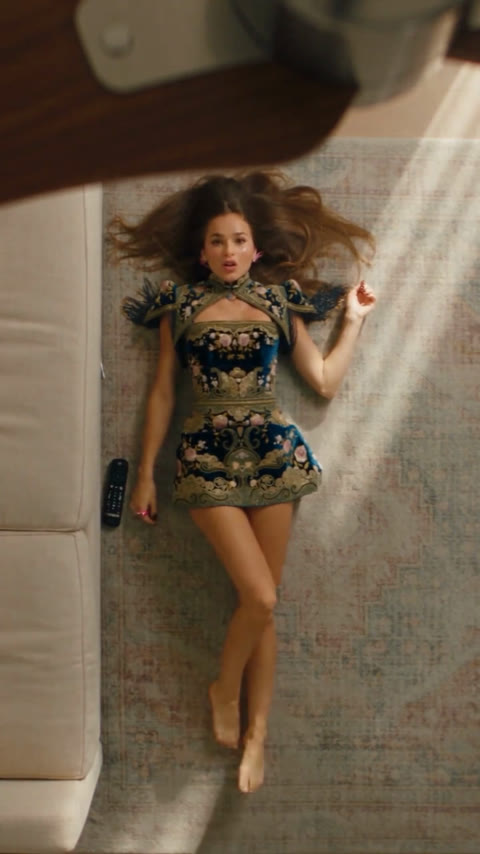
15s · 9:16 · 720p · original sound · ready in a few minutes
Who to put in
Who fits the ceiling-fan dress transition
One clear solo photo drives the entire four-dress sequence. Pick any subject who looks natural in warm indoor daylight.
Fashion & OOTD Creators
Turn a single studio portrait or mirror photo into a four-look wardrobe reveal without changing clothes, booking a shoot, or rigging an overhead camera mount on a real ceiling fan.
Everyday Selfies & Friends
Surprise friends or followers by dropping a casual weekend photo into baroque embroidery, bright ombre sequins, an ivory ruffled gown, and a starry black evening dress in one seamless clip.
Boutique & Lookbook Previews
Preview contrasting dress silhouettes—from structured mini cuts to floor-length formal trains—on a single model pose for vertical social teasers, seasonal mood boards, and styling pitches.
Cosplay & Vintage Styling Fans
Pair retro waves, classic red lipstick, or soft editorial makeup with dramatic evening gowns that fan out naturally across the sunlit living-room rug.
Same category
More Transformation templates
 NEW300 CR
 NEW140 CR
 NEW350 CR
 NEW400 CR
 NEW140 CR
 NEW220 CR
 NEW220 CR
 NEW140 CR
 NEW270 CR
 NEW190 CR
 NEW270 CR
 NEW140 CR
Ideas
Ways creators style and caption the AI dress trend
Pair the four-dress reveal with playful wardrobe polls, styling prompts, or before-and-after photo hooks.
Run a "Which Dress Wins?" Poll
Ask viewers in your caption to vote on Outfit 1 (navy-gold baroque), Outfit 2 (pink-orange ombre), Outfit 3 (ivory high-low ruffles), or Outfit 4 (black starry evening gown).
Pair Casual Input With Evening Glam
Upload an everyday hoodie or daytime coffee photo so the jump into four couture dresses feels extra dramatic from the very first second.
Match Warm Sunlit Portraits
Photos taken in soft afternoon window light blend naturally with the diagonal sunbeams crossing the rug and cream sofa in the overhead scene.
Post as a Vertical Fashion Reel
Exported at 720p in 9:16 vertical MP4 with the original audio track attached, the 15-second cut fits TikTok, Instagram Reels, and YouTube Shorts with zero extra editing.
Build a Capsule Wardrobe Series
Generate clips for different friends or styling moods and stitch them into a multi-part outfit ranking or seasonal lookbook countdown.
Spotlight Hair & Makeup Details
Because the overhead camera keeps your face centered and well-lit throughout all four cuts, bold earrings, sleek updos, or loose waves stay clearly visible.
Specs
What goes in and what comes out
Upload a single JPG, PNG, or WebP photo up to 20 MB and receive a finished 15-second vertical video ready to share.
You upload
- 1 clear front-facing portrait or full-body photo (JPG, PNG, or WebP, max 20 MB)
- Even, natural lighting where your face, hairline, and shoulders are clearly visible
- A single person centered in the frame so Kling 4.0 locks identity across all four dresses
You get
- 15-second 9:16 vertical MP4 rendered at crisp 720p resolution
- Original trending soundtrack synced to every ceiling-fan blade transition
- Four complete dress changes—baroque mini, pink-orange ombre, ivory ruffled gown, and black starry evening dress
- Consistent facial likeness, natural hair spread on the rug, and realistic fabric drape
| Photos | 1 |
|---|---|
| Model | Kling 4.0 |
| Duration | 15 seconds |
| Picture | 720p, 9:16 |
| Audio | Original soundtrack |
| File | MP4 |
| Credits | 400 per video, refunded if it fails |
Photos: JPG, PNG, WebP, up to 20 MB.
The scene
Beat-by-beat breakdown of the 15-second dress transition
Four distinct dresses unfold in one continuous overhead shot as each pass of the spinning fan blade wipes the frame.
0–4 s · Baroque Navy & Gold Mini Dress
The camera looks straight down from a spinning dark-brown ceiling fan onto a sunlit woven rug beside a cream sofa. Your subject rolls onto her back with hair spread across the rug in an ornate navy-blue and gold embroidered mini dress with structured shoulders.
4–8 s · Fan Blade Wipe to Pink-Orange Ombre
A dark-brown fan blade sweeps smoothly across the lens. As it clears, the same sunlit pose continues seamlessly in a vibrant pink-to-orange ombre sequin slip mini dress.
8–11.5 s · Second Wipe to Ivory High-Low Gown
The ceiling fan blade passes across the frame once more, revealing an ivory ruffled corset high-low gown with a long pleated train cascading across the living-room rug.
11.5–15 s · Final Wipe to Black Starry Evening Gown
After the third fan-blade sweep, the clip closes in a floor-length black evening gown accented with delicate white starry floral details and a sweeping hemline.
FAQ
AI Dress Trend FAQ
How does the AI Dress Trend generator work?
Upload one clear front-facing or full-body photo, and Kling 4.0 places you into the 15-second overhead ceiling-fan transition. Each sweep of the fan blade swaps your outfit across four dresses while keeping your face and lighting consistent.
What kind of photo gives the best outfit transition?
A sharp, well-lit portrait or full-body photo of one person looking toward the camera works best. Clear facial features and natural lighting help the model preserve your likeness across every dress change.
How many credits does one AI Dress Trend video cost?
Generating one 15-second 720p vertical video costs 400 credits, scaled proportionally from our standard 15-second rate and including the original soundtrack.
Can I upload a JPG, PNG, or WebP image?
Yes. The upload slot accepts standard JPG, PNG, and WebP photos up to 20 MB and automatically prepares your image for the 9:16 vertical frame.
Does the finished video include music?
Yes. The output MP4 includes the original trending audio track timed to the four ceiling-fan outfit reveals so you can post directly to TikTok, Reels, or Shorts.
How long does rendering take?
Most 15-second Kling 4.0 reference-to-video generations finish within a few minutes, and your completed clip stays saved in your generation history for easy downloading and sharing.
Can I use this template for TikTok, Instagram Reels, and YouTube Shorts?
Yes. Every clip renders in a 9:16 vertical 720p MP4 format with the original soundtrack already mixed in, so it fits TikTok, Instagram Reels, and YouTube Shorts directly.
Keep scrolling
More viral AI video trends
 NEW140 CR
 NEW270 CR
 NEW300 CR
 NEW350 CR
 NEW270 CR
 NEW380 CR
 NEW240 CR
 NEW320 CR
 NEW400 CR
 NEW270 CR
 NEW240 CR
 NEW400 CR