
Movie & TV · New
Elevator Scene AI Video Generator
Turn one or two clear portraits into a 15-second Elevator Scene AI video inspired by the 500 Days of Summer lift moment. Cast the headphone listener, the speaking passenger, or both in 720p widescreen with original sound for 400 credits.
Elevator Scene AI · 15s · 16:9
Upload one portrait or both—each passenger slot is optional; add at least one clear face to star in the 15-second elevator meet-cute.
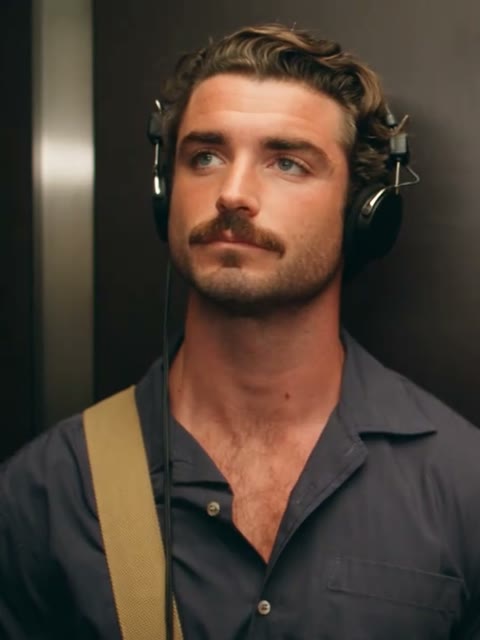
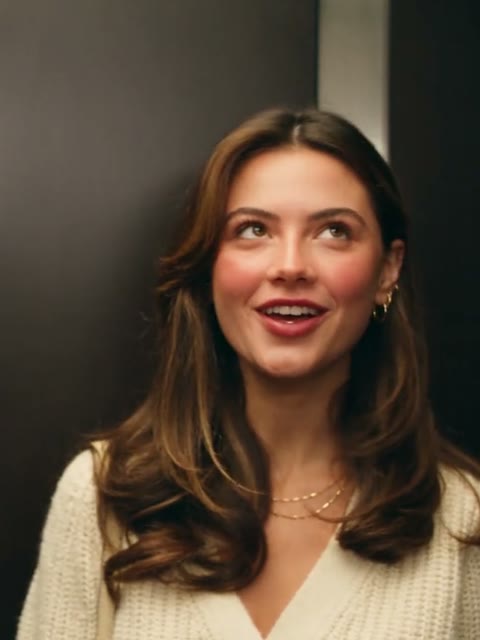
15s · 16:9 · 720p · original sound · ready in a few minutes
Ready to post
Captions ready for your Elevator Scene AI clip
Pair your finished 15-second lift exchange with a crisp hook that highlights the headphones, the shared song, or the duo you cast.
- “He took his headphones off for her. That is when you know. Fifteen seconds in one elevator and zero numbers exchanged.”
- “Wearing headphones in a lift until one sentence about your playlist changes the whole ride. Made with Elevator Scene AI.”
- “Heard one line about The Smiths and planned the entire five-year arc before the lobby doors even opened.”
- “One brushed-metal lift, a completely different cast. Who should we drop into the headphone slot next?”
- “Me and my best friend recreating the 500 Days of Summer Elevator Scene AI video over the same three songs we play every week.”
- “Put my dog in the left headphone listener seat and honestly this is the most charming meet-cute on the internet.”
- Open your caption with the shared-music hook so viewers stay through the headphone removal at second two and the smiling closing beat.
- Tag the friend, partner, or music buddy you cast in the second slot and invite followers to vote on your next pairing in the comments.
- Keep on-screen captions brief near the top edge so both faces, the headphones, and the brushed-metal cabin remain fully clear.
Same category
More Movie & TV templates
 NEW380 CR
 NEW100–400 CR
 NEW380 CR
 NEW400 CR
 NEW400 CR
 NEW100–400 CR
 NEW100–400 CR
 NEW100–400 CR
 NEW100–400 CR
 NEW100–400 CR
 NEW100–400 CR
 NEW100–400 CR
Photo tips
Portrait tips for crisp Elevator Scene AI framing
The camera holds a steady chest-up two-shot for all 15 seconds, so clear front lighting and relaxed expressions carry every reaction.
- Use a single-subject front portrait for each chosen slot so Kling 4.0 locks facial structure, hairline, and eye contact cleanly.
- Pick chest-up or waist-up shots with soft, even light across the face to blend naturally with the warm overhead panel inside the metallic lift cabin.
- Choose a relaxed, neutral, or gently smiling expression; the 15-second take flows smoothly from quiet listening into surprised eye contact and warm laughter.
- Upload regular bare-headed portraits for the left passenger—Elevator Scene AI automatically places matte black over-ear headphones on the listener and slides them around the neck at second two.
- When casting two people together in an Elevator Scene AI video, pick contrasting outfit colors (such as dark slate against cream) so both silhouettes separate cleanly inside the tight two-shot.
- For a comedy pet remix, drop a bright front-facing cat or dog photo into the left listener slot so the over-ear headphones frame their ears naturally.
Specs & pipeline
What goes in and what comes out of Elevator Scene AI
Upload one portrait or two, let the reference lock the single-take lift camera and timing, and download a ready-to-share MP4.
You upload
- One portrait for the left headphone listener, one for the right speaking passenger, or both optional slots filled together.
- Everyday selfies, studio headshots, stylized characters, or a clear front-facing cat or dog portrait.
- Regular portraits with bare ears—black over-ear headphones are rendered naturally on the left passenger.
You get
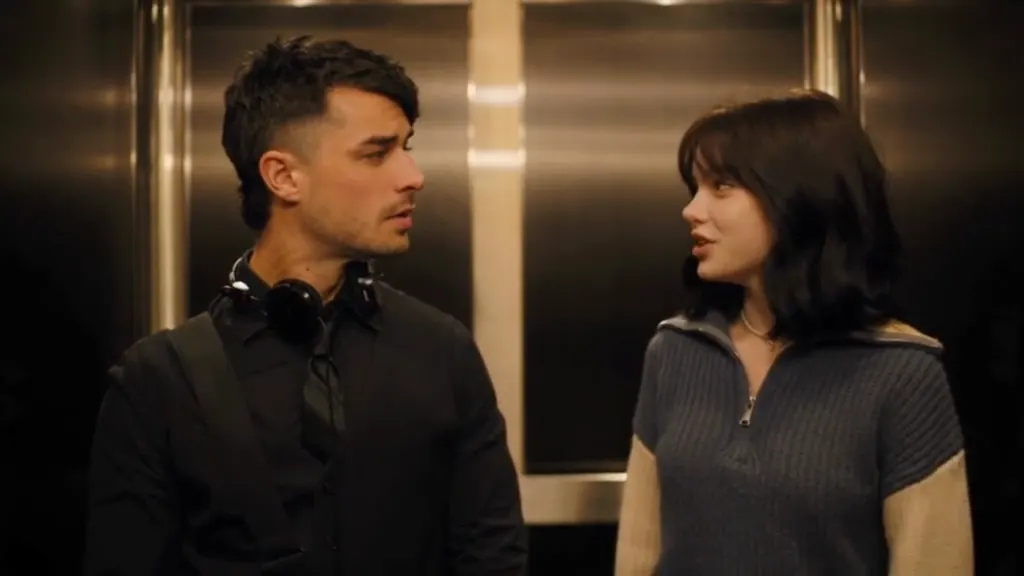
- A continuous 15-second single-take 16:9 widescreen Elevator Scene AI video inside a brushed-metal lift with warm overhead lighting.
- Every acting beat preserved: listening in headphones, catching the remark, slipping headphones around the neck, trading smiles, and the soft closing lyric beat.
- A clean 720p MP4 muxed with the original reference audio track and saved to My Work, with automatic credit refunds if any generation fails.
| Photos | 1 or 2 optional portraits |
|---|---|
| Model | Kling 4.0 (Omni Reference) |
| Duration | 15 seconds |
| Picture | 720p, 16:9 widescreen |
| Audio | Original reference sound included |
| File | MP4, ready for social upload |
| Credits | 400 per video, refunded if it fails |
Also called
Other names for the Elevator Scene AI trend
Creators, fans, and movie lovers refer to this viral two-person lift recast under several closely linked titles.
500 Days of Summer Elevator Scene AI
Named directly after the Day 4 office lift scene in Marc Webb’s 2009 film (500) Days of Summer, where overheard headphones spark an instant connection between two coworkers.
I Love The Smiths AI Trend
Titled after the famous opening line spoken by the passenger on the right upon hearing "There Is a Light That Never Goes Out" leaking from the listener’s headphones.
Elevator Meet-Cute AI
A romantic-comedy label used by short-film creators and couples who restage this 15-second headphone exchange with their own portraits.
Two-Photo Elevator Template
Describes the side-by-side casting layout where Photo 1 takes the left headphone listener role and Photo 2 steps into the right speaking passenger role.
Elevator Duet Recast
Used across music and fandom edits when viewers pair favorite duos, friends, coworkers, or pets inside the same continuous two-shot cabin.
How it works
How to make your Elevator Scene AI video in three steps
Camera blocking, headphone timing, and synced sound are built directly into the template—just choose who rides the lift.
Pick one passenger or cast both roles
Select the Headphone listener slot on the left, the Speaking passenger slot on the right, or fill both slots with JPG, PNG, or WebP photos up to 10 MB each. Any slot you leave open keeps its original reference passenger automatically.
Let Kling 4.0 restage the 15-second take
Click Generate and Kling 4.0 Omni Reference maps each uploaded face, hairstyle, and outfit onto its assigned side of the cabin while preserving the steady eye-level camera, headphone-off gesture at second two, and warm dialogue expressions.
Preview with sound and share your clip
Once rendering finishes in a few minutes, SameVid AI merges the original reference audio track onto your 720p widescreen Elevator Scene AI MP4 and saves it to My Work so you can download and share right away.
Photos: JPG, PNG, WebP, up to 20 MB.
FAQ
Elevator Scene AI FAQ
What movie and song inspired the Elevator Scene AI trend?
The Elevator Scene AI trend recreates the Day 4 office elevator encounter from the 2009 film (500) Days of Summer, where The Smiths song "There Is a Light That Never Goes Out" leaks through a pair of headphones and sparks a conversation. Film critics still analyze that scene years later (Vice), and a major wave of AI elevator recasts and parodies broke out in November 2026 (Chosun Ilbo).
Can I make an Elevator Scene AI video with just one photo?
You can generate an Elevator Scene AI video with either one photo or two because both passenger slots are optional. Upload one portrait into the Headphone listener slot on the left or the Speaking passenger slot on the right, and the open slot automatically keeps its reference actor so the complete two-person exchange plays smoothly.
Does upload slot order matter in Elevator Scene AI?
Slot placement controls each passenger’s role in the 15-second clip. The left slot casts the Headphone listener who begins facing forward in black over-ear headphones, pulls them around the neck at second two, and watches with a smile; the right slot casts the Speaking passenger who turns to start the chat and closes facing forward softly singing.
Do I need to wear headphones in my uploaded photo?
Your uploaded portrait works best bare-headed with no headphones required for Elevator Scene AI. Kling 4.0 automatically renders matte black over-ear headphones on the left passenger at the opening of the clip and animates them sliding smoothly down around the neck when the conversation starts.
Can I put a cat or dog into the Elevator Scene AI template?
Pets work great in this template alongside human portraits. Placing a clear front-facing photo of your cat or dog in the left Headphone listener slot while casting yourself on the right is one of the most popular comedy remixes.
How long is an Elevator Scene AI video and how many credits does it cost?
Every Elevator Scene AI generation outputs a 15-second, 720p, 16:9 widescreen MP4 with original reference sound included for 400 credits. You can compare credit packs and plans on the SameVid AI pricing page, and failed runs refund credits automatically.
How does SameVid AI keep the clip consistent without writing a prompt?
SameVid AI pairs a clean single-take 15-second reference clip with Kling 4.0 Omni Reference and structured spatial blocking for both passenger slots, then remuxes the original sound afterward so your finished video keeps steady eye contact, accurate headphone timing, and synced audio in one click.
How does Elevator Scene AI differ from I Love the Smiths AI?
Elevator Scene AI delivers a 15-second brushed-metal single-take lift recast built on a crisp 1280×720 reference clip for 400 credits, whereas I Love the Smiths AI uses a separate 14-second warm elevator reference clip for 380 credits. Both live inside our Movie and TV Scene AI Templates collection so you can pick the lighting, cast pacing, and framing you prefer.
Keep scrolling
More viral AI video trends
 NEW380 CR
 NEW400 CR
 NEW320 CR
 NEW380 CR
 NEW270 CR
 NEW220 CR
 NEW10 CR
 NEW320 CR
 NEW100–400 CR
 NEW140 CR
 NEW220 CR
 NEW220 CR