
Dance · New
Medieval Subway Dance AI Video Generator
Upload one clear photo to star in the 13-second Medieval Subway Dance AI trend. You wear the burgundy velvet noble robe and gold chain on a New York subway platform, matching every step in 9:16 720p with the original sound for 350 credits.
Medieval Subway Dance AI · 13s · 9:16
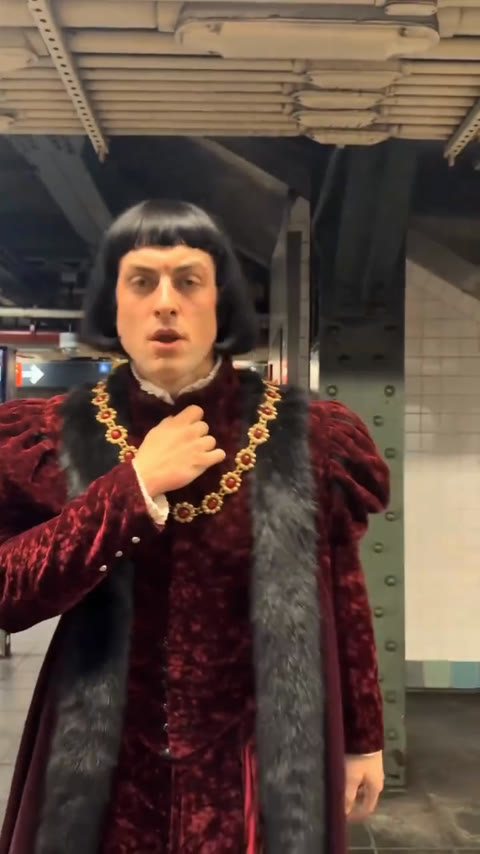
13s · 9:16 · 720p · original sound · ready in a few minutes
Examples
See the Medieval Subway Dance AI template in action
Watch the full 13-second reference sequence you step into—from the sprint along the yellow platform edge to the full-energy dance.
Burgundy noble subway platform routine
The protagonist sprints past a silver NYC subway car, peers into the train window, clutches the gold chain collar, and bursts into an exaggerated, fast-paced dance down the platform while the camera tracks backward.
Same category
More Dance templates
 NEW320 CR
 NEW400 CR
 NEW270 CR
 NEW270 CR
 NEW140 CR
 NEW400 CR
 NEW380 CR
 NEW400 CR
 NEW400 CR
 NEW300 CR
 NEW400 CR
 NEW400 CR
Photo tips
How to pick a photo that locks cleanly onto the dancer
The model transfers your facial identity onto the medieval noble in every frame, including the close-up turn and fast head whips.
- Use a bright, front-facing portrait or upper-body photo where both eyes, eyebrows, nose, and jawline are clearly visible and evenly lit across the entire face.
- Choose a single-person shot with a relaxed or expressive face—confident smirks, wide-eyed surprise, or dramatic noble expressions match the comedy of the turn toward the camera.
- Keep the face completely open and clear of sunglasses, hats, or hands so the AI can preserve your exact likeness when the dancer whips around toward the lens.
- High-resolution portraits with clean contrast and a simple background work great for friends, family members, cosplay avatars, or stylized character illustrations.
- Pick a photo taken at eye level rather than a steep top-down or bottom-up angle so your facial proportions align naturally with the tracking camera on the subway platform.
Ready to post
Captions ready to copy and post
Pair your finished 13-second clip with short POV hooks and medieval-meets-commute humor that perform well on short-form feeds.
- “POV: You were just trying to catch the Flushing local, but your medieval noble energy had other plans.”
- “The night is young. My commute is not. #medieval #subway #dance”
- “When the burgundy velvet robe hits the yellow platform line and the beat drops.”
- “Lord Farquaad energy on the 7 train at rush hour—would you join in or switch cars?”
- “POV: A 15th-century noble discovers the NYC subway and decides to put on a show.”
- “Held together by nothing but a velvet tunic, a gold chain, and pure subway platform groove.”
- Open with a 2-second POV hook in the on-screen caption before the dancer turns around toward the camera.
- Tag a friend who always brings main-character energy to public transit, Renaissance fairs, or costume parties.
- Post at 9:16 vertical 720p with the original trend audio intact so viewers immediately recognize the beat drop.
- Pin a playful follow-up comment asking whether viewers would join the dance or wait for the next train.
From TikTok
How creators are remixing the medieval subway trend
From gothic vampire lords on crowded platforms to period-wigged commuters inside subway cars, creators are putting their own spin on the anachronistic commute.
@.vladdracula
Gothic vampire noble in white wig and crimson vest dancing on a packed subway platform with 698K+ views.
@itsarchiepimm
Period-wigged commuters bringing medieval court energy straight into a moving NYC subway car with 486K+ views.
How it works
Make your Medieval Subway Dance AI video in three steps
No prompting, timeline editing, or costume rentals required—just upload one photo and let the template handle the choreography and sound.
Upload one clear photo
Drop a front-facing photo (JPG, PNG, or WebP up to 20 MB) into the Main dancer slot. A clear face with even lighting gives the sharpest identity lock.
Generate in 720p vertical
Click Generate for 350 credits. SameVid runs the 13-second 9:16 sequence frame by frame so the robe, gold chain, and subway platform stay true to the reference.
Download with original sound
Once rendering finishes, download your clean, watermark-free MP4 with the original trend audio synced from the first frame, ready to share.
Photos: JPG, PNG, WebP, up to 20 MB.
Variants
More viral AI dance templates to try next
If you love anachronistic costume comedy and high-energy solo choreography, try these popular dance templates next.
 NEW220–430 CR
 NEW400 CR
 NEW400 CR
FAQ
Medieval Subway Dance AI FAQ
How long is the Medieval Subway Dance AI video?
Each generated clip is 13 seconds long in 9:16 vertical format at 720p resolution, matching the exact pacing and camera tracking of the viral reference.
How many credits does one generation cost?
One 13-second 720p generation costs 350 credits, scaled proportionally from our standard 15-second rate.
Does the output include the original trend audio?
Yes. SameVid automatically merges the original trend soundtrack back onto your finished 13-second MP4 so it is ready to post immediately.
What kind of photo works best for the Main dancer slot?
A sharp, front-facing portrait or upper-body photo in JPG, PNG, or WebP format (up to 20 MB) with even lighting and a clearly visible face works best.
Can I put a friend, pet, or fictional character into the dance?
Yes. You can upload a photo of yourself, a friend, a family member, or a clear character portrait—the template places their likeness into the burgundy velvet noble costume.
Does this template handle prompts and editing automatically?
Yes. All choreography, burgundy velvet wardrobe, subway platform lighting, camera tracking, and audio syncing are built into the template so you only need to upload one photo.
What resolution and aspect ratio is the finished video?
Your finished video exports in crisp 720p HD at a 9:16 vertical aspect ratio (720x1280), sized directly for mobile short-form feeds at native vertical framing.
Can I preview the dance before spending credits?
Yes. You can watch the full 13-second example clip right on this page with its original sound to see the exact sprint, window peek, and platform dance sequence before uploading your photo.
Keep scrolling
More viral AI video trends
NEW220–430 CRNEW400 CRNEW400 CR NEW220 CR
 NEW380 CR
 NEW10 CR
 NEW320 CR
 NEW100–400 CR
 NEW100–400 CR
 NEW380 CR
 NEW140 CR
 NEW220 CR