
Music · New
Anuel AI Video Generator
Upload one portrait to star in the 7-second black-and-white Anuel AI beat-cut edit. Kling 4.0 places you into the rapid cuts beside Anuel AA's skeleton-jacket and sunglasses scenes in 720p 9:16 with dark shades and the original track (190 credits).
Anuel AI · 7s · 9:16
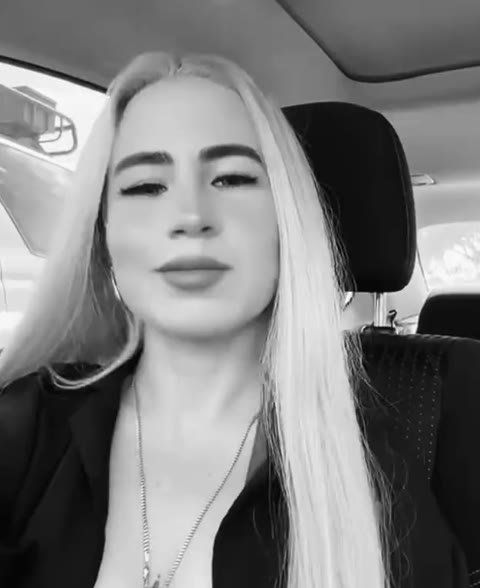
7s · 9:16 · 720p · original sound · ready in a few minutes
Origin
How the black-and-white Anuel AI beat-cut trend took off
From Puerto Rican Latin trap visuals and a viral fan-made track to a mid-November 2026 monochrome editing wave.
Anuel AA visuals and the RHLM2 album moment
Puerto Rican Latin trap artist Anuel AA built one of the most recognizable visual identities in urbano music: stark monochrome street frames, bone-print skeleton track jackets, thick designer shades, and deadpan stares into the camera. Ahead of his twenty-three-track studio album Real Hasta La Muerte II (released on his birthday, November 26, 2026), fan edits spotlighting those signature scenes surged across short-form feeds.
The Anuel AI format pairs five high-contrast clips—Anuel AA standing in a crowd wearing a skeleton jacket and dark sunglasses, crossing his arms, walking down a lamp-lit night street, rapping in thick white-framed shades, and leaning back in the rear seat of a car—with rapid split-second cuts back to the viewer holding a cool, composed expression.
The "Otra Noche" sound and mid-November 2026 breakout
Most viewers know the Anuel AI edit by its urgent melodic trap beat, often searched as the Otra Noche Anuel sound. Its musical foundation traces back to December 15, 2024, when producer Darezzo released an AI-voiced track in Anuel AA’s vocal style titled "Otra Noche", which circulated widely across Latin music communities before fueling a fresh wave of synchronized video edits.
Beginning on November 15, 2026, creators posted clean full-screen monochrome takes—starting with early beat-cut edits on TikTok—before reaction clips pushed the format past one million views within forty-eight hours and sent more than seventy-two thousand videos onto the same sound by November 22, 2026.
Same category
More Music templates
 NEW100–400 CR
 NEW400 CR
 NEW100–400 CR
 NEW320 CR
 NEW100–400 CR
 NEW380 CR
 NEW270 CR
 NEW270 CR
 NEW400 CR
 NEW400 CR
 NEW270 CR
 NEW100–400 CR
How it works
How to make an Anuel AI trend video from one photo
Three quick steps take a standard color selfie to a finished 7-second monochrome Anuel AI clip with dark shades and original sound for 190 credits.
Upload one front portrait
Drop a clear JPG, PNG, or WebP photo up to 20 MB into the You slot above. Regular color photos work immediately—the Anuel AI template converts your half of the cut to high-contrast black and white and adds dark rectangular shades automatically.
Click Generate to run Kling 4.0 Video Edit
Press the Generate button (190 credits) to start rendering. Kling 4.0 edits our clean 7-second reference cut frame by frame, swapping your face, hairstyle, and outfit into the car-seat portrait beats while preserving every rapid transition and Anuel AA scene.
Download your 720p vertical MP4 with audio
Within a few minutes your completed 9:16 Anuel AI video lands in the studio result panel and My Work with the trend’s original track synced right onto every flash cut, ready to share directly on TikTok, Reels, or Shorts.
Photos: JPG, PNG, WebP, up to 20 MB.
Specs
What goes into Anuel AI and what comes out
Every Anuel AI render locks onto the exact 7-second split-second cut rhythm and original beat shown in the studio preview.
You upload
- 1 clear front-facing portrait of yourself, a friend, or an illustrated character
- Standard color lighting—high-contrast monochrome grading and dark shades are styled automatically
- Browser-ready workflow—cut timing, monochrome grading, and sunglasses styling come built into the template
You get
- A 7-second, 9:16 vertical MP4 rendered at 720p with crisp monochrome film contrast
- Your face, hair, and clothing placed into every rapid portrait cut with dark square sunglasses
- All five signature Anuel AA music-video scenes kept locked to the original beat-cut timing
- The trend’s synchronized original audio track merged cleanly into the final file
- Permanent access in My Work so you can replay or download anytime
| Photos | 1 |
|---|---|
| Model | Kling |
| Duration | 7 seconds |
| Picture | 720p, 9:16 vertical |
| Style | High-contrast black and white with dark shades |
| Audio | Original trend sound included |
| File | MP4 |
| Credits | 190 per video, refunded if it fails |
Also called
Other names people use for the Anuel AI trend
Creators across English and Spanish feeds share this exact monochrome rapid-cut format under several closely related titles.
Anuel Trend / Viral Anuel Trend
The main umbrella name for the November 2026 fast-cut template pairing a user portrait with Anuel AA’s classic skeleton-jacket and night-street clips.
Black and White Anuel Edit
Highlights the stark monochrome film contrast that unifies the five artist scenes and the user’s deadpan close-up shots across every flash cut.
Otra Noche Anuel Trend
Named after the melodic "Otra Noche" AI trap track whose pounding rhythm dictates the rapid alternating transitions from start to finish.
Anuel Sunglasses Trend
Points to the cool, unfazed sunglasses attitude shared across both halves of the edit—black rectangular shades on your portrait opposite Anuel’s signature black and white-framed eyewear.
RHLM2 Album Template
Used by Latin trap and reggaeton fans posting monochrome edits during the November 2026 Real Hasta La Muerte II release week.
Credits
Transparent credits for every Anuel AI edit
One 7-second 720p Anuel AI video costs 190 credits with the original track merged in, and the button displays the exact amount before you start.
- Basic$9.90400 credits2 videos
- Growth$19.90850 credits4 videos
- Most PopularPro$39.901,800 credits9 videos
- Studio$99.904,800 credits25 videos
- Max$299.9015,000 credits78 videos
Photo tips
How to pick the sharpest photo for your Anuel AI edit
Because the beat cuts flash back to your close-up every fraction of a second, clear facial framing makes every single frame pop.
- Use a chest-up or head-and-shoulders portrait facing straight toward the lens so your jawline, hairstyle, and shoulders read clearly inside the car-seat framing.
- Pick a photo with bright, even lighting on your face; strong tonal detail translates cleanly into crisp high-contrast black and white.
- Upload an everyday color selfie with your eyes clearly visible so Kling 4.0 can fit the dark rectangular shades naturally onto your bridge and temples.
- Choose a relaxed, confident, or deadpan expression—calm composure matches the street-classic Latin trap energy of the rapid cuts.
- Frame a single clear subject in the photo so the Anuel AI edit locks onto one consistent face from the opening beat through the final car-seat flash.
FAQ
Anuel AI FAQ
What is the Anuel AI video trend?
Anuel AI recreates the viral 7-second black-and-white beat-cut edit that flashes on every drum hit between five signature Anuel AA music-video scenes and a cool-faced front portrait of you wearing dark sunglasses, complete with the trend’s original sound. You can explore more beat-synced drops across our music AI video templates.
Can I upload an everyday color portrait for Anuel AI?
Yes. Upload any well-lit everyday color portrait with your full face clearly visible. The Anuel AI template automatically grades your shots into high-contrast black and white and fits dark rectangular sunglasses onto your face to match the trend.
Does the finished Anuel AI video include the original music?
Yes. Every finished 7-second MP4 merges the trend’s synchronized original audio track directly onto the video so the rapid alternating cuts hit right on the beat when you post to TikTok, Reels, or Shorts.
How many credits does one Anuel AI video cost?
Each 7-second 720p Anuel AI clip costs 190 credits, scaled proportionally from our 15-second rate. Compare flexible credit packs on our pricing page—the Generate button shows the exact price up front and credits return automatically if a render encounters an issue.
How does Kling 4.0 keep the rapid cuts locked to the beat?
This Anuel AI template uses Kling 4.0 Video Edit mode on a clean 7-second reference edit. Editing directly on the beat-synced clip keeps every split-second flash transition and Anuel AA scene intact while replacing the portrait subject with your photo.
Who can I put into the Anuel AI template?
Upload a clear front portrait of yourself, a friend who agrees to join the trend, or an anime or game character. For another monochrome look or a full rap-video performance, try Black and White Cinematic AI or Bulin 47 AI.
Why do people also search this as the Otra Noche Anuel trend?
Many creators pair the rapid black-and-white edit with a viral sound derived from the fan-favorite AI vocal track "Otra Noche", so viewers across TikTok and Reels look up the same format as Anuel Trend, Otra Noche Anuel Trend, or Black and White Anuel Edit.
Keep scrolling
More viral AI video trends
 NEW400 CR
 NEW400 CR
 NEW270 CR
 NEW400 CR
 NEW30 CR
 NEW350 CR
 NEW400 CR
 NEW240 CR
 NEW100–400 CR
 NEW270 CR
 NEW190 CR
 NEW190 CR